Showing posts with label FTM2017People. Show all posts

Saturday, September 28, 2019

Undocumented Fact Report Management

I understand that many users don't care about Sources and Citations. Over the years, I have learned how important they are. I have also learned how to manage that issue. I want ALL Facts with a Citation, even those Facts that I create and the I use for my purposes to maintain the file.

Working with two (2) new files, in the past three years, I learned to run the Undocumented Fact Report Daily. By doing so, and I can keep this issue under control. That is FIX the issue, based on the work that I did that day.

I took those two files and merged them into my Master database. That experience is a whole other topic. Because for the past two or three years I was in the habit of running the Undocumented Fact Report I ran it for the first time in my Master database. What I ended up with was a 169 PAGE Report. Shocked, to say the least.

To run this report, go to the Publish Workspace, select the Source Report in the Collection Tab, select Undocumented Facts, then Create Report.


When the "Create Report" button is selected, I want to make sure ALL Individuals are included.


Then I realized one problem that really brought the importance of this report. A change, many versions ago, about the "Sex" Fact had been changed requiring a Citation. Many Records either state that as a fact or can infer that fact, and should be documented. Family Names / Given Names are not always obvious. So we were given the Citation field for that Fact.

That second image is the clue /  reminder to me as to why there were so many pages of Undocumented Facts. I have some clean up work to do. I had to develop a Plan to deal with all of these Undocumented Facts. What I was NOT going to do, is clean them all up right now.

As you may know, we can Edit the Profile, from the Report, by double clicking on the Name (that is bolded) and the Person View will appear.


The Sex Fact does not have a Citation, but the Name Fact does have a citation, This is a quick and easy way to resolve this problem, Copy the Citation from the Name Fact, and Paste Link to Source Citation. The Copy source citation is the ICON to the Right of the "New" and left of the Edit (Pencil) ICON. That is the Family Tree Maker Clipboard (not Windows Clipboard)

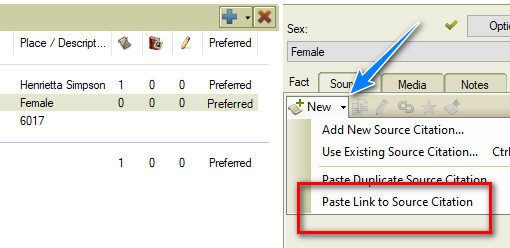
Then select the "Sex" Fact, and Past Link to Source Citation.


That process will take care of those Facts that did not require a citation from previous versions. Easy but time consuming and needs to be done.

BUT, the next profile had other Facts that did not have Citations. From my analysis since I started this clean up project, over the many versions of Family Tree Maker, some Citations were lost and / or unlinked from Facts. So I needed a PLAN.

My plan is to use the Filter Feature to help me manage those profiles that have one or many Facts without a Citation. To do that, I created a "No Documentation" Fact. That way, I can Filter In or Filter Out, anyone with the No Documentation Fact. The name of the fact is not important, that was just the one I chose.

Keeping in the Undocumented Fact Report, I would ADD that Fact to every person in that report AND put a Citation on that Fact. Here is my citation (Reference Note)
Worthington, Russ, [ ADDRESS FOR PERSONAL USE, ], File Citations; This is a "No Documentation" citation, where there are no citations on Facts.
As I started to go through this process, three things were seen.

  1. No Citations on any Facts in that profile
  2. Only ONE Fact without a Citation
  3. A number of Facts without a Citation
Number 1 was may be a large problem, as there is not clue, on that screen to tell me where that information came from. More time involved, but in the People Workspace, Person View, looking at other information, especially a spouse, parents, or children. Clearly not in the report.

It became clear, that this phase of the project is to Mark All Profiles with a Citation issue. 

Number 2 and 3 are a little easier, in that I have at least ONE Citation on other Facts. I can review those citations to see if that record addresses the Fact(s) that are not documented. The Only one fact, should be an easy fix.

This is time consuming, but here is where the Filter In / Filter Out feature comes in very handy.

Lets say I added the No Documentation Fact to the First Page in the Report. I can now go back to the "Individuals to Include". Select ALL, Filter OUT, select the "No Documentation Fact", Any Data, and those profiles with that Fact will be removed from the report.


For me, this does a couple of things, Lets me focus on the easy fixes, or the ones that will take more time, and I can resolve that one fact that doesn't have the citation from previous versions of the program.

In looking at the Undocumented Fact Report, it became obvious which Profiles had that one fact, not documented. It included on the Name and the Fact.

I can fix them right then and there, as noted above.

Once all of the Undocumented Facts are identified what the No Documentation Fact, I can then get back to research and when I come across a Profile with that FACT, I can deal that that undocumented fact then, because I can see it in the List of Facts.


I marked the No Documentation Fact as Private, so only I can see it. In this example, I do not know the persons Name, (5 underscores), but when I look at the full profile, I see that this is a Spouse of someone in my database. I can look at the Citations for the Spouse, to pick up the Citation for this person, that has NO Citations on either Fact.

The No Documentation in the Fact Description field, may be an easy fix, or may be  not so easy.

My goal is to KNOW who has one or more Facts that are not documented. Using the Filter In / Filter Out feature, and get that Undocumented Fact report to Zero, then I can go back to my research. AND I can also go to the People Workspace, and use the Filter In Feature, to Filter IN all who have the No Documentation Fact, and further include, if I want, the No Documentation, Undocumented Fact, or Undocumented Facts in the description.

NOW, once I have all of the Facts documented in the Profile, I can DELETE that No Documentation Fact from that Profile. Now running the Undocumented Fact Report is important to be run frequently, with the goal of No / Zero profiles on that report (again, filtering out the No Documentation Fact).

Lesson Leaned: Run the Undocumented Fact Report daily
____________________________________________________________
Copyright © 2019 by Cousin Russ

Thursday, September 19, 2019

User Question: Merge Two Facts


I saw this question on a Facebook Group, not a Family Tree Maker group, but thought I would address it here. The user, had moved the database from one Genealogy Program to another. The question was:


Is it possible to merge 2 fact types 
[ say Address to Residence]
In FTM2017, you can right click  on any Fact, and there is a "Merge Duplicate Facts" option. That option would not work here. The Data from the Address Fact, would have to be Copied and Pasted into the Residence Fact. I am sure you all know that. 

The Reason I want to post about those two items is this:
The Residence Fact, should be used for ANY Record that claims the Location of where the Profile Resided, by Location. City, County, State, County. It's important for me, so that Place name, puts that Profile on the Map.
The Address Fact. takes that Residence Fact to the next Level. I say that, because, by Default, I have the Address Fact marked as Private. Yes, it's still on the Map, but the use of the Historical Place Name feature, resolves that Place Name, which is also important.  I have chosen, not to include any Address Fact, in the Ancestry Member Tree, since I mark that Fact as Private.
Clearly this is a user's choice. For me, I want the Address, every time I can find one, on the many records that provide it. I do NOT put that Address in the Description field, but the Place Name field and use the Historical Place Name feature.

What I have been known to do, IF that Address is in driving distance, I may go take a ride and take a picture of it. I have one photo, of where my grandmother lived in the last 1800's, in Waltham, Massachusetts. I later took my parents to that same place, so show my mother where she lived, but the house was gone. I only had the photograph to share with my mother. That photo, would be linked to a Citation, and the Citation linked to that Address Fact, marked Private.

On final thought about the Residence Fact. I have seen many users use a Census Fact. My question is always, is a Census a FACT or a RECORD ? I'll leave that answer to you.


____________________________________________________________
Copyright © 2019 by Cousin Russ

Monday, February 11, 2019

User Question: Multiple / Duplicate Birth, Marriage, Death Facts

A question from a Blog Reader:
Thank you for your Knowledge Base series. They are a great resource.

Sometimes one or more B/M/D facts have two dates and, no matter how hard 
you research the problem, you just can not figure out which is correct.

I had the problem with a birth date and kept the two Birth fact entries. 
FTM's error checking routines did not like this and kept flagging the 
two Birth entries as an error.

So, what to do? It finally hit me, the solution to duplicate facts is to 
eliminate the duplication. I kept the original Birth fact and added a 
second "Birth - ALT" fact to hold the alternate fact. The same could be 
done by creating "Death - ALT" and "Marriage - ALT" facts.

If I ever manage to resolve the conflict, all I have to do is put the 
correct date and citation(s) in "Birth" and delete "Birth - ALT."

If needed you can create a custom Report to keep track of these 
additional facts by filtering in "xxx - ALT" as "Is Not Blank."

Thought this might give you an idea for one of your video demos.
First, I am sure I have done more than one video on this topic and a number of written blog posts as well.

But, I'll try to answer your questions here.


 In this example. there are six (6) Birth Facts and three (3) Death Facts. You will note that the 3rd item down, birth fact, has 24 Citations. You might say, well that MUST be it. 

Same with the Death Fact. The 3rd from the bottom, on the right, has 24 Citations. BUT, in evaluating the Citations, I have made the determination as to which Birth and Death Fact is PREFERRED. 

Usually, the preferred fact will be the most complete set of information.

You did NOT tell me what error messages Family Tree Maker was providing. A HINT, however, IF the error you are talking about is from the Data Error Report, try selecting Preferred ONLY.

I submit to you that these are NOT Duplicate Facts !!!!! They are ALT Facts. To be "duplicate" facts ALL of the Fields in that Fact MUST be Exact. Alt Facts are see above, where a couple of Citations will give the Year only. (BMD Facts I ALWAYS use Abt. YYYY). There are a couple facts that had the full date, but not Place Name.

Bottom line: (for me)

I record what I see on the Record and Cite the source. So, when it comes time to Evaluate my data, to make that Preferred Fact determination, I can do that very quickly.

My preferred facts change all of the time, until I get what my "current thinking" is about that Fact or event.

____________________________________________________________
Copyright © 2019 by Cousin Russ

Thursday, December 6, 2018

User Question: No Spouse Entered

A User Requestion:

A person has multiple parents listed, natural parent (not married), adopted parents, [no spouse entered]. [no spouse entered] is listed for both father and mother. Because of this when I try to show the person's tree no ancestors appear. I do not know how to fix this?
In the Search Box, upper Left, enter "No Spouse Entered". I have already blogged about that.

Hope this helps


_______________________________________________________________
Copyright © 2018 by Cousin Russ

Wednesday, December 5, 2018

Family History Blog Posts and Family Tree Maker

This blog post is a result of reading Tony Proctor's Parallax View, A different view on things, titled The Future of Online Trees. His blog got me to think about what I might do when linking my Family Blog posts into Family Tree Maker.

This video are my thoughts on how I am linking my blog posts into my database..


_______________________________________________________________
Copyright © 2018 by Cousin Russ

Sunday, May 6, 2018

User Question: What Name to Use


Answering another Reader Question:
What would be the proper procedure to: If a male changes his surname name legally is his birth surname still the name the one used ? Ie: born Gingles Adopted and name changed to Yaworski Legally changes surname to Sundberg What name do I use for my genealogy records? or do I use notes to show the history?

I'll expand on that to "Any Name Changes", including names that the Family knows.

The simple answer is, Record the NAME as claimed by the record? With the appropriate Citation.

Here is an example from my own database:


The "Also Known As" or A.K.A. is what he was called by many, others by the Preferred AKA Fact.

The highest number of Citations, also does not Drive the Preferred Name Fact. In this case, there are 7 records that has his name with "Sr" at the end. I have blogged about that as well. As with females, I make the Preferred Name as the Birth Surname. He wasn't born with "Sr" as part of his name. Later records may reflect "Sr", but I do not use that as the Preferred name.

The control over the Preferred Name comes from User Evaluation of the records.

The Reader's question gets to the next level, where the Surname Changes. My preference, in general, is Birth Surname. The Exception, and I have them, gets down to the reader or audience of your database. My cousin was adopted by her step-father. I made her Preferred Name to be her adoptive surname. So family may drive the name preference. So, the person asking the question might choose to use the most recent surname.

User's choice.

Now, the AKA issue. Not specifically asked, but in Reports and Charts, that AKA field is Optional.

In the Publish Workspace, Chart Collection, Pedigree Chart (and most others) you have this option under Items to Include


In a Descendants Report, with AKA selected, it would look like


Which option to use ? It's up to you. As mentioned, my preference is Birth Names, Family or Given Names and Surnames, but there are times, when it is appropriate to make another Name entry as Preferred. In my example: I have 10 different Name Facts, with 42 Citations for all of the Name facts. In this specific example, the Name Fact with 24 was my choice, as my current thinking it is the most accurate, but I have another example of 8 different Name Facts, 39 Citations, but the Preferred Name Fact only has 4 Citations. 

Or, as I have seen and heard "It Depends"


_______________________________________________________________
Copyright © 2018 by H R Worthington

Tuesday, April 17, 2018

People Workspace, Customize View FACTS from Person View

I saw a comment today about a feature that I tried a very long time ago, and was reminded as to why I don't use it. But, since I haven't blogged about this feature before, I thought I would do a blog post about it just to show that it is available.

In the People Workspace, Tree View, information about the high lighted person are in the Right Hand Panel and will display the Facts that you want to see in the Tree View.


Your screen may not have these facts, but I link to have the Burial Fact in the Right Hand Panel in the Tree View.

I added it by selecting the Custom View button, lower right corner of the Right Hand Panel.

A Menu will appear:


I selected Burial from the Left Panel, clicked on the Right pointing Arrow, to ADD the Burial Fact to the Right Hand Panel, and clicked OK. The result is:


I change the Facts in the Tree View based on the work that I am doing at the time. I do 99.9% of my data entry from the People Workspace, Person View.

I know that when I want to Add a new Fact, for a profile, I click on the Green Plus at the top  right of the Center Panel of the Person View, where the list of FACT will appear for me to choose from.


Works for me and I know that I can start typing the Fact I want to select, while that window is open. One letter, slowly, at a time. Works for me.

These are my normal features that I use all of the time. But, to the right of that green plus sign is a pull down menu. The FACTS that are in that Pull Down Window are the FACTS that have been selected for the Right Panel of the Tree View.


So, you don't have to start typing, just use that pull down menu. When you click the "More" button (high lighted item in the above screen capture) the menu from the Green Plus will appear.

My experience with this feature is that I don't always get that pull down menu (my fault) and found in easier just to start typing the Fact name. But, it would help remind me as to what Facts are displayed in the Tree View.

So, to add a new Fact, to that pull down menu, you need to go back to the Tree View and use the Customize View to add a Fact to that menu.

_______________________________________________________________
Copyright © 2018 by H R Worthington

Friday, February 16, 2018

Found 2 Marriages

Discovered that a person had been married twice and have Children connected to the wrong Mother. Here is how to resolve this.


_______________________________________________________________


Copyright © 2018 by H R Worthington

Friday, November 17, 2017

Why am I not seeing the Tabs in the Person View ?

Blog post comment that they were not seeing the Media and Notes Tabs in the People Workspace, Person view


Note: the screen may go blank in the last 2 or 3 seconds. Sorry about that. _______________________________________________________________
Copyright © 2017 by H R Worthington

Wednesday, November 15, 2017

How to manage a large Marriage Report ?

A FTM2017 (for the Mac) was having difficulty managing a large Marriage Report, where relationships needed to be updated.


_______________________________________________________________
Copyright © 2017 by H R Worthington

Monday, October 9, 2017

FTM2017 - Merge Duplicate People, Not in the Find Duplicate People Report

As a follow up on the Find Duplicate People Report, this time it is for a Duplicate person that does NOT show up in the Find Duplicate People Report.


_______________________________________________________________
Copyright © 2017 by H R Worthington

Wednesday, October 4, 2017

Blog Question: Use of the AKA Fact

A question was left on the Blog about the use of the Also Known As, Fact. Here is my answer:


_______________________________________________________________
Copyright © 2017 by H R Worthington

FTM2017 - People Workspace

High level Overview of the People Workspace in FTM2017


_______________________________________________________________
Copyright © 2017 by H R Worthington

Saturday, September 30, 2017

FTM2017 - Seven Workspaces

Continuing my review of the Workspaces, this time will give a high level view of each of the workspaces. The individual Workspaces will be covered in coming days.


_______________________________________________________________
Copyright © 2017 by H R Worthington

Thursday, July 27, 2017

Color Coding and Multiple Ancestral Lines

In my blog post yesterday there was a comment about multiple "lines" being color coded.

http://ftmuser.blogspot.com/2017/07/color-coding-and-civil-war-soldiers.html

Will demonstrate how Color Coding showed that I have Direct Ancestors of multiple lines or from more than one grandparent's ancestry.

_______________________________________________________________
Copyright © 2017 by H R Worthington

Wednesday, July 26, 2017

Color Coding and Civil War Soldiers


This is response to a comment made on this blog post 

http://ftmuser.blogspot.com/2017/07/color-coding-end-of-line.html 

In my reply to the comment, I said that I would do a blog post on how I would answer the question about the use of color coding for the Civil War Soldiers. My approach is to use the Filter In / Filter Out feature. Before I posted my response, I tested it out and it worked as expected. 

My focus is to Identify ONLY my Direct Line Ancestors who might have a Civil War Record that I may not have found before.

This video will demonstrate out I used the Color Coding and the Filter Feature to answer my question.


_______________________________________________________________
Copyright © 2017 by H R Worthington

Tuesday, July 25, 2017

FTM2017 - No Hints from Ancestry

Just purchased or upgrade to FTM2017 and the People Workspace, Tree View has no Hints.


Simple answer, go to the Plan Workspace and Check the Sync Status:


The answer: You must have an Ancestry Member Tree (AMT) to receive Hints. Those AMTs are what provides us with the hints.

Upload and Line to Ancestry is the Answer. Be sure to check the settings of the Ancestry Member Tree as you upload and sync.

  • Public
  • Private
  • Private, not searchable by Ancestry
Are the options.

_______________________________________________________________
Copyright © 2017 by H R Worthington

Print Friendly