A FTM2017 (for the Mac) was having difficulty managing a large Marriage Report, where relationships needed to be updated.
_______________________________________________________________
Copyright © 2017 by H R Worthington
Showing posts with label Marriages. Show all posts
Showing posts with label Marriages. Show all posts
Wednesday, November 15, 2017


Thursday, January 13, 2011
RE: Creating Source Citations in Family Tree Maker 2011 - Post 3
I have been following Randy Seaver's Blog for a while now. Of late, Randy has been moving is Version 16 Source-Citations, into the Version 2011 Source Templates. In this Blog Entry: http://www.geneamusings.com/2011/01/creating-source-citations-in-family_12.html. He was struggling with how to get this specific record, into the Template. As I also have been cleaning up my Source and Citations in my own file, I thought I would take his example and see how I would approach this record type. I have not run into this type of record (yet), but know that I haven't gotten down to this type of record.
The record is from the Ancestry.com online database. It's a Marriage Record that can be found in the Ada County Courthouse in Idaho.
To start, I created a new file in the Plan Workspace, New Tree Tab and entered the Name, William E. Sebring. Because I wanted to cite where that name came from, I first went into Source Workspace, and clicked on Add (on the right), but wanted to use the Template feature for information from a Blog. Clicking on NEW and when this screen appeared typed BLO (and stopped. The Keyword BLO brought up this screen for the Blog Template.

This brought up the screen for a Blog (not shown here) but after filling in the Blog fields, this is the Source screen that was generated.

This Source is the Specific Blog entry that details the issue that Randy is working on. The Name, in this file came from that Blog entry, AND since the Source was already created, I went to the People Workspace, Person Tab, and selected the Name Fact for William. In the Right Hand (RH) Panel, selected the pull down menu for a New Citation, but selected the Use Existing Citation.

In doing so, this brought up the Source Citation List and selected the Source that was just entered and clicked on the Link To Citation.

When that was completed, the Cursor was placed over (not clicked) on the Source for the name.

You can see that I had Randy's blog open behind the Family Tree Maker screen, but you can see the Citation for the Name Fact. Since the Blog also had Mable Shown and a Marriage Date of 19 February 1900, that information was entered and a Citation place on the Name and the Shared Marriage Fact.
Just to see where we are at this point, went to the Publish Workspace, Relationship Collection and brought up the Family Group Sheet.
 Because we want to find that Marriage Record, switched to the Web Search Workspace and did a Web Search for William E. Sebring. The Lower Left window of the Web Search Screen shows the information in our Data Base, and the first result was the Idaho Marriages, 1842 - 1926, where William and Mable are listed. By selecting that result, the Lower Right panel showed the information that Ancestry.com has in that record. Looking between the Left and Right Panel (information in the file, and information online), it looks like a good match.

Just to be sure, the link that is in the Blue was clicked to see a little more about this record. This is the Printer Friendly view of that page.

A couple of things to note, for later, is that 1) there is NO image, and 2) the Source Information is what Randy had in his blog. Just confirming that we were looking at the same record. For this example, we went ahead and did the Web Merge. Verifying each merge screen to make sure what was going to be merged. Please note below that what was entered for the marriage was just the Date. In the Web Merge, the Date AND Place (location) was in the Online Record. So, the bullet item next to Make Alternate was selected, making the Online Record information as the Preferred Marriage Fact.

The completing all of the web merge screen and before the merge is executed, the Summary Screen is presented. Please note, that there is no indication that there will be a Media File, with the merge. We didn't see one online either.

Note the Source citation what is coming from Ancestry.com. That is just like the earlier screen that was in the Printer Friendly view of the online record. So far so good.
However, this is not in the Template Format. Returning to the Source Workspace, selecting this Source entry and looking at the RH Panel, we see the old Citation.

This is what we want to change from this format to the appropriate template.
Clicking on the Pencil ICON at the top of this panel, will open the Source Screen.

In this case, rather than using the Keyword search, a manual selection will be made to locate the appropriate template.
In this case, we were looking at a Local and State Record - Courts and Governance record. It was a Derivative that was found in and Online Database.

Note the Bottom of that screen about the Database Outline and at the top of the screen referring to the QuickCheck model that can be found in Evidence Explained!.
Making that selection brings up the Edit Source Screen, where the Source Template is filled in, at the time, so completing the Database Title, Webside creator/owner, Website Title, URL, and Year fields are filled in.

Clicking on OK, takes us back to the Source Workspace and the Citation screen, which has taken the information from the old format, and is now in the Template format.
Information from that Printer Friendly screen where the Source talked about "This record can be found ..." was put into the Citation Text, along with "Entry for marragee of William E. Sebring and Mable Shown, 19 February, 1900.

Because I wanted all of the information to appear in the EndNotes, a check mark was put into the Include in ref. note.
Returning to the Family Group Sheet, we now see the Facts that now have that citation, and the new citation.

Returning to the Source workspace and selecting this Citation, the facts will also be listed in the Center Panel.
Copyright © 2010 by H R Worthington
The record is from the Ancestry.com online database. It's a Marriage Record that can be found in the Ada County Courthouse in Idaho.
To start, I created a new file in the Plan Workspace, New Tree Tab and entered the Name, William E. Sebring. Because I wanted to cite where that name came from, I first went into Source Workspace, and clicked on Add (on the right), but wanted to use the Template feature for information from a Blog. Clicking on NEW and when this screen appeared typed BLO (and stopped. The Keyword BLO brought up this screen for the Blog Template.


When that was completed, the Cursor was placed over (not clicked) on the Source for the name.

You can see that I had Randy's blog open behind the Family Tree Maker screen, but you can see the Citation for the Name Fact. Since the Blog also had Mable Shown and a Marriage Date of 19 February 1900, that information was entered and a Citation place on the Name and the Shared Marriage Fact.
Just to see where we are at this point, went to the Publish Workspace, Relationship Collection and brought up the Family Group Sheet.


Just to be sure, the link that is in the Blue was clicked to see a little more about this record. This is the Printer Friendly view of that page.

A couple of things to note, for later, is that 1) there is NO image, and 2) the Source Information is what Randy had in his blog. Just confirming that we were looking at the same record. For this example, we went ahead and did the Web Merge. Verifying each merge screen to make sure what was going to be merged. Please note below that what was entered for the marriage was just the Date. In the Web Merge, the Date AND Place (location) was in the Online Record. So, the bullet item next to Make Alternate was selected, making the Online Record information as the Preferred Marriage Fact.

The completing all of the web merge screen and before the merge is executed, the Summary Screen is presented. Please note, that there is no indication that there will be a Media File, with the merge. We didn't see one online either.

Note the Source citation what is coming from Ancestry.com. That is just like the earlier screen that was in the Printer Friendly view of the online record. So far so good.
However, this is not in the Template Format. Returning to the Source Workspace, selecting this Source entry and looking at the RH Panel, we see the old Citation.

This is what we want to change from this format to the appropriate template.
Clicking on the Pencil ICON at the top of this panel, will open the Source Screen.

In this case, rather than using the Keyword search, a manual selection will be made to locate the appropriate template.
In this case, we were looking at a Local and State Record - Courts and Governance record. It was a Derivative that was found in and Online Database.

Note the Bottom of that screen about the Database Outline and at the top of the screen referring to the QuickCheck model that can be found in Evidence Explained!.
Making that selection brings up the Edit Source Screen, where the Source Template is filled in, at the time, so completing the Database Title, Webside creator/owner, Website Title, URL, and Year fields are filled in.

Clicking on OK, takes us back to the Source Workspace and the Citation screen, which has taken the information from the old format, and is now in the Template format.
Information from that Printer Friendly screen where the Source talked about "This record can be found ..." was put into the Citation Text, along with "Entry for marragee of William E. Sebring and Mable Shown, 19 February, 1900.

Because I wanted all of the information to appear in the EndNotes, a check mark was put into the Include in ref. note.
Returning to the Family Group Sheet, we now see the Facts that now have that citation, and the new citation.

Returning to the Source workspace and selecting this Citation, the facts will also be listed in the Center Panel.
Copyright © 2010 by H R Worthington
Tuesday, May 18, 2010
How To Enter an individual who Never Married
The Family Tree Maker Blog has a great article on how to enter an individual who Never Married. Please stop by and see the article at:
http://blogs.ancestry.com/ancestry/2010/05/17/family-tree-maker-unmarried-or-childless-relatives/#comment-45983
I actually ran into this situation in my own file. In the source I was reading, it actually stated that this person Never Married with the "UNM" abbreviation. Here is what the source said:
Mary Virginia, b. Nov. 25, 1878, East Bradford; d. Aug. 5, 1946, West Chester; unm
Here is what I did:
In the People Workspace, Person Tab, clicked on the "+" on the Individual & Shared Facts bar, on the right, and selected New.

Entered "No Descendants" into the Fact Label, and selected Description Only.

To have the No Descendants appear in Charts and Reports, the words No Descendants is typed into the Description field.

To indicate that this person Never Married, the Marriage Fact is selected from the "+" menu, and typed Never Married into the Description field in the Marriage Fact.

The appropriate Source-Citations are added to both entries.
Changes may need to be made in how the Marriage Fact is displayed in Charts and Reports. In this example, will use the Family Group Sheet.
Go to the Publish Workspace, selecting Relationship Reports from the Collection, and Family Group Sheet from the Detail selection. When the initial report is generated, click on the "Items to Include" in the Right Hand Panel under the Family Group Sheets Options. Then select Marriage, then Select Marriage Options.

This will bring up the Marriage Options, where the Description field will be clicked to add the bullet into that field.

To Add the No Descendants to the Family Group Sheet, the Green Plus sign, at the top of the Items to Include screen and selecting No Descendants from the pull down menu will result in this:

The Family Group Sheet now included the the Never Marriage (Marriage Fact) Description and the No Descendants Fact.

Although the Spouse and the parents of the Spouse and list of children are reported, the reason that them being blank is shown in the in the Marriage Fact Description and the No Descendants Fact.
Note: other information has been grayed out on purpose for this example.
© 2010, copyright H R Worthington
http://blogs.ancestry.com/ancestry/2010/05/17/family-tree-maker-unmarried-or-childless-relatives/#comment-45983
I actually ran into this situation in my own file. In the source I was reading, it actually stated that this person Never Married with the "UNM" abbreviation. Here is what the source said:
Mary Virginia, b. Nov. 25, 1878, East Bradford; d. Aug. 5, 1946, West Chester; unm
Here is what I did:
In the People Workspace, Person Tab, clicked on the "+" on the Individual & Shared Facts bar, on the right, and selected New.

Entered "No Descendants" into the Fact Label, and selected Description Only.

To have the No Descendants appear in Charts and Reports, the words No Descendants is typed into the Description field.

To indicate that this person Never Married, the Marriage Fact is selected from the "+" menu, and typed Never Married into the Description field in the Marriage Fact.

The appropriate Source-Citations are added to both entries.
Changes may need to be made in how the Marriage Fact is displayed in Charts and Reports. In this example, will use the Family Group Sheet.
Go to the Publish Workspace, selecting Relationship Reports from the Collection, and Family Group Sheet from the Detail selection. When the initial report is generated, click on the "Items to Include" in the Right Hand Panel under the Family Group Sheets Options. Then select Marriage, then Select Marriage Options.

This will bring up the Marriage Options, where the Description field will be clicked to add the bullet into that field.

To Add the No Descendants to the Family Group Sheet, the Green Plus sign, at the top of the Items to Include screen and selecting No Descendants from the pull down menu will result in this:

The Family Group Sheet now included the the Never Marriage (Marriage Fact) Description and the No Descendants Fact.

Although the Spouse and the parents of the Spouse and list of children are reported, the reason that them being blank is shown in the in the Marriage Fact Description and the No Descendants Fact.
Note: other information has been grayed out on purpose for this example.
© 2010, copyright H R Worthington
Monday, August 24, 2009
Multiple Marriages and Remarriage
How do you enter Multiple Marriages, where the first (or other) spouse was remarried.
Please note that this example is where there was a marriage. However, other FACTs can be selected to clarify the type of Relationship the two individuals had.
Peggy Marriage was married 3 times. See the number next to the spouse ICON.

Going to the People Workspace, Person Tab, FACTs page, the three marriages are listed. The Date of the Marriage and the fact that, in this example, the marriages ended in Divorce (with dates). They are listed in the Shared FACTs for each relationship.

The date of the new marriage was added and marked as Preferred.

What will this look like in a Genealogy Report (Collection Tab), Register Report (Detail Tab), in the Publish Workspace?
By default, the Preferred only FACTs are selected. The three marriages are reported, BUT the first marriage is not. Removing the Check Mark, in the Items to Include ICON, will resolve this.

Figure 227
The result shows the complete set of relationships and the fact that there was a child from the first relationship.

Figure 228

Please note that this example is where there was a marriage. However, other FACTs can be selected to clarify the type of Relationship the two individuals had.
Peggy Marriage was married 3 times. See the number next to the spouse ICON.

Figure 223
Going to the People Workspace, Person Tab, FACTs page, the three marriages are listed. The Date of the Marriage and the fact that, in this example, the marriages ended in Divorce (with dates). They are listed in the Shared FACTs for each relationship.

Figure 224
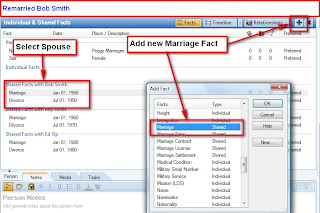
To add a new Marriage to the First Spouse, click on the Green Plus sign and a New FACT screen will appear, where Marriage is selected. Note that the cursor is on the First Spouse (Select Spouse)

Figure 225
The date of the new marriage was added and marked as Preferred.

Figure 226
What will this look like in a Genealogy Report (Collection Tab), Register Report (Detail Tab), in the Publish Workspace?
By default, the Preferred only FACTs are selected. The three marriages are reported, BUT the first marriage is not. Removing the Check Mark, in the Items to Include ICON, will resolve this.

Figure 227

Figure 228
References:
Adding a Spouse in Family Tree Maker 2009 & 2010
Adding Multiple Spouses on Family Tree Maker 2009
Adding a Spouse in Family Tree Maker 2009 & 2010
Adding a Spouse in Family Tree Maker 2009 & 2010
Adding Multiple Spouses on Family Tree Maker 2009
Adding a Spouse in Family Tree Maker 2009 & 2010

Wednesday, July 29, 2009
Data Base Clean Up - How to handle Names
My friend, Randy Seaver, of the Genea-Musing Blog has made another Challenge.
He starts:
"[For those wondering why I'm still working in FTM 16, it's a long story. Mainly it is because I am real comfortable with it and can work fairly quickly in it, and then I can import the native FTW file to FTM 2009 and RootsMagic.]
My guess is, each of use has done this, especially moving from Version 16 to Version 2008 or 2009. For me, it was the question of Which Version was easier to do the clean up. When I made this conversion, I checked or both versions with Copies of my Working Family File. I wanted to work with the Same Information with both Versions.
Actually, I started my clean up in Version 16, but quickly discovered Version 2009 was easier. Now, I was NOT dealing with the Name issue, I was working on the Place / Location entries. Since Randy was only addressing Names, I will post my thoughts on each question.
Before I start, I suggest two things. Back Up your Family File. Don't go forward until you do.
Second, make a Copy of the file to check out how you want that file to look like when you are done. Especially with the Names, run some test Reports and look at some Test Trees, to see if they look like what YOU want them to look like. In other words, look at the Output to help you determine how you want to do the Input.
Only my opinion and it's what I did.
Randy Continues:
"I would really like to create a genealogy database that I can be proud of, with standardized naming conventions and the like."
That is a Great statement. I can buy into that. Not being a professional genealogist, nor a "wanna be" professional I can only say what I understand what the 'standards' might be. Of interest, is the Comment made on Randy's Blog by Rebecca, referring to a standard that was proposed by Gary Mokotoff. It can be found on this website:
http://www.iijg.org/home/standards.html
I had not read it until today. What I will say below is not what has been proposed.>
Randy continues:
"When I looked in my index list for the names, I found that I have been very inconsistent with my naming conventions, including:
* (unknown) - I have some persons named (unknown) because I don't know either their first or last birth names. This is different from persons with no names at all who are listed as I deleted them because they had no connections to any other person in my tree. Should I use underscores like _____ for an unknown name? Should I use FNU for "first name unknown" and LNU for "last name unknown?"
Here is my take, and the reason why I suggested looking at Reports and Trees to see how you like the results. Try each of them.
For me, I have used 5 Underscores: _____ . Reason, I can live with the Reports and Tree format. The benefit is when you share your findings, I have found that people, knowing he information will "fill in the blanks".
When you look at Indexes or lists of names, they stand out very clearly what you have unknown Name information. It a reminder to fill in the blanks.
* known first name and unknown last name. I could use underscores or LNU.
* unknown first name and known last name. I could use underscores or FNU.
I use the 5 Underscores for Both. But, please see if you like what that looks like.
* Persons found with more than one first name in the records. Or a diminutive like Harry for Henry, Bob for Robert, Bert for Albert or Herbert, Molly for Mary, Abbie for Abigail, Peggy for Margaret, Sally for Sarah, etc. I've been putting these in as "Henry/Harry" (without the quotes) and getting a notice from FTM that there's an unrecognized character.
For Family Tree Maker, and that's the only program that I work with, has a Field for AKA, or Also Known As. The good news here, is that in most trees or reports, you can Specifiy IF you want the AKA to appear. That field will also be exported in a GEDCOM file. That is for Randy's Bert or Albert or Herbert question.
As for the "what was the real name", where you find in a your research, Family Tree Maker has the option to have more than one Name FACT.
In the example from last night. One document had Michael, another had Michael J. Which to I use. My answer is Both. Two Name FACTs.
The tricky part here is Selecting the Preferred Name Fact. Again, when reports or trees are created, Family Tree Maker has the option to see ALL of the FACTs or only the Preferred FACT. In the Example I have in my file, that I was using last evening, I found 4 different ways the name of the individual was presented in my Source information. Base on the other information and relationships, I could determine that the four names were the same individual.
Of course, there are Source-Citations on each of the names in my file.
Taking this one step further, and understanding of who is going to look at your research, in a tree or report is important. Lets say that everyone in the family knew a gentleman by "Uncle Harry". However, his full real name was Henry. The full NAME FACT would be Henry, but the AKA was Harry, or Uncle Harry. This is a case when the AKA field would be used in my file. Harry is in the AKA field, and the AKA is printed in the tree or report.
* Persons found with a first name in one record and an obvious nickname in another. I've been doing the same thing as the diminutive, e.g. "Henry/Skip." These are usually nicknames and I've seen them input as Henry "Skip" with the nickname in quotes.
I mentioned this above. My further comment is how do YOU want it to look in the Software begin used. In Family Tree Maker the quotes and slashes are not required, but can be entered. As Randy mentioned above, there will be an error Warning to deal with. I don't use those characters since I have control how the Name is displayed.
* Widows (and divorcees too) that marry again. I have a lot of "Mary Jones (widow Smith)" in my database because Tom Brown married Mary Smith in the records and she was the widow of Mr. Smith. Even worse, I have many of these loose widows without a known maiden name. I shouldn't be inputting her as "Mary Smith" because I don't know her maiden surname. Should I be inputting "Mary _____ Smith" or "Mary MNU Smith?' Or just "Mary _____," "Mary MNU" or "Mary LNU" and connect her to an unknown "FNU Smith."
In Family Tree Maker, it is expected that the Birth Surname is entered for the females. Having said that, from the example above, the unknown birth name or maiden name, I handle it like I handle any unknown name.
Within Family Tree Maker, again, you have the option to present the name, in reports or trees. When the married name is desired, the Contents, Items to include, has the ability to "Use married name for Female".
While we are here, the Name format option also includes the ability to "Display last name in all caps".
There is something that needs to be addressed here. In my family file, I have a married female, who did NOT, legally, take. This latter option might cause a problem. In the same file, there is a female who was married, then divorced. In the divorce papers, she took back, legally, her maiden, or birth surname.
This may present an issue for certain other family members, in printed trees and reports. Entering the data consistently and the use of the Name options are important to know and understand.
In either case, the use of the NOTES section is important to make use of.
In the Proposed Standard, by Gary Mokotoff, he makes a very important point. "Married women are identified by their maiden name, that is, their legal name ..." (page 4, paragraph 1.2). A little further down that paragraph, he discusses an immigrant, that upon entry into the U.S., the "changed her given name ... ". The key term here, for me, is "legal name".
Another entry on this Blog was on Searching Census Records, within Family Tree Maker for females:
* I've also seen the string "--?--" in genealogy periodicals and books for unknown names.
This standard suggests the use of the "?" for unknown portions of name (Paragraph 1.4). I tried that, but found when reading a report or looking at a tree, it was confusing to some of the readers.
Randy concludes:
"I note that the Rootsweb WorldConnect databases have:
* 60,920 entries for surname - LNU
* 11,052 entries for surname MNU
* 92,331 entries for surname - Unk
* 5,232,913 entries for surname Unknown
* 181,428 entries for surname (Unknown)
* 20,305 entries for surname --?--
* 124,687 entries for surname _____
* 1,166,278 entries for surname ?
* 8,117 for surname ?????
* 78 entries for surname Whoknows
* 64 entries for surname Dontknow
* 37 entries with surname Mystery
* 1,493 entries for surname Who
* 35 entries for surname Who?
Are there any standards for inputting these names into a genealogy database? Who has the authority to deal with this? Have there been extended discussions about these issues that I've missed in books, articles, blogs, message boards or mailing lists? What do you do in your genealogy software database?"
Again, one of the comments provide a proposed standard.
This topic comes up frequently on the Various Family Tree Maker message boards and email lists. There has only been discussions, and not one has seen a Name "standard". Not being part of any of the professional organizations, I wouldn't know if a standard is being worked on. I haven't seen a specific discussion, where a conclusion or recommendation was presented and agreed to.
As a User of Family Tree Maker, I can only offer how I use the Program, with my logic on how to handle the issue at hand. Just be consistent in how you handle these issues.
In Family Tree Maker, on the People, Family screen, the Left Panel provides some display options:
Two First Names: FTM: How do I enter someone who has two first names?
There is a Tool to convert a Name that had been entered in All Capital letters. The "standard" is the use of Upper and Lower cases, and it referred to in Paragraph 1.8 (Syntax. All portions of the name will be presented in upper/lower case.) This tool will help with this transition.
Convert Names Tool in Family Tree Maker 2009
Another name Knowlege Base article is:
FTM: How do I enter missing or unusual surnames?
PS - for Randy. You might want to look at what the Find and Replace feature will do for you, IF you choose to make any changes. BUT, don't forget to BACK UP your Family File BEFORE you state.
Thanks for listening.
Are there standards for names in family trees?
I am quoting his blog so that responding to his Database Clean up is easier. He asks great questions. I am guessing that each of us have asked our selves the same questions. In fact, last eveing I was a Family Tree Maker, Version 2009, and some of these same questions came up. So, it's time for my take on them.He starts:
"[For those wondering why I'm still working in FTM 16, it's a long story. Mainly it is because I am real comfortable with it and can work fairly quickly in it, and then I can import the native FTW file to FTM 2009 and RootsMagic.]
My guess is, each of use has done this, especially moving from Version 16 to Version 2008 or 2009. For me, it was the question of Which Version was easier to do the clean up. When I made this conversion, I checked or both versions with Copies of my Working Family File. I wanted to work with the Same Information with both Versions.
Actually, I started my clean up in Version 16, but quickly discovered Version 2009 was easier. Now, I was NOT dealing with the Name issue, I was working on the Place / Location entries. Since Randy was only addressing Names, I will post my thoughts on each question.
Before I start, I suggest two things. Back Up your Family File. Don't go forward until you do.
Second, make a Copy of the file to check out how you want that file to look like when you are done. Especially with the Names, run some test Reports and look at some Test Trees, to see if they look like what YOU want them to look like. In other words, look at the Output to help you determine how you want to do the Input.
Only my opinion and it's what I did.
Randy Continues:
"I would really like to create a genealogy database that I can be proud of, with standardized naming conventions and the like."
That is a Great statement. I can buy into that. Not being a professional genealogist, nor a "wanna be" professional I can only say what I understand what the 'standards' might be. Of interest, is the Comment made on Randy's Blog by Rebecca, referring to a standard that was proposed by Gary Mokotoff. It can be found on this website:
http://www.iijg.org/home/standards.html
I had not read it until today. What I will say below is not what has been proposed.>
Randy continues:
"When I looked in my index list for the names, I found that I have been very inconsistent with my naming conventions, including:
* (unknown) - I have some persons named (unknown) because I don't know either their first or last birth names. This is different from persons with no names at all who are listed as I deleted them because they had no connections to any other person in my tree. Should I use underscores like _____ for an unknown name? Should I use FNU for "first name unknown" and LNU for "last name unknown?"
Here is my take, and the reason why I suggested looking at Reports and Trees to see how you like the results. Try each of them.
For me, I have used 5 Underscores: _____ . Reason, I can live with the Reports and Tree format. The benefit is when you share your findings, I have found that people, knowing he information will "fill in the blanks".
When you look at Indexes or lists of names, they stand out very clearly what you have unknown Name information. It a reminder to fill in the blanks.
* known first name and unknown last name. I could use underscores or LNU.
* unknown first name and known last name. I could use underscores or FNU.
I use the 5 Underscores for Both. But, please see if you like what that looks like.
* Persons found with more than one first name in the records. Or a diminutive like Harry for Henry, Bob for Robert, Bert for Albert or Herbert, Molly for Mary, Abbie for Abigail, Peggy for Margaret, Sally for Sarah, etc. I've been putting these in as "Henry/Harry" (without the quotes) and getting a notice from FTM that there's an unrecognized character.
For Family Tree Maker, and that's the only program that I work with, has a Field for AKA, or Also Known As. The good news here, is that in most trees or reports, you can Specifiy IF you want the AKA to appear. That field will also be exported in a GEDCOM file. That is for Randy's Bert or Albert or Herbert question.
As for the "what was the real name", where you find in a your research, Family Tree Maker has the option to have more than one Name FACT.
In the example from last night. One document had Michael, another had Michael J. Which to I use. My answer is Both. Two Name FACTs.
The tricky part here is Selecting the Preferred Name Fact. Again, when reports or trees are created, Family Tree Maker has the option to see ALL of the FACTs or only the Preferred FACT. In the Example I have in my file, that I was using last evening, I found 4 different ways the name of the individual was presented in my Source information. Base on the other information and relationships, I could determine that the four names were the same individual.
Of course, there are Source-Citations on each of the names in my file.
Taking this one step further, and understanding of who is going to look at your research, in a tree or report is important. Lets say that everyone in the family knew a gentleman by "Uncle Harry". However, his full real name was Henry. The full NAME FACT would be Henry, but the AKA was Harry, or Uncle Harry. This is a case when the AKA field would be used in my file. Harry is in the AKA field, and the AKA is printed in the tree or report.
* Persons found with a first name in one record and an obvious nickname in another. I've been doing the same thing as the diminutive, e.g. "Henry/Skip." These are usually nicknames and I've seen them input as Henry "Skip" with the nickname in quotes.
I mentioned this above. My further comment is how do YOU want it to look in the Software begin used. In Family Tree Maker the quotes and slashes are not required, but can be entered. As Randy mentioned above, there will be an error Warning to deal with. I don't use those characters since I have control how the Name is displayed.
* Widows (and divorcees too) that marry again. I have a lot of "Mary Jones (widow Smith)" in my database because Tom Brown married Mary Smith in the records and she was the widow of Mr. Smith. Even worse, I have many of these loose widows without a known maiden name. I shouldn't be inputting her as "Mary Smith" because I don't know her maiden surname. Should I be inputting "Mary _____ Smith" or "Mary MNU Smith?' Or just "Mary _____," "Mary MNU" or "Mary LNU" and connect her to an unknown "FNU Smith."
In Family Tree Maker, it is expected that the Birth Surname is entered for the females. Having said that, from the example above, the unknown birth name or maiden name, I handle it like I handle any unknown name.
Within Family Tree Maker, again, you have the option to present the name, in reports or trees. When the married name is desired, the Contents, Items to include, has the ability to "Use married name for Female".
While we are here, the Name format option also includes the ability to "Display last name in all caps".
There is something that needs to be addressed here. In my family file, I have a married female, who did NOT, legally, take. This latter option might cause a problem. In the same file, there is a female who was married, then divorced. In the divorce papers, she took back, legally, her maiden, or birth surname.
This may present an issue for certain other family members, in printed trees and reports. Entering the data consistently and the use of the Name options are important to know and understand.
In either case, the use of the NOTES section is important to make use of.
In the Proposed Standard, by Gary Mokotoff, he makes a very important point. "Married women are identified by their maiden name, that is, their legal name ..." (page 4, paragraph 1.2). A little further down that paragraph, he discusses an immigrant, that upon entry into the U.S., the "changed her given name ... ". The key term here, for me, is "legal name".
Another entry on this Blog was on Searching Census Records, within Family Tree Maker for females:
Census Search for Females
The above use of the "_____" has little impact on the Surname. When I trying to use "unknown" as a name, there was a tendency to overlook the word "unknown" in the name field. I my experience, it was a little more obvious that an unknown name was being searched for.* I've also seen the string "--?--" in genealogy periodicals and books for unknown names.
This standard suggests the use of the "?" for unknown portions of name (Paragraph 1.4). I tried that, but found when reading a report or looking at a tree, it was confusing to some of the readers.
Randy concludes:
"I note that the Rootsweb WorldConnect databases have:
* 60,920 entries for surname - LNU
* 11,052 entries for surname MNU
* 92,331 entries for surname - Unk
* 5,232,913 entries for surname Unknown
* 181,428 entries for surname (Unknown)
* 20,305 entries for surname --?--
* 124,687 entries for surname _____
* 1,166,278 entries for surname ?
* 8,117 for surname ?????
* 78 entries for surname Whoknows
* 64 entries for surname Dontknow
* 37 entries with surname Mystery
* 1,493 entries for surname Who
* 35 entries for surname Who?
Are there any standards for inputting these names into a genealogy database? Who has the authority to deal with this? Have there been extended discussions about these issues that I've missed in books, articles, blogs, message boards or mailing lists? What do you do in your genealogy software database?"
Again, one of the comments provide a proposed standard.
This topic comes up frequently on the Various Family Tree Maker message boards and email lists. There has only been discussions, and not one has seen a Name "standard". Not being part of any of the professional organizations, I wouldn't know if a standard is being worked on. I haven't seen a specific discussion, where a conclusion or recommendation was presented and agreed to.
As a User of Family Tree Maker, I can only offer how I use the Program, with my logic on how to handle the issue at hand. Just be consistent in how you handle these issues.
In Family Tree Maker, on the People, Family screen, the Left Panel provides some display options:
Note: Name index options.
- Use AKA if available as a middle name: If an alias is included in quotes after the middle name , both the given name and AKA (Also Known As) are listed in the Index.
- Use AKA if available as an additional entry: If an alias or nickname has been entered for an individual, both the given name and AKA are listed in the Index.
- Use titles if available: If a name includes a title, both the given name and title with name are listed in the Index.
- Use married names for females: Lists married females by their married name instead of the maiden name.
To open the Options: Dates/Names dialog box in Family Tree Maker 2009:
Click Tools > Options > Dates/Names.
The Knowledge Base website also has:Click Tools > Options > Dates/Names.
Two First Names: FTM: How do I enter someone who has two first names?
There is a Tool to convert a Name that had been entered in All Capital letters. The "standard" is the use of Upper and Lower cases, and it referred to in Paragraph 1.8 (Syntax. All portions of the name will be presented in upper/lower case.) This tool will help with this transition.
Convert Names Tool in Family Tree Maker 2009
Another name Knowlege Base article is:
FTM: How do I enter missing or unusual surnames?
PS - for Randy. You might want to look at what the Find and Replace feature will do for you, IF you choose to make any changes. BUT, don't forget to BACK UP your Family File BEFORE you state.
Thanks for listening.
Monday, April 20, 2009
How to Enter an Intra Familial Marriage - Part 4
Continued from How to Enter an Intra Familial Marriage - Part 3
A look at the Outline Descandant Report from Samuel Osbun, seen in Figure 114, will show the two relationships that this Intra Famial Marriage created. The two individuals are listed, with their spouse, under their Parents. Note the order of the names.
The Child is listed first, then the Spouse with a "+" sign in front of the name.
A look at the Outline Descandant Report from Samuel Osbun, seen in Figure 114, will show the two relationships that this Intra Famial Marriage created. The two individuals are listed, with their spouse, under their Parents. Note the order of the names.
Under Fred and Nancy (Osbun) Pittenger is Nathaniel Pittenger and Elizabeth Osbun
and
Under Isaac Osbun and Eileen Gilbert is Elizabeth Oshun and Nathaniel Pittenger
and
Under Isaac Osbun and Eileen Gilbert is Elizabeth Oshun and Nathaniel Pittenger
The Child is listed first, then the Spouse with a "+" sign in front of the name.

Figure 126

Figure 127
There is a Nathaniel Pettenger Jr listed, as he was the child of this marriage. Nathaniel was added the same way as in Figure 116 of How to Enter an Intra Familial Marriage - Part 1.
More information on how to handle Relationships can be found on the Family Tree Maker Knowledge Base website. Go to this website: http://ftm.custhelp.com/ Enter 4202 into the Keyword Search box and read that Article.
How to Enter an Intra Familial Marriage - Part 3
Continuing from How to Enter an Intra Familial Marriage - Part 2
We left of in How to Enter an Intra Familial Marriage - Part 2 where Nathaniel Pittenger and Elizabeth Osbun were married. We were on the People, Person, Attach/Detach, Attach Spouse screen in Figure 121. From there the "Select The Spouse To Attach" screen. Here we select Osbun, Elizabeth from the list.
We left of in How to Enter an Intra Familial Marriage - Part 2 where Nathaniel Pittenger and Elizabeth Osbun were married. We were on the People, Person, Attach/Detach, Attach Spouse screen in Figure 121. From there the "Select The Spouse To Attach" screen. Here we select Osbun, Elizabeth from the list.

Figure 122
Once Elizabeth has been selected, the Attach Spouse screen will change to a New Family window, where you will click on the button to the Left of the New Family entry.

Figure 123
Clicking on OK will take you back to the People, Family View showing the New Family and relationship.

Figure 124

Figure 125
Continued on How to Enter an Intra Familial Marriage - Part 4
How to Enter an Intra Familial Marriage - Part 2
Continued from How to Enter a Intra Familial Marriage - Part 1
Following the marriage of Isaac Osbun and Eileen Gilbert, they had a Daughter, Elizabeth Osbune. Clicking on the Add Child, again, will open the Name window.
Following the marriage of Isaac Osbun and Eileen Gilbert, they had a Daughter, Elizabeth Osbune. Clicking on the Add Child, again, will open the Name window.

Figure 118
A quick look at the Kinship Report, at this point, might be helpful. Select Nathaniel Pittenger, the Child in Figure 118, then Click on Publish in the Workspace will open the Collection tab, from which Relationship Reports will be selected. The select the Kinship Report.

Figure 119
The Kinship report for Nathaniel will be generated. Not that Nathaniel is listed as "Self", as that is who was selected, and that Elizabeth Osbun is listed at First Cousin.

Figure 120
Now, Elizabeth Osbun and Nathaniel Pittenger marry. Both are currently in the Family File, to the trick is to ATTACH the two together. This is done by clicking on Person, on the People Workspace. A drop down menu will appear, where Attach/Detach Person will appear and another menu will open to the right. Select Attach Spouse. Remember that we are on Nathaniel's record.

How to Enter an Intra Familial Marriage - Part 1
A listener of the Genealogy Gems Podcast, Episode 63, asked How to Enter a situation where Cousins Marry. A term that might describe this is "Intra Familial Marriage".
Here is the question:
MAILBOX: Listener Question regarding Family Tree Maker 2009 Platinum Edition.
"I have at least one instance in my husband's tree where two first cousins married. This, of course means that some of the tree overlaps itself. I can not get the FTM software to recognize that the people are the same…Do you or any of your listeners know if I am just missing something or can it not be done??”
This post will describe how to create this relations.

You can see the Relationships within the family above.
Nancy marries Fred Pittenger. One of the ways to do this is to click on the Add Spouse under Nancy's name. In this case, Double clicking on Nancy, in Figure 114, changed the view to Figure 115. A small window will open to enter the name.
Here is the question:
MAILBOX: Listener Question regarding Family Tree Maker 2009 Platinum Edition.
"I have at least one instance in my husband's tree where two first cousins married. This, of course means that some of the tree overlaps itself. I can not get the FTM software to recognize that the people are the same…Do you or any of your listeners know if I am just missing something or can it not be done??”
This post will describe how to create this relations.
- Go to the People, Family View
- This list of of Individual in the first family

Figure: 114
You can see the Relationships within the family above.
Nancy marries Fred Pittenger. One of the ways to do this is to click on the Add Spouse under Nancy's name. In this case, Double clicking on Nancy, in Figure 114, changed the view to Figure 115. A small window will open to enter the name.


Figure 116
Now, Isaac Oshun, the second child of Nathaniel Pittenger and Elizabeth Oshun married Eileen Gilbert. She was added by clicking on the Add Spouse to the Right of Isaac. Again the Name and sex small window will open where Eileen Gilbert is entered.

Subscribe to:
Posts (Atom)