HOW TO:
I would like a print out of All of the Surnames in my file and to see the number of people with that surname.
Here is how to do that.
_______________________________________________________________
Copyright © 2014 by H R Worthington
Showing posts with label Report_Surname. Show all posts
Showing posts with label Report_Surname. Show all posts
Friday, April 25, 2014


Friday, October 28, 2011
FTM2012 - Surname Report
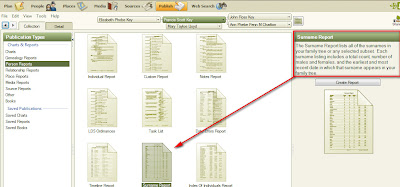
One of the featues that I use a lot, especially when I want to have a little higher level view of my file is the Surname Report. This report can be found in the Publish Workspace, Person Collection.
There are the usual features for this report. You can select All Individuals, Immediate Family or Selected (filtered) individuals.
The first ICON in the Right Hand Panel is the Font type, whether or not you want the Page Header on each page, what footer information on each page, is in the second ICON. page set up, Save Report Settings, and Save Report. Report settings will all the user to save the settings for this report when ever it is brought up. The Save Reports is a specific set of parameters you might want to use for a specific reason. The Saved Reports menu will be any Saved Reports up.
This is the report format. At the end of the report is a summary.

Copyright © 2011 by H R Worthington
There are the usual features for this report. You can select All Individuals, Immediate Family or Selected (filtered) individuals.
The first ICON in the Right Hand Panel is the Font type, whether or not you want the Page Header on each page, what footer information on each page, is in the second ICON. page set up, Save Report Settings, and Save Report. Report settings will all the user to save the settings for this report when ever it is brought up. The Save Reports is a specific set of parameters you might want to use for a specific reason. The Saved Reports menu will be any Saved Reports up.


This is the report format. At the end of the report is a summary.

Copyright © 2011 by H R Worthington
Subscribe to:
Posts (Atom)