This blog post will show how to use the Family Tree Maker Template, for an LDS Film that was located at a local Family History Library. The film was found at the North Caldwell, New Jersey, Family History Library. This was a Baptisms, Marriages, and Deaths file rom 1831-1864 for the Greek Catholic Church located in Cemerne, Saris, Slovakia.
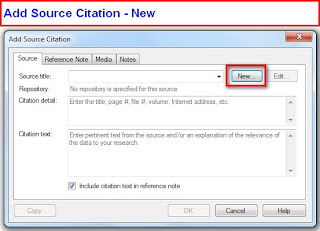
One way to start the documentation for this record is to go to the Sources Workspace, then clicking on the Add ICON in the upper right of the list of Sources. This will bring up the following window, where the New button will be selected.
The first thing to be recorded, starting from the Source Workspace, is a New Document or Book, or in this case a Microfilm from the LDS Family History Library.
The new Source will allow us to enter a "Keyword". Since we know this is a LDS film, typing the letters L, D, then S, will bring up the suggested Template for an LDS Film.

Selecting the suggtion will bring up an Add Source Screen, since this is the first new Source using the Microfilm template. The screen below will show the fields that will be filled in during this process.
For this case, the Source Repository is in my genealogy filing cabinet. Using the Down Arrow to the right of the Source repository, my name was selected.
The Church name and location was entered, "Greek Catholic Church" in the Church/author field, Cemerne, Saris, Slovakia, in the Church Location field. The Record Series "Baptisms, Marriages, Deaths, 1831-1864" was entered. This information was found with the LDS Film. The Film ID was also recorded as found in the film documentation. There was no Call Number for this film. Wanting to remember that a Copy of the film was in my possession, a Comment was made for this Source.
At this point, we have created a New Source.
The person whose record was found was Michael Hricz-Gyunik. Going to the People Workspace, Person Tab, and selecting the Name (Fact), in the Right Hand Panel, under the name, the New, Down Arrow showed this menu, and Add New Source Citation was selected, as this is the first Source Citation to be entered for this Source.
Since the Source has already been created, clicking on the Pull Down Menu (1) has the list of Sources already in the file. Selecting the Greek Catholic Church item will open a Source Citation window for this specific Source Citation.
The two fields to be completed are the Citation Detail and the Citation Text. In these two fields, what should be entered into them is shows in light gray. "Enter the record book, volume, page, and description of the item (including date)", for the Citation Detail, and "Enter pertinent text from the source and/or an explanation of the relevance of the data to your research", for the Citation Text.
From the film, the LDS Film Number, the Item, Page, and Entry numbers are recorded in the Citation Detail. The Citation Text included the Individuals Name, the Parents Names, the Birth Date, the Baptism Date, and God Parents names, as they appeared in the Film.
The following step will be done for each Fact that is entered into Family Tree Maker. For example, the Father's Name, as shown below. The Father's name, Hiram Hricz-Gyunik was selected, but this time the "Use an Existing Source Citation" menu item would be selected, as the Source-Citation for this document has already been filled about.
The list of Source-Citations is brought up and by letting the Mouse rest over the Source-Citation, the details are shown in order to select the correct Source-Citation.
Selecting Greek Catholic Church, the clicking on Link to Citation will put this Source-Citation onto Hiram's Name Fact.
To see what the Source-Citation will look like, go to theSources Workspace, selecting the Greek Catholic Church entry, in the Left Panel, then selecting the Print ICON on the right, will bring up a Source-Citation Usage Report.
Below is that report, showing the Source Title, Repository, since a copy is in my files, the Citation Details, and Citation Text, as reflected above, is presented in the report, along with the Name and Facts that are using this Source-Citation. For this example, its the two name facts.
Going to the Publish, Relationship Collection and Family Group Sheet, for the Father, Hiram, the Sources are listed. Note: these are the only Source-Citations for this family. Additional Source-Citations would be listed as entered.
This process would be used to document the names and facts obtained from this specific part of the Film. If other information was obtained from a different part of this same file, another Source-Citation would be created, starting at the New Source-Citation, under New Source above. The New Source would allow for new / different Citation Details and Text.
Do Not Use the "Use Existing" further down this blog item, as it will bring up the existing Citation Details and Source Text.
© 2010, copyright H R Worthington


