Showing posts with label FamilyBookCreator. Show all posts

Saturday, January 22, 2022

Learning from a Book Review

What do I want YOU to see VS What do I need to see

I recently create a "Book", using the Family Book Creator plugin for the Family Tree Maker program (FTM2019).
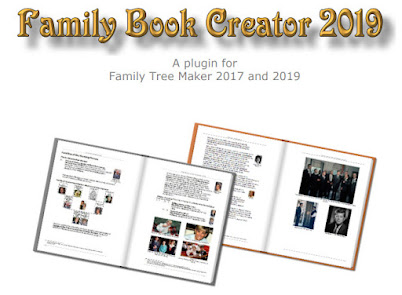

It was a draft to show a class what an "end result" might be for our research. The book was about 120 pages, with charts, stories, Pictures, records, and a Place and Person index.

This book was created from a file that I have been using, in an "in person" class, based on some research for one of the students. The research has been shared with the class, over the past several months, some of the material has been used on this blog.

I gave one copy of the book to the student two weeks ago. This past class, the student gave me a stack of pages, all marked up. The details of the comments were awesome. Lots of "red marks" in the Footnotes. Someone actually read the footnotes, I said to myself.

As it turned, most of the comments are GREAT teaching moments for the next class. Presentation already done.

Here is an example of one of pages:
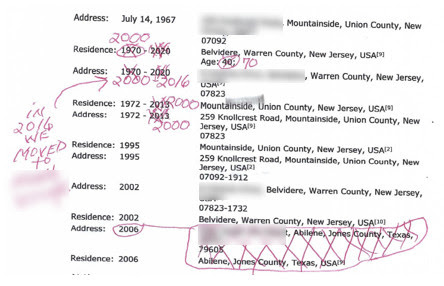

Lots of red marks and "corrections".

This file (and book) is being used to prepare for the 1950 Federal Census, for the USA, later this year (04/01/2022 to be exact). So the Residence Fact and Addresses are important. All well and good.

BUT

I knew where this information came from, after all everything has a Citation. All of this information was helpful for me, but what I had not thought about, is what about a reader of the information provided in this book. The comments made it very clear to me, that everything had been read and thought about.

Most of the information with the red marks came from 3 Sources or Record Groups on Ancestry. All very helpful for the 1950 Preparation work, but not so much for the reader of the book. Understanding those 3 sources, and what they contain, I have marked any information, that were turned into Facts, in FTM2019, I marked as Private, so they will not appear in the Ancestry Member Tree (AMT) nor will they appear in the next printing of the Book.

I want to see those Facts in FTM2019, and I want the Online Tree (AMT) to have a link to the Record, but ONLY for the Name and Birth Date FACTS, that were on the Record. I want the reader to see the record, just not the other FACTS that the record provided.

A review of ALL of the Citations from those three (3) record groups. There were 27 Citations, so far, for those three record groups, and all of the "Residence" Facts have been marked private.
Original data: Voter Registration Lists, Public Record Filings, Historical Residential Records, and Other Household Database Listings.
That is from the Source Information from Ancestry. An Index, with no image, nor real information about the source of information.
No wonder the student marked it up. 

There was also an upside to this review, New Information that I did not have before.
____________________________________________________________
Copyright © 2022 by Cousin Russ

Friday, December 7, 2018

Knowledge Base - Family Book Creator (Plug-In)


The Family Book Creator is a Plug-in for Family Tree Maker.


I have blogged about this Plug-In in the past

_______________________________________________________________
Copyright © 2018 by Cousin Russ

Sunday, July 31, 2016

FTM2014 Plug In - Family Book Creator


I received an announcement that the Family Book Creator is now available in Spanish (Español) and French (Français) as additional output languages

This is a great plug in for FTM2014. I use is, have blogged about it, its a great tool for creating books.

Here is a link to the Family Book Creator Press Release

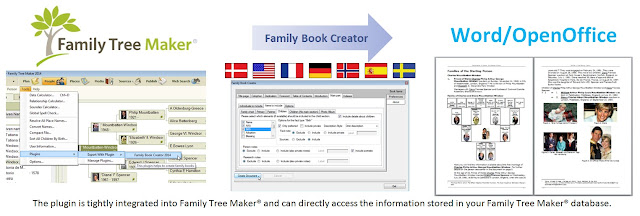
If you haven't looked at this or tried it yourself, here is a really neat chart of the work flow between the Family Tree Maker program and the output. I have created several books myself. In fact, I am working on another right now.

.


_______________________________________________________________
Copyright © 2016 by H R Worthington

Thursday, May 22, 2014

Family Book Creator - Second Book - Printing

A couple of hints about the book that I just created:

Family Book Creator - Second Book

The book I created was 109 pages with pictures. I wanted 5 bound books so that I could give the book to my 1st cousin 2x removed, the 7 year old. The quote was over $300.00. Oops, that's not going to work. Out of the 109 pages, less then 20 had colored pictures on them. The rest is text.

They are going to bind the book, double sided pages, with ONLY those pages with pictures will be in color. There are thumbnail pictures in the report, they will be black and white, but the photos on their own pages will be in color.

The price will be about $100.00 for 6 books. I added one, as the family picnic where I am going to deliver the book will have another 1st cousin, 2x removed. He might as well get one as well.

It has been suggested that I do a video on how to generate a PDF file, which I will, from within FTM2014, but for this Plug In, there are too many variables.

Also, please visit Randy Seavers Genea-Musing.com blog based on his experience with this plug in.

Family Book Creator - Post 1: Creating the Book


Family Book Creator - Post 2: My Ancestors Book - First Try


_______________________________________________________________
Copyright © 2014 by H R Worthington

Family Book Creator - Second Book

This is a follow up on using the Family Book Creator plug-in for FTM2014.

On facebook, a cousin told me her 7 year old daughter wanted to know about "where she came from" and who her Ancestors were. So, I wanted to put this plug in to real use and to be able to create a book that a 7 year old might be interested in.

In this video, I spend a few more minutes with some of the options. What I have focused on, is how you can EDIT a book, created with this plug in, to make adjustments to the content of the book that was created.


This book will not have Footnotes, Endnotes, nor a lot of detail on the person, but will have a Bibliography, Index of Places, and Index of People AND colored pictures that are in my family file.

I should also mention, that it was another "out of the box" book. I did not look at the User manual, nor have I fine tuned the book based on the developers documentation. Just trying to see how difficult it would be for me to just create and now edit the book.
_______________________________________________________________
Copyright © 2014 by H R Worthington

Sunday, May 18, 2014

Family Book Creator - First Book

Family Book Creator - First Book

Here is a quick review of the un-edited book that was created by the Family Book Creator plug in for Family Tree Maker


_______________________________________________________________


Copyright © 2014 by H R Worthington

Saturday, May 17, 2014

Family Book Creator - the First Plug In for Family Tree Maker

Yesterday I mentioned A Plugin for Family Tree Maker so now I will start describing it. I say start, because Books take some time to create. I have created 15+ books in Family Tree Maker since that feature was first introduced many years ago. I haven't blogged about that feature because "it's complicated". 


I have always asked the question "What is the purpose of the book?" "WHO is the focus person for the book?" and "Who is the audience for that book?" Those questions will drive the layout and information to be included.

This new plug in makes that much easier. HOWEVER, there is some up front planning required before you start the plug in.

I am going to walk through the screens that you will see, options to use, so that when the book is generated it will come out the way you want. Pictures, Charts, Footnotes, and more. 

This is not the first screen you will see, but I will walk through all of that later. This Blog post will show what you need to be thinking about before you start.

The Title Tab:

This is easy. the Program will "fill in the blanks for you" based on who the book will be about.


The < > are the indicators as to what the title of the book will be about. This can ALL be changed later, as the output of this program is an Rich Text Format (RTF) file that your word processor can open and you can edit.

The Colophon Tab:

Again, this is publication information and the program will "fill in the blanks". There are Header and Footer Options for you to choose from.


The Dedication Tab:

This is where the work begins. You have an option and should consider writing a Dedication for this book.


The Forward Tab:

Like the Dedication, a forward would be a good thing to have in the book. Again, this is one of the pre-planning items to consider before you start the book. However, the Family Book Creator does offer you some suggestions. It will also autofill the Author Name, Author Place, and the Current Date.


Table of Contents:

Actually, you can let this one go by, as it will be created when the book is created.


Introduction.

The program will offer a suggested Introduction. It also includes some file statistics. Don't rush to re-write what is there, as it pretty well explains that format of the book. As mentioned earlier, you can always edit this in your word processor.


Main part:

Where is where you have the choices of who and what to include. I'll not spend a lot of time here with this, but there is a tab for Individuals to include, Items to include, Options.

These options are much link what is already in Family Tree Maker.. You can limit the number of generations or All generations. Lots of flexibility


Indexes Tab:

Bibliography or list of sources.

You can have the Index of Individuals, with options there

And, you can include an Index of Places, with choices.


Down the left side are three more tabs. Book Items, which I just covered, Preferences and About.

I will cover them in another Blog Post.

I think that it is important to thing about what Items you want to include in the Book.

The output of the book, is worth the wait.


More details may be found at www.FamilyBookCreator.com. There is an evaluation version available for you to try. There is no Mac OS X Version available.

http://www.FamilyBookCreator.com


_______________________________________________________________
Copyright © 2014 by H R Worthington

Friday, May 16, 2014

A Plugin for Family Tree Maker

I just received an announcement that we have all been waiting for. A Family Tree Maker Plug In.

The plug-in is called Family Book Creator.  I was asked to beta test this and found it an excellent tool. In fact, I met the developer at RootsTech 2014. I have created several books using this Plug In and it's very easy to use and install. 

I will create a book and blog about it shortly.

Family Book Creator is a Plug In for Family Tree Maker 2010, 2012 or 2014 which turns your research into a detailed personalized book with just a few clicks.

More details may be found at www.FamilyBookCreator.com. There is an evaluation version available for you to try. There is no Mac OS X Version available.

http://www.FamilyBookCreator.com

_______________________________________________________________
Copyright © 2014 by H R Worthington

Print Friendly