Showing posts with label Find-A-Grave. Show all posts

Friday, January 7, 2022

Editor's choice

I have not published this before, but have had a couple of comments on the blog that I will not publish. That is a three letter abbreviation for this website.
I will be very happy to publish comments about this website, and I have many blog posts about my use of it, but the Website NAME MUST be spelled out. I hope you understand. ____________________________________________________________
Copyright © 2022 by Cousin Russ

Wednesday, September 22, 2021

FTM2019 - Find A Grave Memorials - Review what you have

Focusing on Find A Grave is a real bonus, for me at least.


Spending time just on my Find A Grave and Burial information, I found an additional benefit.

Of the 246 Find A Grave Memorials, I added 6 new headstones to my database 3 new records, and 4 new portraits that I added to my database. I did this by relooking at those 246 Citations, clicking on the Link to the Find A Grave Memorial link, in my Citation screen, and founds those records. 

Besides those Memorials that have been removed or merged, I may have found a clue on how to find out where those memorials went. I do remember when this happened, because of my notes, it was when ownership of the Web Site changed to Ancestry. A number of contributors took the memorials down, that they had created.

After I complete my review of the Find A Grave Fact Notes, I will then use my Citation, where the memorial has been removed, and relocate the memorial. One of my clues, was when a Burial had the word "unknown" when I found them a number of years ago, but because I marked them as in my Memorial Number fact (Find A Grave #), I can filter on that and re-search for them OR to check to see if those profiles have a Find A Grave Index Hint.

____________________________________________________________
Copyright © 2021 by Cousin Russ

Friday, September 17, 2021

FTM2019 - Find A Grave Memorials --- Moved Memorials

Clean up, focusing on Find A Grave Memorials.


This clean up of my Find A Grave memorials has been really helpful. What I started with, was to Move any Find A Grave entries, in the Person Notes field, to the Find A Grave Memorial # Fact Notes Field. I had notes in both places but wanted them ALL to be in the Fact Notes.

I have only reviewed the start of the alphabet, up to the letter D. I am doing a Surname by Surname letters to keep track of where I am. Using the Filter In Feature, I used the Find A Grave Memorial # Fact as my Filter.

As I finish a letter or series of names, I remove them from the Filter. So, it's easy to keep track of where I am.

To date: I have reduced 35 Pages of Person Notes, and have added 11 Pages of Fact Notes. Going in the right direction, as I had hoped. I have 322 profiles that have the Find A Grave Fact.

As I am doing this review, I look at the Burial Fact, to make sure that the Cemetery in that Fact is in my "Cemetery" database, which is a Citation. I have 81 Cemeteries in that Database. So far, that means that  ALL of the Cemetery Information from the Find A Grave website, is ALL in ONE place. I had a number of Burial Fact Notes with information about the cemetery, which is why I created the Cemetery Database. That database is anything I can find on the Find A Grave website about the cemetery, including physical locate, contact information (some time), former Cemetery Names, most helpful, and other comments. I don't have to remember to put cemetery information in the Burial Fact Notes.

Also, with the focus on Find A Grave, I was reminded that when there was a change in "ownership" of the Website other things changed. For example, some Memorials did NOT have Cemetery Locations. Many of those Memorials were removed. I HAD marked, in the ToDo list, those memorials in two ways. The ToDo list AND in the Find A Grave Memorial # Fact AFTER the number. So, looking at the Find A Grave custom report I created, I could SEE those memorials I used to have, that no longer exist.

At last count, there are 30 such memorials that no longer exist. But, some of them had been replaced. I have been tracking that. I had 79 "missing" memorials, so I have been finding some of them.

I have also made sure that IF I have a Find A Grave Index record, that I also have the information from the Find A Grave website. I have about 65 of those identified.

As I have been doing in the past, but have been really focusing on this Clean Up (Genealogy Do-Over, my style) to make sure that I have my Evernote Notebook Up to date.

Time consuming, yes, but so worth the time an effort when I do more work on my Prep work for the 1950 Census Release.

 ____________________________________________________________
Copyright © 2021 by Cousin Russ

Wednesday, August 29, 2018

Genealogy Do Over (Go Over) Find A Grave - Photo Citations

I recently did a blog post on Genealogy Do Over (Go Over) Find A Grave, and have since been asked about Citations for Photo's from the Find A Grave Website.


Great question, easy answer. The video has the answer, in that the Find A Grave Citation is how I do that.

I think I know why I was asked the question, so I'll answer it now. The Citation is for the FACTS, right? I have the Headstone Photo's on my computer in FTM2017, but I mark them ALL Private, as I do not have permission to use the photos. That does NOT mean I can't have them in my File.

The bottom line answer for Citations on Photos from the Find A Grave Website is that they are Marked Private and will not be in my Ancestry Member Tree.

I will be doing two of three more Blog Posts on my change in dealing with the Find A Grave website. They will include My Memorials, My Cemetery Source Group, and My Photos on a Find A Grave Memorial page.

_______________________________________________________________
Copyright © 2018 by H R Worthington

Tuesday, August 28, 2018

Genealogy Do Over (Go Over) Find A Grave Citations

I have reviewed how I had been doing my Find A Grave Citations, didn't like them, and they were confusing to me. The NEW Format of the Website, gave me a reason to Relook (Go Over) my Citations for the website. 

Here are my findings


_______________________________________________________________
Copyright © 2018 by H R Worthington

Monday, December 25, 2017

Observation when doing a Web Merge on a Find A Grave INDEX Hint for Two People

An observation about Hints, when Two People have hints and One Person is selected, but the Web Merge includes two people. In this example, I had already merged the data from the Wife into FTM2017 from her Hint, so, his hint should no longer be there, as all of the information from that record is already in that database.


I will probably do this example again, to show the Hint issue. The point of this one, is to show that the Hint was followed for one person, the Husband, but the data from the Wife was included in the Web Merge. And that Hint should not have been there.to start with.
_______________________________________________________________
Copyright © 2017 by H R Worthington

Observation when doing a Web Merge on a Find A Grave INDEX Hint for One Person

Will describe how Ancestry is presenting the County field in a Web Merge


_______________________________________________________________
Copyright © 2017 by H R Worthington

Monday, April 24, 2017

How Do You Handle Female Names?

My friend Randy Seaver of Genea-Musings had a question about how he handles Female Names. I encourage you to read it.

It's been a while since I have blogged about this one, so here is my take on this subject.

The first thing to understand, for me, is the question of how to handle Unknown Names. My rule of thumb, in my database is the use of 5 Underscores [ _____ ]. If it's a female and I don't know the Given nor Birth Surname I enter it as [ _____ _____ ]. If there are other names for this person, like a married name, these 5 Underscores will be the Preferred Name.

My Index, in the People Workspace, Tree View, looks like this:


Yes, I have a lot of Unknown Names. and a lot of unknown Female Birth Surnames:


But, It works for me. For Example, I find a Find-A-Grave Memorial, where the Married name is provided. The husband is George McNaughten Vial and the memorial has for his wife Emma Frost Vial, I add the 5 underscores to the Preferred Name.


This is what the Person View looks like.


The memorial has her married name, and the Find-A-Grave citation is recorded for that Name Fact, but marked as the Alt Name Fact. The Preferred Name is with the 5 underscores.

When I find a Census Record that lists where the Parents were born, I want to capture that. It may be helpful when looking at other records. In this case, I use assume that the Surname for the Father to be the Surname of the person in the Census Record, for recording this. I realize that it may not be the actual surname, but I have not run into that "problem" yet. But I carry the Unknown Given Name and the Surname from the "child" in the Census Record. For the Mother, both the Given and Surname I handle the same way, with my Unknown Name strategy. This important thing is that I capture the birth location and Cite it.


REASON:
  1. Does not interfere with Hints
  2. Does not interfere with Searching on websites
  3. Reminds me I need to find the Birth Surname
  4. and when others review my work, they help Fill In the Blanks


_______________________________________________________________
Copyright © 2017 by H R Worthington

Thursday, March 30, 2017

Query Answer: Multiple Sources, Multiple Citations, Same Record

I have a User Requested Blog Post:
Handling (almost) identical citations when available from multiple sources. Example: a citation was created (using a template) from a source that was originally found only on FamilySearch. Now Ancestry has the same information available, even using an identical database title (and gives a "hint" to it.) How do you recommend handling the "source" which could be argued is identical, although the channel to get to the source, and therefore the citation, is different.
I submit that these are two different Sources. Ancestry and FamilySearch. That would required TWO Citations, in fact Two Source Groups.

I often will have a Hint from Ancestry.com and it has a Film Number from FamilySearch. I will cite the Ancestry entry, then go over to FamilySearch, find that Film Number and entry and Cite that one as well. Somethings, when I have done this, I find that the Image my be clearer on one vs the other. I will KEEP both and Cite Both. Yes, it may be the same source material.

Find-A-Grave is another example of this. I will cite the Index from Ancestry.com, but will go to the Find-A-Grave website, find that memorial. One source in Ancestry.com the other the Find-A-Grave website. Two Source Groups. Two Citations.

I have 28 Blog posts on how I handle Find-A-Grave information

Hope that answers your question

_______________________________________________________________
Copyright © 2017 by H R Worthington

Wednesday, June 29, 2016

Why I like Ancestry.com Find-A-Grave Hints and use the Web Merge Feature

Here is a video demonstrating why I like to follow an Ancestry.com Find A Grave Index HINT and use the Web Merge Feature within Family Tree Maker


_______________________________________________________________
Copyright © 2016 by H R Worthington

Monday, May 2, 2016

FTM2014 - Web Merge from the Find A Grave website

How I handle the Web Merge feature from the Find A Grave website.


_______________________________________________________________
Copyright © 2016 by H R Worthington

Monday, March 23, 2015

FTM2014 - Following a Shaky Leaf Hint for Find A Grave Index, 1600s-Current from Ancestry.com

How I handle a Shaky Leaf Hint for Find A Grave Index, 1600s-Current from Ancestry.com database


_______________________________________________________________
Copyright © 2015 by H R Worthington

Sunday, November 16, 2014

FTM2014 - Ancestry.com - Find A Grave Index Hint

Here is how I handle an Ancestry Member Tree hint, for the Ancestry.com U.S., Find A Grave Index, 1600s-Current and bring that information into FTM2014.
In this specific case, I am creating a bread crumb that would lead me to the Find A Grave website. The reason for me to create this lead to that website, is so that I can create the Creator of that Memorial, get the memorial number. I would then deal with any images or other information that might be on that memorial.


_______________________________________________________________
Copyright © 2014 by H R Worthington

Thursday, September 11, 2014

Find A Grave Celebrates 100 Million Photos On Site!

Thought I would share this with you all.

Find A Grave Celebrates 100 Million Photos On Site!

Russ
_______________________________________________________________
Copyright © 2014 by H R Worthington

Wednesday, March 5, 2014

Find A Grave App Now Available in the Apple Store

An announcement from Ancestry.com

As promised, we have recently released the first version of the Find A Grave mobile app.  First of all, it’s free, just like Find A Grave.  With the app, you’ll be able to bring the most important aspects of Find A Grave with you.  You can see cemeteries near you or around the world, search for loved ones by name, take photos for existing memorials, or add new ones right from the app.  The app is beautiful and contains rich photos, and all of the memorial details that the website has, but with a modern view of the Find A Grave brand.  One aspect of Find A Grave that I’ve always loved, is the ability to request photos and take photos for others.  Not strictly required, I think this aspect of Find A Grave captures some of the best community spirit, and so we made sure to get this in our first release.  As a logged in user, you can request photos for memorials, just like on the website, and the network of volunteers can see those requests and fulfill them directly, or claim them, in order to help plan their next cemetery outing.
 
For a list of features, I’d direct you to our glossy product page, but I did want to point out a few things before I go.  First, this release is just the beginning and we have a road map of features for our users which will keep the Find A Grave mobile app improving over time.  Second, we’re linking the Find A Grave mobile app to Ancestry’s peerless support team to make sure our users get the help they need in a timely fashion.  Finally, we are planning our Android App as well, and though I don’t have a release date Android is certainly not forgotten.

Visit our product page for more information: http://www.findagrave.com/mobileapp
 
cid:image006.jpg@01CF3471.56AB2800cid:image004.jpg@01CF3471.56AB2800


Find A Grave App Team


Note: I have downloaded the APP and it works as expected. Haven't gone to a cemetery yet, as we still have about a foot of snow on the ground, but I found the navigation was easy and screens clear. Can't wait to get out and take some pictures.

Saturday, December 7, 2013

GeneaMusings Challenge Summary

A little over a month ago, TUESDAY, OCTOBER 29, 2013 to be exact, my genealogy friend Randy Seaver made this blog post. CrowdSourcing Opportunity: When and Where did John Louis Powell Die?

Always up for a challenge, I thought I would take this project on. I have posted as a result of that challenge a number of time. But, I want to draw this challenge, for me, to a close. I do want to share a couple of things that I learned along the way.

  • Have a Genealogical Question to Answer
  • Stay focused
  • Record what you find (where and when)
  • Don't create a "brick wall"
  • Have a search strategy
  • Review what you have
  • Have a research log
  • Create To Do lists AS YOU GO
  • Establish guidelines when sharing an Ancestry Member Tree
Each of the above could and may become blog posts in the future. This blog post is a summary of the findings. Future Blog posts will probably high light a couple of people in this tree that Randy has blogged about on Geneamusings


Here is what the Plan Workspace, File Statistics show at this point.


With Randy's blog post, I now have 328 people in this file going back 7 generations with 85 Surnames.

All 75 Sources are using the FTM2014 Template Feature. I have added 211 Media items; all of them are linked to Citations. Speaking of Citations, the 187 citations are linked to 3,514 Facts.

Looking at the summary on the Ancestry Member Tree (AMT):


The number of people match, but there appears to be differences in the way Photos and Records are counted.

Of importance here is the number of Hints that can be followed. 202 of the 328 people in the file have Hints, in the AMT.

There is where the plan comes into play. At least it did for me.

My focus was on the "home" person. Randy's friend John. I attempted to stay focused on his direct line. I identified 8 of his 4th great-grandparents, 14 of his 3rd great-grandparents, 10 of his 2nd great-grandparents, all 8 of his great-grandparents. I was able to collect a fair amount of information on 15 of these ancestors.

My strategy was to use three sources to collect and verify as much as possible the information collected. 1) Census Records, 2) Find-A-Grave memorials 3) Ancestry Hints. The census records helped establish family groups; the Find-A-Grave records helped with locations and dates that lead back to census records, and the Hints were part of that mix. BUT I had to stick with the Direct Ancestors or I would never get done. Every couple of days, I would print the Direct Ancestor Chart to keep me focused.

The Ancestry.com website helped with the Census Records. I looked at 43 census records (citations), (back to 1870), and picked up 1,647 links to facts. Ancestry overall provided 78 citations with links to 1,850 facts.

On the Find-A-Grave website, I found 80 memorials (citations) linking to 1,407 facts. One contributor provided over 500 links to facts. In the process I identified 2 or 3 living relatives or suspected relatives for John.

I think the most important lesson for me was that FTM2014 has the features to help do a good research plan. There are features in FTM2014 that were  not there when I started. This specific file I would and have shared with Randy. I want to close this project down so that I can take what I learned, about how to manage a file, to put to use in my own family file.

The second most important lesson that I learned was a way that can be used to Collaborate with another genealogist using the Ancestry Member Tree.

DearMYTLE hosted a Hangout On Air with Randy and I to discuss this topic.

Ancestry Member Trees: Practical collaboration tips


I want to thank DearMYRTLE, and Randy, for having the conversation. From that conversation, I created a Note Person in my family file, in FTM2014, that would be uploaded to the AMT. That person has some Notes about the tree and how I have set the tree up. In FTM2014 I see that in the Plan Workspace, but someone looking at the AMT can't see that. I also added my ToDo list to the person. I have 309 Tasks or To Do Items to be worked on.


I mentioned that I have been keeping Research Notes as I went along. This is something else that an AMT viewer can't see. These tree reports were generated from within FTM2014, saved as an RTF file and was in the Notes for the Notes Person. These three reports show up as Recent Stories on the Tree Overview and the Notes Person profile.

What also can't be seen in the AMT are the 211 media items, of which most are from Find-A-Grave. I don't have permission to post them and FTM2014 allows me to mark them as Private. That is a GREAT feature. Those media files are important to me, as the researcher, so I can see them from within FTM2014. The good news there is that the Citation for the information, from that memorial page, should appear as a link in the AMT, that will go to the Find-A-Grave memorial page where the image resides. I just checked and it  does. There is a Citation and in that citation is a Web Address.

Thank you Randy for the Challenge. I learned lots.
_______________________________________________________________
Copyright © 2013 by H R Worthington

Friday, December 6, 2013

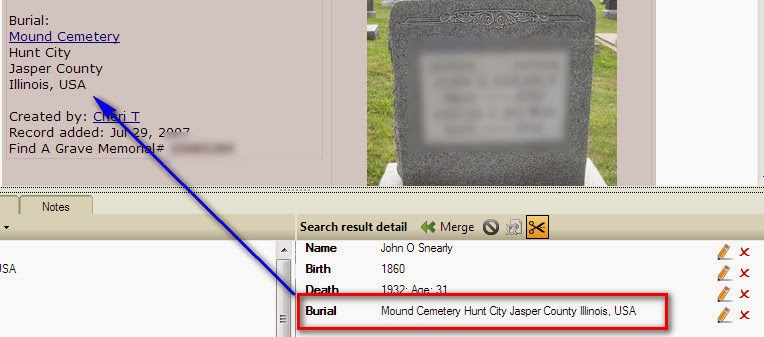
FTM2014 - Web Clipping from Find-A-Grave - Trick

I find the Enable Web Clipping feature very helpful when working with a memorial on the Find-A-Grave website. However, the formatting of Location (Place Name) Information causes a problem when the merge is complete and the Place Name is not in the right format.

For Example:

Mound Cemetery Hunt City Jasper County Illinois, USA

There are no commas in that string of characters. The comma is used by Family Tree Maker to separate the Cemetery Name, from the City, from the County, and from the State. In the above example there is only one comma.

Also, Family Tree Maker does not use the term "County" in the place name. What Family Tree Maker is looking for is:

Mound Cemetery, Hunt City, Jasper, Illinois, USA

I have found it much easier to resolve this problem BEFORE the Web Merge is complete.

I have selected the Cemetery Name and location and the Web Clipping feature "asked" where do I want to put this hilighted information. Burial Fact, Place field.


It does that exactly the way it is on the Find-A-Grave website.


But, it will be wrong after the merge.

In the lower right corner of the Web Merge screen is a Pencil (Edit) ICON. Clicking that will open up a window where that information can be edited.


A simple adding of the appropriate commas (between the Cemetery Name, the City, the County name, and the State, AND removing the Word County will result in the proper format following the Web Merge.


_______________________________________________________________
Copyright © 2013 by H R Worthington

Wednesday, November 20, 2013

Oh no - An "Index" causing a problem (???)

I have been working on this project on Crowd Sourcing and ran across some conflicting information. I thought I would share how I was able to resolve the problem.

I followed two Shaky Leaf hints from Ancestry.com. One was to the Index on Ancestry.com to the Find-A-Grave website. The other was from Illinois, Deaths and Stillbirths Index, 1916-1947 also from a hint from Ancestry. Both hints were from within FTM2014. Oh great, two off-site hints for Indexes. I have been told many times not to use indexes. Well, that is true, but I record them as Citations in my file, That does NOT mean I would write a proof statement based on those indexes. I like to keep some bread crumbs that lead me to some additional information.

So, I had one of the indexes and found the 2nd one.

Hunt Cemetery, Crooked Creek, Jasper, Illinois, USA (the top entry) and
Hunt Cemetery, Rose Hill, Jasper, Illinois, USA (the 3rd entry)


I created a ToDo / Task to resolve this problem.

Looking at the Citations, I found the Crooked Creek entry in the Illinois, Deaths and Stillbirths Index, 1916-1947 and the Ross Hill on Find-A-Grave.

The Find-A-Grave page didn't have any address, so I could not do much in Google Maps for that. So I turned to the Places Workspace, and brought up the Person View there for the person.


Not even close. Now what?

Looking a little closer, Bing Maps (used within FTM2014), picked up Crooked Creek and didn't pay attention to the County Name I was providing (Jasper) and took me directly to that upper arrow, near the lake.

Looking at the Ariel View didn't help either because it's farm land. My guy as a farmer and were many of his family.

Remember INDEXES. Lets look at the real item.

Here is the Index from Ancestry.com (1)


It's my guy AND it have the Family History Library Film Number: (I picked up his mother's surname from that index. Didn't have that before)

From within FTM2014, I went to Family Search.org because that Illinois source was a film at Family Search. (Hope there is an image)

This is all within FTM2014, Websearch Workspace, but I have added Family Search as one of my Favorite search spaces.

I do this, so that I can see my data in the lower Left, and the record in the upper right. Same Information. So the Index was right, but NO Images. So, I can't actually see the document. I could order it, or see if a local Family History Center has that film, OR I could look for another solution. (2)


A little closer look:


What about the Find-A-Grave (3) record that I found earlier, before I knew I had a conflict?

The images aren't as important as the fact there there IS an image of the headstone. Is that the answer to this conflict? After all, it's written "in stone". Unfortunately, I have seen too many stones with bad information, but there is still something not right.


Still have Rose Hill and Crooked Creek. Same Cemetery Name. The Find-A-Grave website, Ancestry.com and FamilySearch.org weren't helping. Looking closer at Find-A-Grave starting at the county level, I found TWO cemeteries.

Hunt Cemetery
Rose Hill
Jasper County
Illinois
USA
8 654
Hunt-Cummins Cemetery
See: Hunt Cemetery

Rose Hill
Jasper County
Illinois

Actually, only one, but two names.

So far, everything up to now was within the Web Search Workspace. It's a powerful place to research from, but ......

Doing a Google search is how I found out about what the Bing Map had done, putting me in the wrong place, and I wasn't finding the cemetery, for sure, in the search results. UNTIL I found this website:


The above was down to Jasper County, and I went to Page 2, for the "H" for Hunt Cemetery.

Something was 'amiss' with this cemetery name, once I figured out the mapping problem..

Scrolling down this Genealogy Trails website I found the answer.


Not only that, but I had been looking earlier in the day for Boss Chapman. From with FTM2014, is some of the names I have and there is Boss Chapman. Right place and dates, so at this point right families. (will get back to that later).


Scrolling down further I found my person.


If you were to compare the two lists, you will see a number of the same people. The other people on this website are probably not entered into my database, because I am trying to stay with Direct Lines. The names I saw were from Census Records.

Bottom line here. It's the SAME Cemetery, with at least three names. I was able to re-create these steps because I HAD cited my "index" sources. The answer wasn't in the index, but I was able to resolve the conflicting information because I did.


(1) "Illinois, Deaths and Stillbirths Index, 1916-1947", Ancestry.com (www.ancestry.com), FHL File NUmber: 1819835; accessed 17 Nov 2013. Record for Willis Collins.

(2) "Illinois Deaths and Stillbirths, 1916-1947," index, FamilySearch (https://familysearch.org/pal:/MM9.1.1/N3PP-8VH : accessed 20 Nov 2013), Willis Collins, 17 Jul 1939..

(3) Ernie Chapman, "Find-A-Grave", database, Find-A-Grave (www.findagrave.com) Willis Collins (1858 - 1939) - Find A Grave Memorial# 36242319; 17 Nov 2013.
_______________________________________________________________
Copyright © 2013 by H R Worthington

Monday, November 18, 2013

FTM2014 - Thought about Shaky Leaves - Status

Another update for Randy's Crowd Sourcing project that I have been working on. FTM2014 - Thought about Shaky Leaves - Status

This project had turned into a great study for a presentation that I have done several times in the past and am scheduled to give in in 2014. I great opportunity to sharpen my (limited) skills and to update the presentation at the same time. 

I started with CrowdSourcing Opportunity: When and Where did John Louis Powell Die? 

I created a file based on the 5 items, in Red, in his blog and wanted to determine if I could find the answer to his question. Very quickly, the CrowdSourcing team (his readers) found the answer. I always remind myself, that not everything in online. And that was certainly the case on that question.

But I had started my normal research pattern to try to construct the "family" based on that data, looking at Census Records and the use of the Find-A-Grave website. I have blogged about that recently.

But, here is an update: probably the last, because I have pretty well accomplished what I wanted to do and have found some great examples for my presentation.

First an updated view of the Ancestry Member Tree Hints:


The tree has grown to 269 people and have 58 of them with hints (Shaky Leaf).

I am not planning on following all of those hints. If this were my file, still to many.

But, what does FTM2014 tell me about this file.


The same 269 people, 97 Marriages, 7 Generations and 74 Surnames.

How did I get there?

I have looked at over 150 records. Some have been reports from FTM2014, like timelines for people, The Map feature (not counted in the 150 records). But, I have found 29 US Federal Census Records to help fill out these family units and 65 Find-A-Grave Memorial Pages. The two records have complimented each other about 98% of the time. Those names, dates, places, and relationships have been found in other sets of "records".

It has worked both ways. Finding a Census Record helped with locating a Find-A-Grave Memorial and the Find-A-Grave Memorials helped locate Census Records.

As you can see, I have used 57 SOURCES, all are using the Template Feature of FTM2014. The pay off for that was a Genealogy Report that I handed off to Randy, with very clean (for me) set of EndNotes. What would have taken 10 - 12 pages in the past was 3 or 4 pages. Mostly due to the way FTM2014 handles the EndNotes.

Along the way, it was obvious that a couple of the Contributors to Find-A-Grave were related to the person on the Memorial Page. I think that I have identified 3 "cousins" for Randy's friend John, if he is interested in making those contacts.

What is not on this list above, is that I have 202 items on my ToDo List. Things like Find-A-Grave memorials that are there, but I have chosen not to follow up with them right now. Mostly they are NOT direct Line people.

One of my earlier blog posts was about being distracted. I have worked very hard at not doing that. One reason for those ToDo lists for Find-A-Grave. BUT, I am and will work a little more on the Direct Line Hints. I have 41 Direct Line People, direct from John, and I have identified 27 hints to follow on those 41 people.

Bottom Line here, for me, I think the file is relatively clean, about 6 of the 119 Place Names are "on the map", using the Place Name Authority in FTM2014, all 57 Sources are using Templates, and I have NO facts without at least one Citation.

What the 113 Citations doesn't mention, is how many FACTs are linked to those Citations.

Also picked up 141 media files, such as Census Images, Headstone Images (can not see them Online as they are marked Private in FTM2014 to avoid copyright issues), several obituaries, Research Logs on every one, with notes on all Residence Facts (who what in the household in that Census year, but head of household), and data from the Find-A-Grave website.

A big Thank you to Randy Seaver for the challenge !!!


_______________________________________________________________
Copyright © 2013 by H R Worthington

Friday, November 15, 2013

FTM2014 - Thought about Shaky Leaves - Status

You may remember that I have been working on a project, based on Randy Seavers
CrowdSourcing Opportunity: When and Where did John Louis Powell Die? Blog post

I then posted FTM2014 - Thought about Shaky Leaves and FTM2014 - Thought about Shaky Leaves - Follow up

Since I started this project, I wanted to help find that answer to Randy's question. The simple answer is that "It's NOT All Online". But, since I started, I really wanted to see what I would find if I started just capturing the "low hanging fruit" from Ancestry.com and the Shaky Leaves.

I thought that I would submit a process report:


My small file has grown a bit. One Shaky Leaf led to another, and pretty quickly there was an Index hint to a Find-A-Grave memorial page. I have had a Find-A-Grave presentation that I have used for a while, and have two more chances in 2014 to do it again. So, I decided to see what Find-A-Grave could do for this project. The growth in people, came from Find-A-Grave. But, so has the number of Hints to follow. I will get back to them in a couple of days.

Of the 206 people in the database, I have 66 Death Dates, and only 15 people that I haven't found (yet) on Find-A-Grave.

The good news is that of all of the FACTs in this file, the Undocumented Fact reports that I have there are NO facts without documentation. All of my Research Notes for each person is up to date, but my ToDo List is up to 94 items, and growing.

But the really cool thing about this is that through Find-A-Grave, I would be able to contact 2 living contributors to this family for Randy, if his friend wanted to do this. These two people submitted or are maintaining 38 Find-A-Grave memorials. Watching what was on the Memorial and some of the comments, two obituaries on the memorial page led to these two living people.

I did take a break and found two more generations of people in the Direct Line for John. The Ancestry Member Tree is private, but Randy has access to it if he wishes to view it.

Now back to research and updating of my presentation. Thanks Randy !!!!
 

_______________________________________________________________
Copyright © 2013 by H R Worthington

Print Friendly