Showing posts with label Web_Merge. Show all posts

Wednesday, November 27, 2019

And a Citation to the rescue !!!

And a Citation to the rescue !!!
In Family Tree Maker, when you do a Web Merge (probably the Real Reason, I rely on that feature. When you do that, you get a Web Address for the Record. But there is also a "View Source Online"


I went to one of the Fact, so that I could click on the Globe on the Right, to look at the Record, from the Sources Workspace. JAW Dropped, not globe, no link.


I then went to the Source Workspace to see what was going one. There was a link in the Citation just above I was looking at and there was a Link, so I clicked on it. Something is wrong. It looked like I have not merged every one.
But, half of the family was on one of the citations and the other have on the 2nd one. Then I looked at the Citation.
Sheet 14A Lines 38 - 40 and Sheet 14B, Lines 41 - 43.
HeadSlap: The family was on two pages, so I was NOT missing a link after all.
Since what we see on the Record from Ancestry, it's one Link, and I use the Head of Household for ALL census record, Copy/Paste the Link in the 2nd Citation.

Citation to the Rescue

1940 U.S. census, population schedule, Delaware, New Castle County, Delaware City,S.D. No. 1, E.D. No. 243, Sheet No. 14B, lines 41 - 43, 312 Fifth Street, House Visited No. 35, Fouracre, R. Roger household; NARA microfilm publication T627, roll 546; digital image, Ancestry (https://ancestry.com : accessed 11 November 2017).
___________________________________________________________
Copyright © 2019 by Cousin Russ

Friday, May 4, 2018

User Question: FTM2017 starting to add 100's of Facts


Here is a Family Tree Maker User Question:

FTM 2017 has started a new fact for 100's of facts that normally would have gone into a regular Fact item. I use Ancestry online to make changes and sync to FTM 2017. Now in FTM 2017 I have all these new fact categories. I don't how or why it is doing it and don't know how to fix them.
Sorry, the question is too vague but I will take a stab at a response. Beware, I will probably have some views along the way.

What I am guessing the question is about, is the types of FACTs that Ancestry will add when a Merge of a record, from Ancestry, OFFERS to the owner of that Ancestry Member Tree (AMT). When a merge is started, the user is offered what Facts to keep, ignore, or accepted as Alternate Facts.

What I don't understand it "facts that would have going into a regular Fact item. A FACT is a FACT. Don't know what a "regular fact" is nor do I know what "new fact categories" means. Above that, how to fix "it".

Various Records from Ancestry offer many different Facts, based on that Record. In other words, these records provide us with INFORMATION about the Profile (person) to help us determine that persons story. If Regular Facts means Birth, Death, and Marriage Facts, then a Social Security Death Index Record might add Facts like "Last Residence", Last Benefit", "Social Security Number".

One of the advantages of doing the Merging of Records in FTM2017 is that you are the "big" picture, all of the Facts, that you have collected so far, before you do the merge, and during the merge you see some of them. That is on the Lower Left Panel of the Web Merge Screen, and in the Lower Right Panel is the FACTS (Information) that is contained in the Record.

Like the merge done online, you have the option to chose which Facts are or are not going to be included in that Merge.

Here is what the Web Merge looks like in the AMT


The information on the Left is from the Record and the information in my database (AMT) is on the Right. In this example, I only have the person's NAME (fact) and some relationships. This was taken from an AMT Hint. The word NEW in the left panel and right panel, is suggesting that I can ADD those FACTS to this profile. AND I have choices.

Sorry, I just can't guess what the real question is, only guessing what it might be.

Finally, IF I were do to this merge in the AMT, then did a FamilySync with FTM2017, those "new"facts would be added to my FTM2017 database.

_______________________________________________________________
Copyright © 2018 by H R Worthington

Wednesday, December 27, 2017

Doing a Web Merge from a Find A Grave Index Hint

My process for following a Hint from the Find A Grave Index collection from Ancestry


_______________________________________________________________
Copyright © 2017 by H R Worthington

Thursday, December 21, 2017

Observation when doing a Web Merge on an SSDI Record

Just some observations when doing a Web Merge, with FTM2017, with a Social Security Death Index (SSDI) Record. Specifically the Death Location fact, creating / using a Last Residence Fact, a State Issued Fact, and the use of the SSN.


_______________________________________________________________
Copyright © 2017 by H R Worthington

Saturday, August 26, 2017

Observations about the new Ancestry API

An observation about the communications between Ancestry.com and FTM2017.

I have been using the Web Merge feature of Family Tree Maker for years. It has worked very well. The biggest reason is that I don't have to re-type, then proof read the information from the record on Ancestry. As I have blogged about before, this feature puts a link in the Citation, right back to that record. I don't have to go looking for it. 

I further use the Web Merge feature for all websites, using the Web Clipper feature, then Web Merge.

Because I don't have to re-type and proof read what is in the record, I have more time to really look at the record and see what the Record claims, and make sure that is recorded in my FTM2017 file.

I record exactly what the record claims, right, wrong or indifferent, so I have a "messy" database, that is Facts for a person. Then I can Evaluate the information on a specific person's list of Facts and determine which is my current conclusion, or as I call it, "Current Thinking". It's important to know that all records have errors in them, but it's up to me to evaluate what I have.

I was working with a 1900 U.S. Federal Census Record where my grandfather was who I was looking for. I found him, as expected, when and where he should have been. Yes, I knew that from the past, but I wanted to see what the new interface to Ancestry was doing in FTM2017.

As I understand the process, when I follow a Hint, from FTM2017, I am taken to the Web Search Workspace, look at the Hints provided there, and select one of them. In this case, the 1900 US Federal Census for a township in New Jersey. When I select that record, I have the information from my database on the Lower Left field and the information from the Record in the Lower Right field. I then compare them to make sure that the record is for my person.


Elizabeth Willits is the person in my database. She married twice, once to a Worthington, and then a Leeds. I know that and that is why the Record would be for Eliz W Leeds. It's my evaluation of the same person. I will record her name, per the record as Eliz W Leeds, as an Alternate Name and the Web Merge feature will do that for me and it will include a Citation on that Fact.

I won't go into all of the Facts in this record, because it has worked very well in the past. I did the Web Merge and as usual did my normal clean up. That is putting the Source into the appropriate Source Template, then reviewing all of the claims from that record and making sure that the Facts are entered correctly, and cited. I also add to my research log.

In the above screen, I know you may not be able to read it, but below is the lower right corner, or the information from Ancestry.


You may note "Ethnicity: American" in that record. Hmm. That information is NOT a field in the Census Record.


There is NO Ethnicity field on that record. This website has more information about this specific Census Record. http://www.ancestry.com/wiki/index.php?title=1900_U.S._Census.

The Record didn't have that question, why is Ancestry presenting this to us. It has NOT been there in the past, as I have done this many times in the past, for this specific census year. This is not the first "problem" that I saw, but it should have been the first problem that I saw, because there hasn't been an issue here in the past.

In the Abstract for this Census Record, which I look at before I do the merge, that "Fact" is not presented in that abstract.


When I looked at the abstract, I didn't see it coming in the Web Merge. So after the Web Merge, I saw that Fact in my database and went back to the abstract (above) and that fact isn't there. Looking at the image, that information isn't in the Record.

Have you looked at an Ancestry Census record recently, especially the abstract?

I ask that question because of what I found later.

The family, was a Grandmother, her Daughter, two Grandson's, and a Granddaughter in the household. The Grandchildren were siblings from one of her Son's. The Daughter in question, never married, nor did she have any children.

Here is HER abstract.


I was OK, until I god down to the "Mother's Name" for one of the Grandsons. Wow, that's cool, a Census Record providing the Name of the Mother ?? Not in any census record that I have looked at, has the NAME of the mother been on that record. But, that abstract from Ancestry clearly has a name in a field that does NOT exist in the Census Record.

When did you ever see the Mother's name on a Census Record ?

One of the features of the 1900 Census is the number of Children a female had and how many were still living.


Eliz W Leeds had 5 children, 3 still living, which was correct, and Sarah was single, and therefore no information in those two columns. BUT Ancestry has abstracted the children below (three of them) as being Sarah's children.

As it turns out, that is the Daughter of the Head of Household, Sarah, but the mother of the children (grandchildren of the Head of Household) was a Sarah C(K)atherine Reeve Worthington. The problem there is that she had died 6 years earlier. The father had died 3 years earlier, which is why the grandchildren were living with Elizabeth Willits Worthington Leeds in 1900.

One other issue: Users can make "edits" on Ancestry, when they thing the record is wrong. Here is an example, from this SAME 1900 Census Record:

This is what was on the abstract:

The NAME on the Census was Sarah Worthington. Someone assumed is should have been Sarah Leeds, or Iuah Worthington. There was not error on the Census, only the users edit.

I that past, those User Edits were NOT presented in the Web Merge Feature. Look again.


They were presented as "Also Known As" in the Web Merge. I don't want the "user edits" my database. I want what the record claims. I'll do the evaluation. Sarah Worthington is the correct name, in my database as well as the 1900 Census.

This is not the first time that I have seen information in the Web Merge being brought into the database that wasn't in the record, but had not realized the scope of the problem. That is, how much information is being merged that really should not have been merged. Stepping back and doing some analysis is where I determined that Ancestry is putting information into their abstract that is not even in the record.

Some / many will say "that is why I don't use the Web Merge feature". I am sorry, I make to many typo's to want to key in the data. I want EXACTLY what the record claims. I'll do the evaluation. Also, this had not been happening before the new Ancestry API to FTM2017.

I have confirmed that this is not unique to Family Tree Maker.

I have reported this as a Bug to Family Tree Maker, but I think some of this is issues from Ancestry on the new API that has been developed. Other genealogy database management programs may have similar issues. Note, I an NOT talking about Citations. That is a different topic.

_______________________________________________________________
Copyright © 2017 by H R Worthington

Tuesday, June 28, 2016

FTM2014 - Starting a New Tree from Scratch

This is a re-recording of my last post that had no sound. It is also long.

This Blob Post is how I started a New Family File, so there may be some more information and work that is done in a new file.

This file is being created to see if I can find enough information to create a 5 or 6 generation book in celebration for a farm's 100th anniversary in Long Valley, New Jersey. So, I thought I would record some portions of how I proceed with this project.


_______________________________________________________________
Copyright © 2016 by H R Worthington

Friday, May 6, 2016

FTM2014 - Clean Up after 1910 Census Record Merge

After any Web Merge, I have clean up work to do. I have a number of blogs about this in the past, but thought I would talk about it again, but this time in a video.


_______________________________________________________________
Copyright © 2016 by H R Worthington

Thursday, May 5, 2016

FTM2014 - Why I do my Merging of Records in FTM2014 / FTM-3

There are a number or reasons why I do ALL of my merging of data, mostly from Shaky Leaf Hints, into Family Tree Maker from my PC.

  • Easier control of WHAT data is included in the Merge and how each Fact is handled
  • Easier to Add Facts from data in the record, what is not included in the merge
  • Easier to add Citations to the manually entered Facts
  • Two links directly back to the original Record on Ancestry
  • A copy of the image, when the record includes an image


_______________________________________________________________
Copyright © 2016 by H R Worthington

Monday, May 2, 2016

FTM2014 - Web Merge from the Find A Grave website

How I handle the Web Merge feature from the Find A Grave website.


_______________________________________________________________
Copyright © 2016 by H R Worthington

Thursday, September 26, 2013

FTM2014 - Web Search / Web Merge and the 1850 US Census

Warning: This is a long post, due to the steps required to accomplish the task.

The 1850 US Census was the first census where the names of the members of the household were mentioned along with their ages. Later Census records include the relationship between the members of the Household and the Head of Household. Family Tree Maker understands relationships. Web Merges, where the relationships are known, can be done with one Web Merge. 

This blog post will describe the steps required to merge one census record to each member of the Household.

Here is the Household that should appear in the 1850 Federal Census in Pennsylvania.

Family of a husband, wife, and 9 Children. The source for this family is a family member, several generations later.


 When I do a Web Search, I generally try to search for the Head of Household, which I did in this case. Going from the People Workspace, Tree View over to the Web Search Workspace, I found a hint.

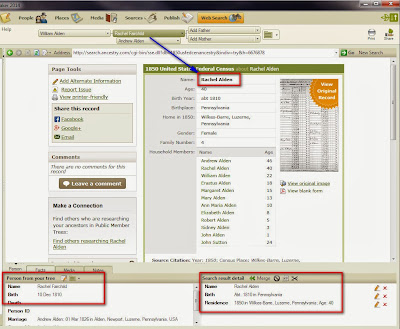
When the hint is selected, the information from that record appears in the lower right corner of the screen. The information about the person in your Family File, is on the Left.
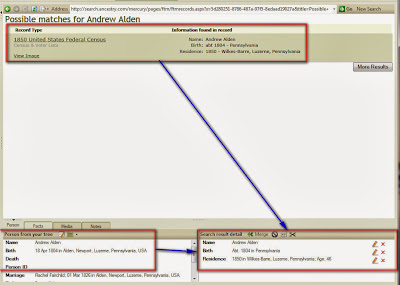
 

Looks like a match for name and dates, go I clicked on View Record in the lower left corner of near the top of the screen, and see the details of the hint.

Looking at the record, there 11 people, (right number) but a couple of differences in the names.
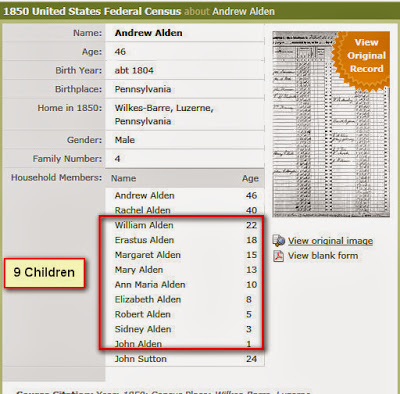
 

Looking at the record, the transcription looks the same as the image. There is a John Sutton listed above, and he is listed below as a minor. Right for the area, so it appears that he is not a family member. 
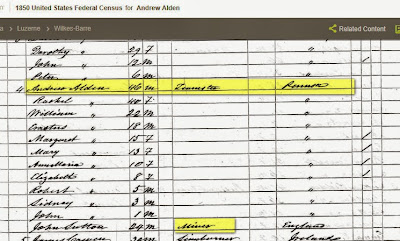
 

The line numbers, page numbers, are records and will be needed for the Citation, so I just print the above image, using the Print Friendly option and put that information on that sheet of paper.   
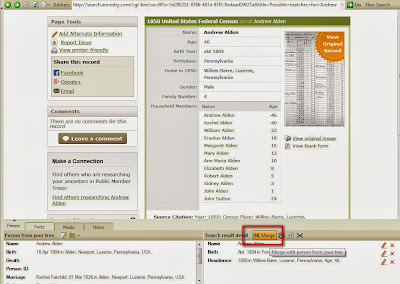
 

This is my person and his family. So, I click on the Merge ICON as seen above. Again, Website information on the Right, information from my file on the left.

The next screen will show and offer choices at to what information on that Census that we want in our file.

Notice that there is ONLY ONE Person on that screen.
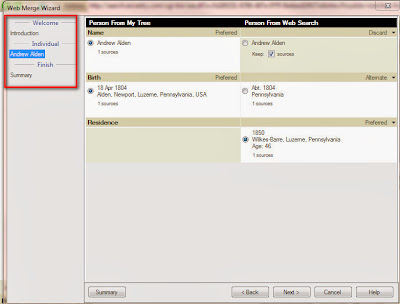


The choices of what is going to be merged are shown above. As earlier, the file information is on the Left, The information from the Web is on the Right.

We can choose to make which of any duplicate Fact to be Preferred, added as an Alternate Fact, or do Discard the information provided in the record.  

Since only one person can be merged at this point we are taken to the final Review of this merge, including the Citation any image or media file and the ability to do some editing here. I choose to Edit the Citation and information in the Media Workspace in the workspace and not at the merge level.
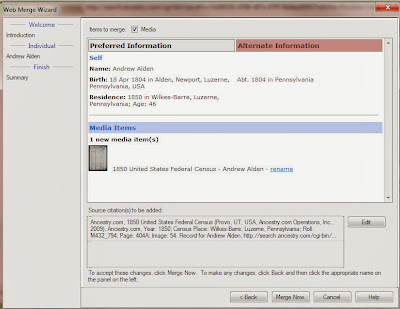
 

With Merge Now selected, the merge will start.

The merge ICON selected the merge begins. The Merge Progress bar will appear, but when it is done, it will remain on the screen, where it is then closed, but you do NOT change screens.
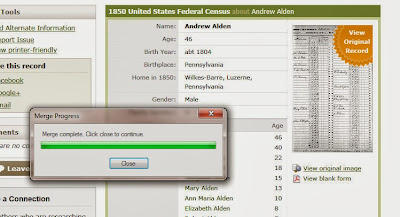
 

That progress window will close and you can now select the Next Person in that record, if there is another person. In this case, I selected the Wife, in two places. In the Mini-Nav bar at the top of the screen, and select the wife in the Web Search windowl 
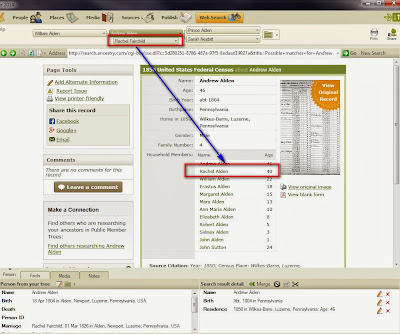
 

You will notice that the results at the bottom of the page will change. Both the information in the Lower Left window, which is the information from your Database and in the Lower Right the information from the record. Again, compare the two "people" to make sure they are correct.


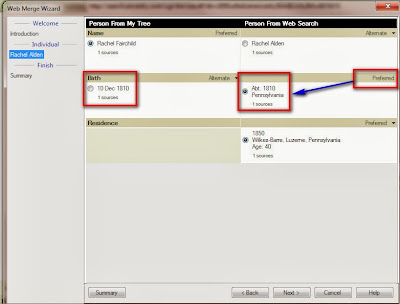
The usual Merge screen will appear. In the case below, the left column, my information has the specific Date of Birth, while the Census Record has a less accurate or vague date but it has the location, which my database didn't have. In this case, I want MY information to be the Alternate birth date, so I select or click into the right column by clicking into the circle to the left of the date. The pull down menu on the far right can be chosen to make the right column as preferred. 
 

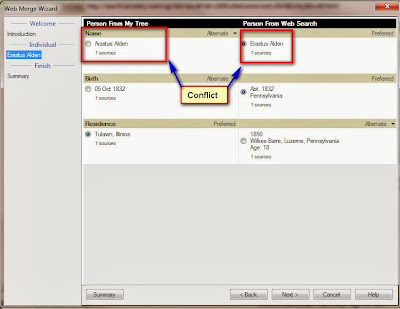
I merged several of the children when I came across this next child. Looking at the Name fact, the Left has the first name of Arastas, while the Census Record had Erastus. That could be a conflict, the other data is correct. Will have to resolve that conflict later. In this case, I will merge these two people, or I could NOT merge them and cancel out of this merge.


That merge is complete and I am working through the children, I selected the pull down menu, to the left of the Father's name and the list of Children appears. That is where I select the 'next' child. 
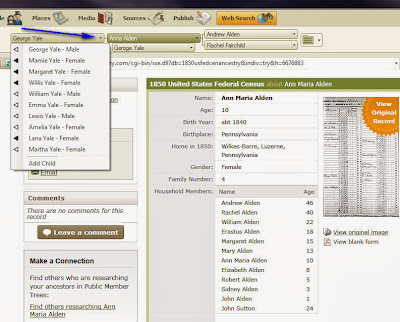
 

The whole process is repeated through the head of household, his wife, and 9 children. So I did 11 Merges without leaving this page. Whole household is done.

I do have a choice as to what to do with John Sutton, who was in the household. I could bring him into my database as an unrelated person, I chose not to in this case.

One might expect that since I did 11 merges, with Images, that there would be 11 media files for this 1850 Census Record.

Going to the Media Workspace, I only find ONE. 
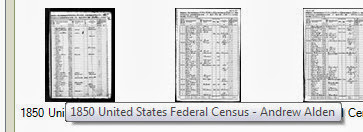
 

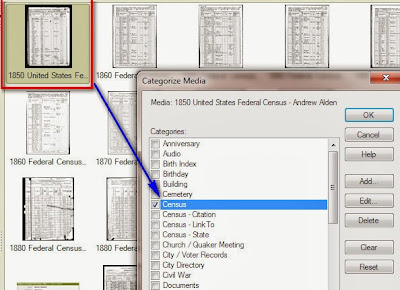
I categorize my media files, so I right click on the image and select the Census Category, which I had added. 
 

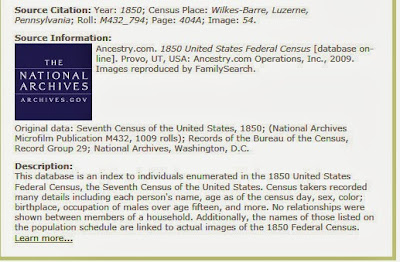
One of the things that I have done, is to return to the Web Search Workspace, and Copy the Source Citation information that is from Ancestry. I put my cursor at the start of "Source" and drag the cursor down to just above the Learn More Link. I will Paste that information into the Citation Notes tab. 
 

Media Workspace is done, now to look at the Sources Workspace. I pull up the list of Sources, but don't find this new Source. The Template Source name will be 1850 U.S. Census, state, county. a Web Merge Source name will be 1850 United States  Federal Census. It's not listed.
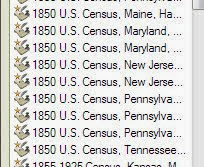
 

Since I have seen this before, hoped that it had been fixed, I went to the persons name fact, looked at what the Citation had in the People Workspace, Person Tab, and the Source read Pennsylvania, Chester County. I went to the 1850 U.S. Census, Pennsylvania, Chester source, and in the center panel was my Luzerne County Citations, all 11 of them. 
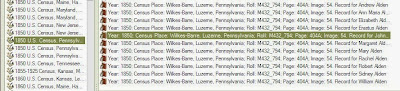
 
I didn't have an 1850 U.S. census source, so I need to create one. Clicked on New, this Add Source window appears, select Population Schedule, the Census range of years, and the Year and Location format. Its important to select the correct schedule. I have chosen to use the Year and Location option. This allows each census Source to be by State.


The Source Template screen is completed,
The Add template Citation window will appear (not shown here). I am just going to Click OK. I already have this screen complete in that other Source screen.

The new Source Template has been created.


The next step is to Move that out of place Citation to this new Source. Right clicking on the first Luzerne County citation, I selected Replace Source Citation. This is, changing the Source Template of Chester County to the Source Template of Luzerne county.


Selecting the Replace Source Citation will bring up this window. I selected the list to be by Source Title, scrolled down to Luzerne County.


A prompt asking if you are sure you want to change the Citation.


Now the Citation is in the right Source. In the Source Comment field, as has been shown in earlier Census Records is the format of the information that needs to be in the Citation Details. I copy that from the Source Comments and paste that into the Citation Details field.


For this case, that information is:

 [ civil division ]; Page __; dwelling number _; family number _; Lines __ - __; [ person of interest ] household; accessed:

I edit that with the information from the Source and would read:

Wilkes-Barre; Lines 17 - 28; Andrew Alden household; accessed: 26 Sep 2013

Now to check on the Media Tab. The media tab is empty, BUT the Media file is in the program. So Link to Existing Media 


The Find Media Item window is open and I selected the correct Media file.


Returned to the Chester County listing and selected the first person from Luzerne County, and in the Pull down window on the Right Selected Luzerne County. Repeating this process 11 times.


Moved all of the mis-placed Citations to the correct Source, selected. It's in the Media Workspace, just now to this new source, but this is still not right, for me. There are 11 Citations, I want one. There are other users who want a Citation for each person, so no change needs to be made at this point. I mentioned earlier that I wanted a Household Citation. So, more work to do. 


Right click on the 2nd entry, I replace it with the 1st entry on the screen above and am given a pop up window.


Yes, replace the old one (second entry) with the new one or first entry.

Repeated that 9 more times and the Source screen looks like this. Citation Details in the upper right, and the Ref Note in the bottom right, a link to all 44 Facts from that Source are in the lower left.


Returning to the People Workspace, Tree View, all of the Birth entries for the children are updated. I only had specific birthdates, but wanted to show, as the preferred Birth Fact, the Abt year of birth, but more important for the birth location to be on the screen as preferred for me.


I still had the issue of Robert vs Sylvester Alden to deal with. I looked at the Source of that name, found it was a Family Group Sheet that I had received. Although the collection of Family Group Sheets appear to be correct, I would trust the Census Record over the FGS that I got this name from. I change the preferred name to Sylvester Alden


Looking that the new Preferred Name, the 2nd column as the #1. That means that there is One Media File linked to that Citation. The New Image is at the right end of that Citation.


My next step is to Document that make up of that Residence or household listing, and put them into the Citation Notes field. I do that by going back to the Web Search Workspace, hi-lite in the household, selecting from the word Name next to the Head of Household's name, down to the age of the last person in the household and Pasting that into the Residence Fact Notes for each person in the Household.

This way I can look at a person's residence fact notes and see who what in the same household for that Census Year.

Yes, it took a while to do all of these steps, but I end up with the information I want about this household and a Citation for the household.

1850 U.S. census, population schedule, Pennsylvania, Luzerne County, Wilkes-Barre; Lines 17 - 28; Andrew Alden household; accessed: 26 Sep 2013; NARA microfilm publication M432, roll 794; digital image, Ancestry.com (http://www.ancestry.com).

_______________________________________________________________

Copyright © 2013 by H R Worthington
Posted by Picasa

Thursday, May 3, 2012

Why Use the Web Merge Feature ?

One feature that has become more important to me, is the Web Merge feature. I have talked about clean up that I might do afterward, but the driving force, and benefit to me, to use this feature is the "View Online" link that is available on the Citation Screen.

For my example, I will do a Web Merge with a link, from Ancestry.com that goes to a Find-A-Grave memorial page. The link is in the Right Hand Panel, of the Sources Workspace, with a specific Citation in the Center Panel.


Clicking on that link will take me directly to the Ancestry.com web page where the information came from.

Lesson Learned: This link has become very valuable to me, while doing the clean up of my Citations, My goal, is to have those links on as many Citations as possible.
________________________________________________________________ Copyright © 2012 by H R Worthington

Print Friendly