Friday, July 24, 2009

Source Citation Template - Group 7 - Local and State Records - Registration, Rolls, and Vital Records

Continuing with the discussion on the use of the Source Citation Templates started

Source Citation Template - Source Group


This series of Blog posts will expand each of the Groups and show the various Categories that will appear on the Category menu. The list of Categories to select from. Each of these categories are referred to in Evidence Explained by Elizabeth Shown Mills

Group 7: Local and State Records—Registrations, Rolls, and Vital Records

Category: Local Records
QuickCheck Model: Pages 421 - 428

Category: State-Level Records
QuickCheck Model: Pages 429 - 432

Source Citation Template - Group 6 - Local and State Records - Court and Governance

Continuing with the discussion on the use of the Source Citation Templates started

Source Citation Template - Source Group


This series of Blog posts will expand each of the Groups and show the various Categories that will appear on the Category menu. The list of Categories to select from. Each of these categories are referred to in Evidence Explained by Elizabeth Shown Mills

Group 6: Local and State Records—Courts and Governance

Category: Original Records
QuickCheck Model: Pages 373 - 377

Category: Image Copies
QuickCheck Model: Pages 378 - 381

Category: Derivatives
QuickCheck Model: Pages 382

Source Citation Template - Group 5 - Church Records

Continuing with the discussion on the use of the Source Citation Templates started

Source Citation Template - Source Group


This series of Blog posts will expand each of the Groups and show the various Categories that will appear on the Category menu. The list of Categories to select from. Each of these categories are referred to in Evidence Explained by Elizabeth Shown Mills

Group 5: Church Records

Category: Church Books
QuickCheck Model: Pages 311 - 313

Category: Image Copies
QuickCheck Model: Pages 314 - 317

Category: Derivatives
QuickCheck Model: Pages 318 - 320

Source Citation Template - Group 4 - Census Records

Continuing with the discussion on the use of the Source Citation Templates started

Source Citation Template - Source Group


This series of Blog posts will expand each of the Groups and show the various Categories that will appear on the Category menu. The list of Categories to select from. Each of these categories are referred to in Evidence Explained by Elizabeth Shown Mills

Group 4: Census Records

Category: Original Manuscripts
QuickCheck Model: Pages 237 - 238

Category: Digital Images
QuickCheck Model: Pages 239 - 243

Category: Microfilm
QuickCheck Model: Pages 243 - 252

Category: Derivatives
QuickCheck Model: Pages 253 - 256

Source Citation Template - Group 1 - Archives and Artifacts

Continuing with the discussion on the use of the Source Citation Templates started

Source Citation Template - Source Group

The next series of Blog posts will expand each of the Groups and show the various Categories that will appear on the Category menu:


Figure 195

Figure 195 shows the list of Categories to select from. Each of these categories are referred to in Evidence Explained by Elizabeth Shown Mills


Group 1: Archives and Artifacts


Category: Archived Material
QuickCheck Model: Pages 93 - 102


Category: Preservation Film
QuickCheck Model: Pages 103 - 104


Category: Private Holdings
QuickCheck Model: Pages 105 - 115

Source Citation Template - Group 3 - Cemetery Records

Continuing with the discussion on the use of the Source Citation Templates started

Source Citation Template - Source Group


This series of Blog posts will expand each of the Groups and show the various Categories that will appear on the Category menu. The list of Categories to select from. Each of these categories are referred to in Evidence Explained by Elizabeth Shown Mills


Group 3: Cemetery Records

Category: Cemetery Office Records
QuickCheck Model: Pages 209 - 212

Category: Grave Markers
QuickCheck Model: Pages 213 - 215

Category: Memorial Plaques
QuickCheck Model: Pages 216

Category: Derivatives
QuickCheck Model: Pages 217 - 219

Source Citation Template - Source Group

In an effort to learn the Source-Citation Templates the many Template Screens were reviewed to help select the best Template for a specific Source that was on hand. An Earlier Blog entry

Source-Citation Template - County Marriage Index

was created. Thinking the others might be interested in a little more information about these templates, over time, other blog entries will be created to help select the correct Template quicker.

This is only ONE WAY to select the appropriate template, but this series will be to walk through that various screens involved.

As you will see, the terms being use with the Family Tree Maker resemble that of Evidence Explained by Elizabeth Shown Mills

To access the Source-Citation Template, go to the People Work Space, selecting the Person Tab, the appropriate FACT is selected. For this example, the Name FACT is used. In Figure 183, below we select New (1)
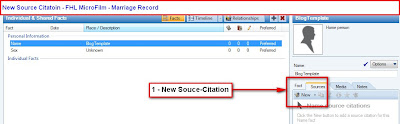


Figure 183

Select New, and a Add Source Citations screen, where New is selected.


Figure 184


The New, Add Source screen, has a new line (the top line), if you have been a user of Family Tree Maker. It is the Select Source Template line. For this blog, we will Manually select the template. In the future, other options for selecting the Template will be shown.

On the Right end of the Select Template line, is the More button. (2).
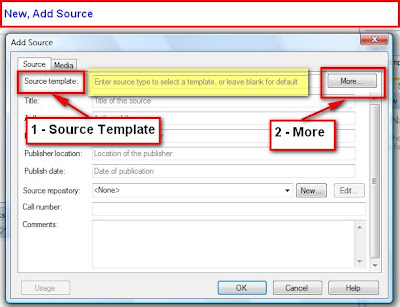


Figure 185

A list of Source Groups are shown.


Figure 194


It is not necessary to have Evidence Explained, but it is helpful. For those with this book, each of these groups, seen about will be listed below with the Chapter and Page Number for each of these Groups.

Group 1: Archives and Artifacts
Evidence Explained: Chapter 3, Page 91

Group 2: Business and Institutional Records
Evidence Explained: Chapter 4, Page 159

Group 3: Cemetery Records
Evidence Explained: Chapter 5, Page 207

Group 4: Census Records
Evidence Explained: Chapter 6, Page 235

Group 5: Church Records
Evidence Explained: Chapter 7, Page 309

Group 6: Local and State Records—Courts and Governance
Evidence Explained: Chapter 8, Page 371

Group 7: Local and State Records—Registrations, Rolls, and Vital Records
Evidence Explained: Chapter 9, Page 419

Group 8: Local and State Records—Property and Probate
Evidence Explained: Chapter 10, Page 487

Group 9: National Government Records
Evidence Explained: Chapter 11, Page 537

Group 10: Publications—Books, CDs, Maps, Leaflets, and Videos
Evidence Explained: Chapter 12, Page 643

Group 11: Publications—Legal Works and Government Documents
Evidence Explained: Chapter 13, Page 725

Group 12: Publications—Periodicals, Broadcasts, and Web Miscellanea
Evidence Explained: Chapter 14, Page 777

Wednesday, July 22, 2009

Source-Citation Template - County Marriage Index

In an effort to help understand the use of the Version 2009 Source-Citation Templates, this blog will attempt to help with it's use, by using specific examples provided by other users.

Here is what was provided:

We found some information on a Microfilm that was ordered from Salt Lake City and was reviewed ar the local Family History. The roll number is 1854080.

This was a microfilm of Muscatine Co. Iowa Marriage Index and Records

The information on the film where the data for my ancestor was found on Project # 07000 Roll 23; Book 2; Page 228.

The original material was housed with Muscatine County Iowa Clerk of the District Court.

In the People Work Space, selecting the Person Tab, the appropriate FACT is selected. For this example, the Name FACT is used. In Figure 183, below we select New (1)


Figure 183

Select New, and a Add Source Citations screen, where New is selected.


Figure 184


The New, Add Source screen, has a new line (the top line), if you have been a user of Family Tree Maker. It is the Select Source Template line. For this blog, we will Manually select the template. In the future, other options for selecting the Template will be shown.

On the Right end of the Select Template line, is the More button. (2).


Figure 185

A list of Source Groups are shown. In this example we have "a microfilm of Muscatine Co. Iowa Marriage Index and Records". It looks like "Local and State Records - Registrations, Rolls, and Vital Records" would be appropriate. Hi--light (1) that entry.

On the Category line, is a pull down menu(2). The Choice Selections are Local or State-Level Records. As this is a County Records, Local Record was selected.


Figure 186

The Template Selection also has a pull down menu, once the Category has been selected.

Vital Records Register is what is chosen in this example.


Figure 187

Below is our Selections for review, before clicking on OK. Notice the Registers Name Value information to help verify that you have made the correct selection for the item you are about to Cite.


Figure 188

Clicking on OK, will bring up the Add Source Screen, with fields that are required to complete the Citation. The Source Citation Template field is filled in.

The State is needed in the State or Country field. Iowa was entered.

The County is called for, Muscatine County was entered

As you are in each field, you will notice a hint below that field. See the Record Series entry below. Muscatine Co. Iowa Marriage Index and Records was entered.


Figure 190

The next entry is the Repository. Where is that Microfilm located, if it is needed again. Clicking on New will bring up an Add Repository window. Since this was found at the local Family History Library, that is entered in the Name, and the Street Address, City, State, ZIP, phone number on Email address information is filled in.


Figure 191

Clicking OK will go back to the Add Source screen, where the Roll Number is entered.


Figure 192

Clicking OK from this screen, will bring up the Add Source Citation screen. Again, notice the hint bubble that will appear as you are entering information into a field. Here more details, for the specific entry is entered. Project # 07000 Roll 23; Book 2; Page 228.


Figure 192

Clicking OK will return to the People Workspace, Person screen.

The complete Source-Citation of the above will look like this, on the Family Group Sheet for this individual.


Friday, July 17, 2009

Marriage Notes, Version 16 to Version 2009

Where did my Marriage Notes go when I moved from Family Tree Maker Version 16 to Version 2009?

Marriage notes in Version 16 (and earlier) could be found on the Marriage Line, with the Date and Location. There are three ICONS that are there.


Figure 178


When the the Edit Marriage window opens, click on Notes, and the marriage notes will appear.


Figure 179

With Version 2009, there are two ways to see the Marriage Notes. First from the People work space, and the Family View, with one of the spouses selected.

Figure 180


In the Right Hand (RH) Panel, the 3rd ICON is the Notes for that individual. In this example, there are a number of Individual Notes, but scroll down to the bottom of that screen and you will see the Relationship, and the Relationship with entry and the Marriage Notes are listed there.


Figure 181

You can also see the Marriage Notes, from the People workspace, Person tab, and on that screen, select the Relationship tab. Go down to the relationship you want to see. In the RH Panel, select Notes. The marriage notes are there.


Figure 182

This tree is on an Ancestry Tree.

Saturday, July 11, 2009

Print Friendly