Wednesday, April 9, 2014

FTM2014 + Public Member Trees = Collaboration

It must be the approaching spring weather but I seem to be treading in waters of controversy these days.

I have been blogging about how to cite my sources, when the Source is an Undocumented Ancestry or Public Member Tree,

Until this point I have stayed away from Using information from them, but have looked at them for research hints. But, if you looked in my FTM2014 family file, you wouldn't find a trace that I had looked at any Ancestry Member Tree (AMT).

A while ago, The Barefoot Genealogist Crista Cowan, had one of her weekly videos that I was watching and for some reason she had "MY" family on her screen. That isn't the first time that has happened to me. After all, that's how I found out that I was related to +DearMYRTLE . I have blogged about some of this in the past.

This time, I want to share how I NOW use information in an AMT. I got the idea from a day long presentation at an Ancestry Day in Philadelphia a couple of weeks ago. +Crista Cowan made a comment about how others are helping her with her research. How? By telling her she had some errors in her tree. Hmmm, hadn't though about that before. But what was my first reaction when I saw MY family on her screen? I got back to work on that branch of my family, as we descend from two brothers. I spent a number of hours working on "cleaning up my act", so that IF I were to share my tree with her, SHE would not find any errors.

After listening to her at the Ancestry Day, I re-thought what I COULD do. What if I put MY Tree Online and got Crista Cowan to do MY research. The word of wisdom that I picked up from +DearMYRTLE , in the Google+ DearMyrtle Genealogy Community, Collaboration came to mind. Why not Collaborate with the owner of this "undocumented" Ancestry Member Tree, share with the information that I have with her, and maybe I can pick up some information from her. After all, she is descended from a different brother. Oh, did I mention that I only have information from a couple of Family Group Sheets? So, which is worse? Actually, I have some information in my file that Crista doesn't have.

NOTE: the ONLY information that I gather from an Ancestry Member Tree (AMT) are the Facts. Only the Facts AND I cite them, as I have recently blogged about. But, look at what I see on the AMT:


There is information that I do NOT have in my file, Richard Ridgeway's father, Robert, and when and where he was born and died.

I wanted to Thank Crista for this new information. I did so in the Comments:


So, WHY would I want information from an UNDOCUMENTED AMT? Those Relationships are MY Relationships. But, I have two children that she doesn't have.


I'll trade you one Great Grandfather for 3 more siblings, including mine. Good deal, right ?

In my Research Notes I entered that I had found the AMT that belongs to Crista.


I also posted some  information that I have in my file, into the Comments for her person:


I have a page of information in the Person Notes already, so I just copied and pasted that into the Profile Comments for this person.

IF there had been any documentation in her tree, I would want to Find those records myself. I would create a Task for that person, such as this.


That is from my To Do List, but if that AMT had a source, I would make that a To Do list to locate it, so I could look at the record myself. That is not a trust issue for me but more about I want to see that record myself. I may be looking for additional information, or look at the record differently.

As I mentioned, I have copied and pasted some information that I have for her. She can do with that whatever she wants. I am not concerned if she even sees what I posted, but it's there if she wants it. In fact, I did put two pieces of sources in the comments. I don't want to update her tree, even if I was allowed, but it's there for her.

So, yes, I am using information in an Undocumented Public Member Tree. For me, the fact that she has many relationships in that AMT that are like mine, why not share the resources? Collaboration should make BOTH of our family trees better. No, I didn't say perfect, just better.

Bottom Line: I may share this branch of my file, Online and Public. I also sent an invitation to my "new" cousin to my public tree.

_______________________________________________________________
Copyright © 2014 by H R Worthington

FTM2014 and Ancestry Member Trees - New Process for Citations

What a great learning experience about How to Cite Public Member Trees.

It started with my first attempt at selecting the "right" Family Tree Maker Template

FTM2014 and Ancestry Member Trees


I shared that in the Evidence Explained Forum (links in the next blog post). I hadn't selected the right Template and was referred to the QuickSheets, also created by Elizabeth Shown Mills


The response to the posting in the Evidence Explained Forum brought forward the finer points of a Citation.

FTM2014 and Ancestry Member Trees - What Next


This is ALL GOOD. What an honor to have Elizabeth Shown Mills help this user of Family Tree Maker understand the art of a citation.

Also, I have seen several colleagues follow suit, using their genealogy programs to show their followers that same process. 

+Shannon Thomas, a Legacy Family Tree has a blog post:


and my friend +Randy Seaver did a blog post for Roots Magic


Reality Check:

Clearly, I have the most "clean up" work in the area of a Citation using the Template feature. That is what I am going to discuss here.

I selected the Online Database, National Archives (United States) as the Template, as it provided the information that was needed for the Source information in the Reference Note. Details of that are in the Update blog post.

Since I may use other Public Member Trees (Ancestry Member Trees) in the future, I don't want to have to Remember what goes where and what I have to change. I have put those notes into the Source Template COMMENTs.

Here is the Edit Template Screen:


That is the large (I enlarged it here) box at the bottom of the Template Screen.

This is the part of the Comment that reminds me what goes into the Citation Detail field
Citation Detail:
"[ Tree Name ]" family tree by [ tree name owner ] profile for [ name, (  [birth information - death information ] undocumented / documented data
This defines the Tree Name that is put into quotes; the text family tree by followed by the tree name owner; the text profile for and the information for the profile that I am looking for, with any information on that profile that will help identify which profile I am looking at. That is followed by either the data is documented or not. The brackets remind me to enter that data from the Profile.

The next step, because the Reference Note information is filled in by the Template and the Citation detail, that needs to be edited next. 

From the Template Comments
Reference Note:
Change The National Archives to Ancestry.com
Put  the "accessed" date inside of the parenthesis (http://www.ancestry.com) with a ":" so that it looks like  (http://www.ancestry.com : accessed  ## Month YYYY) 
This reminds me to change The National Archives from the hidden part of the Template to Ancestry.com and I am reminded to carefully Edit the URL piece of the Reference Note. Adding a space after .com and adding a colon and the date. I use 09 April 2014. That date format is a change for me, based on the Evidence Explained conversation.

The next step is the information that goes into the Citation Text field.
Citation text
Tree owner contact information
Ancestry Member Tree of [ name ] if ancestry.com email is used or email address
Copy the updted Reference Note into this field in case the Reference Note has to be Reset
Copy profile URL into the Web Address
No check marks in Citation text or Web Address
Couple of points here. I want the contact information here. Remembering that Ancestry.com has an internal email system I could put the tree owners, ancestry user name or I can spell out the name of the tree owner. That is what I have done here, because I know the tree owner. I did NOT include the email address in these screen captures, for obvious reasons, but it's in my file. I want the Citation Text to have the information needed to contact the tree owner.

That information and the direct link to the profile page is in the Web Address field but I do not want them in the Reference Note. The Evidence Explained documents so not call for the full URL. The Web Site, ancestry.com is sufficient.

The final note in the Comments:
If the public tree has documentation enter that into the Research Log and create a task to locate that source information
That reminds me that IF the tree has documentation, I want to locate that information myself. I am NOT going to copy or download it from the Ancestry Member Tree. I want to look at it myself. So, I create a Research Log identifying any Source Information in detail, and create a ToDo list for that person to locate that source material.

The Reference note now looks like this:
"Public Member Tree", database, Ancestry.com (http://www.ancestry.com : 04 April 2014); "Cowan Mulliner Woodruff Kerr" family tree by Crista Cowan, profile for Richard Ridgway (b. 1679, Bucks, Pennsylvania - d. 1718, d. Burlington, New Jersey, USA) undocumented data

I'll do another blog post in more detail on the information that I gather from an Ancestry Member Tree.
 _______________________________________________________________
Copyright © 2014 by H R Worthington

Monday, April 7, 2014

FTM2014 and Ancestry Member Trees - What Next

After a delightful chat with The Editor of Evidence Explained forum  I thought I would post an update and my next steps:

This discussion has to do with a Proper Citation for information added into FTM2014, using the Template Feature. I have posted two earlier blog posts on this;

FTM2014 and Ancestry Member Trees


FTM2014 and Ancestry Member Trees - an Update


The first blog post I had selected the totally incorrect Template. I was thinking about how the data looked like in a Family Group Sheet, and the web page looked to me like a Family Group Sheet.

The discussion with The Editor pointed me to the QuickSheet for Citing Ancestry.com® Databases & Images: which I have right next to Evidence Explained: Citing History Resources from Artifacts to Cyberspace (this link is to the electronic edition)

The format should be:
1. “Public Member Trees,” database, Ancestry.com (http://www.ancestry.com : accessed 4 April 2014), “Cowan Mulliner Woodruff Kerr” family tree by Crista Cowan, profile for Richard Ridgway (1679-1718, d. Bucks, New Jersey) undocumented data updated March 2014.
The closest I could get to this was:
"Public Member Tree", database, Ancestry.com (http://www.ancestry.com), accessed 05 Apr 2014; "Cowan Mulliner Woodruff Kerr" family tree by Crista Cowan, profile for Robert Ridgeway (b. 24 Aug 1631 Devon, England - d. in Devon England) undocumented data updated March 2014
Close, but not so much; There are a couple of issues that are different.
"Public Member Tree", database, Ancestry.com (http://www.ancestry.com), accessed 05 Apr 2014; "Cowan Mulliner Woodruff Kerr" family tree by Crista Cowan, profile for Robert Ridgeway (b. 24 Aug 1631 Devon, England - d. in Devon England) undocumented data updated March 2014
Ancestry.com (http://www.ancestry.com), accessed 05 Apr 2014;

There are two things about this piece of the Reference Note:

  1. I have to remember to change "The National Archives " which comes from within FTM2014 where I cna not control what it says. I have to change that to Ancestry.com
  2. The second is that the "accessed" date should be within the parenthesis of the Website: (http://www.ancestry.com : accessed 4 April 2014) which means that I have to manually edit that piece of the Reference Note. 
The problem here is, that the Source Template, for the Public Member Tree can't be edited to include the date that will be used in the Reference Note. Here is what I had in the Citation Detail screen.
accessed 04 Apr 2014; "Cowan Mulliner Woodruff Kerr" family tree by Crista Cowan, profile for Robert Ridgeway (b. 24 Aug 1631 Devon, England - d. in Devon England) undocumented data updated March 2014
All of the information is there and it can be edited but IF I have to use the Reset for the Reference Note, I have to Edit it again.

I am putting the follow note in the Source Template Comment Field:
Change The National Archives to Ancestry.com
Cut the "accessed" date inside of the parenthesis (http://www.ancestry.com) with a ":" so that it looks like  (http://www.ancestry.com : accessed 4 April 2014) 
Then I will copy the correct Reference Note into the Citation Notes field, so that it can be returned to what it should be, before the Reset option was used.

The likelyhood of getting the Template feature to do this, is slim to none. Its a minor technical detail, but it's based on THE Standard.

This is my new "standard" work around for this type of a Source and it's citation. Each citation using this template will be handled this way. I have submitted, on the Feedback forum, to add a New Template to handle The Public Member tree issue. That is, to use the same Template, but to have one where The National Archives is changed to Ancestry.com.

_______________________________________________________________
Copyright © 2014 by H R Worthington

Saturday, April 5, 2014

FTM2014 and Ancestry Member Trees - an Update

I did a blog post on Ancestry Member Trees.

As mentioned in the Comments, I forwarded the blog post to the Evidence Explained user Forum for comments. It was clear to me, that I had selected the wrong Template. I had also forgotten to look at a resource I have on my desk, QuickSheet: Citing Ancestry.com® Databases & Images also by Elizabeth Shown Mills. On the 3rd page, the third and fourth items on the QuickSheet, was the format that I am to use.

Two things caught my eye on the Quick Sheet. First the term "Public Member Trees" and, looking at the data elements I had seen that format before.

As I have shown here in the past, I took that example apart to determine what comes from the Source Template and what I need to provide in the Citation Detail. When I do that, the Template needs to provide the "name" of the database, where did it come from and the URL.

That is when I discovered my first error. I used the term Ancestry Member Tree. For me, that was an FTM2014 'term' and not what we suggested on the Quick Sheet. So, I went back to that image I had provided in the earlier Blog post. and sure enough, "Public Member Tree" is the correct title of the tree.


That can be fixed easily. What I then had to do, is to find a template that would allow me to have Quotation Marks around the "right" database title, the word "database" the Company Name, and it's URL. The year of the database as well. I have worked with such a template so I used the Keyword of DAT. 

As before, I was in the Sources Workspace and since this will be a NEW Source I clicked on Add, the New (screen not seen), which brings up the screen to enter a Keyword. What I remember working on before were records from the National Archives Records Administration (NARA) database. 


That Template is asking me the right questions.


The only thing I won't enter, because Public Member Trees are dynamic, meaning that the user's created the information and the online profile that does NOT have a date, I am leaving the "year" field blank.


I click OK and now have a New Source. But, what about the one I did earlier? Do I have to re-do that? Answer, NO. I just need to replace the old with the new SOURCE.

Here is the old source and citation.


In the upper right, just to the left of the Green Plus sign, is a downward pointing arrow where I select this new one.


All of the data, citation information, from the "old" Source will be brought into the new Source Template.

There were two things to be cleaned up. The Citation Detail had this information in it.
Profile of Richard Ridgway (1679-1718), Ancestry Member Tree; accessed 04 Apr 2014.
That is not very helpful, as there are a number of Richard Ridgway's in that tree as well as mine. It needs to be filled more completely with some quotations around the tree name. I changed it to this:
accessed 04 Apr 2014; "Cowan Mulliner Woodruff Kerr" family tree by Crista Cowan, profile for Richard Ridgway (b. 1679, Bucks, Pennsylvania - d. 1718, d. Burlington, New Jersey) undocumented data updated March 2014 
A far clearer description. Also, when I went back to that online tree, none of the Facts in that tree had any documentation, but I do know that the owner had last updated "the tree" within the last month. The profile doesn't tell me IF Richard was updated, but by the Citation, I can tell that the owner has been active, based on the Owner's profile in my earlier post.

There is ONE issue to be handled carefully. Thise is what the Reference Note now says, remembering that the Reference Note is a combination of the information from the Source Template, some information that we enter, and some generated from within FTM2014, information from the Citation Detail, and Citation Text.
"Public Member Tree", database, The National Archives (http://www.ancestry.com), accessed 04 Apr 2014; "Cowan Mulliner Woodruff Kerr" family tree by Crista Cowan, profile for Richard Ridgway (b. 1679, Bucks, Pennsylvania - d. 1718, d. Burlington, New Jersey) undocumented data updated March 2014.
The National Archives comes from the Template, so we don't have control over that. The URL comes from the field we complete any time the Reference Note is Reset The National Archives information will need to be changed to Ancestry.com.
"Public Member Tree", database, Ancestry.com(http://www.ancestry.com), accessed 04 Apr 2014; "Cowan Mulliner Woodruff Kerr" family tree by Crista Cowan, profile for Richard Ridgway (b. 1679, Bucks, Pennsylvania - d. 1718, d. Burlington, New Jersey) undocumented data updated March 2014.
So now the Citation Screen looks like this:


Looking at the QuickSheet and the feedback from the Evidence Explained user Forum, I think this is a little closer to what the Reference Note should look like.

I will share the blog post to the forum for another review.

_______________________________________________________________
Copyright © 2014 by H R Worthington

Friday, April 4, 2014

FTM2014 and Ancestry Member Trees

One of my readers asked me a question and thought I would do a blog post about this topic, as I suspect other followers may have the same question.

How to Cite information from an Ancestry Member Tree (AMT)?

As a general rule, for myself, I don't spend a lot of time on AMT's, mostly from bad experiences early on. I found information in these trees that made no sense and has no documentation. I have about 8,000 Hints to follow that do NOT include any AMT hints, as I have them turned off. I have enough hints waiting for me already.

Since I was asked the question, I turned on the Hints to see what might be there. Far too many to follow, but I did see one that was of interest to me.

Here are two AMT's that might be of interest:


That first tree is clearly marked as Unsourced. From my earlier experience with on line trees, not just on Ancestry but anywhere, I will not look at those trees. What I am looking for in AMT's is for places or repositories where I should be looking, IF I am running into a brick wall. I don't what to, nor will I, take the information in that tree and put it into mine. BUT there are two things I will do on that 2nd tree. That is what this blog post will be about. What Sources did they use that I haven't looked at yet, AND, perhaps make some electronic connection with that person to help collaborate in our research.

What I see is a Public Member Tree, with 6 attached records and 6 sources. Lippincott and Tuckerton, Ocean County are 'mine', meaning right place, right time, right name. Now, I don't know the name Throckmorton, nor Shepherd, nor the middle names of Norris or Arnold but since the tree is Public, I can go look.

I click on the link to that tree and see:


There are two things that I am looking for. The Contact Person and the confirmation that this person has 6 sources, with the information / facts, with source information. It's worth my time to look a little further.

The names on the right still aren't in my tree. In my tree, in a little earlier time were Lippincotts and Ridgway in the same area of New Jersey. I wonder if this tree has any Ridgway's with the Lippencotts?

So, I want to see if Richard Ridgway is in this SAME tree.


As I have learned with Ancestry, start to type and don't type too fast and watch the results start to appear. I got as far as RIDG and there were three Richards in this same tree. This tree certainly is indicating that we might have a connection.

But now, who Owns this AMT?

I hover over the Owner's ID and see this:


This is a link where I can send her a note, if I want to, and make contact. Of interest to me, is that this tree was last worked on "last month". Meaning recent for me. Some one who is active with their research.

That other tree, when I looked, the owner hadn't been on the tree for a couple of years and without any sources.

This tree is owned by Crista Cowan. I did a blog post about my connection with Crista back in September 2013:

FTM2014 - Ancestry Member Tree Connection - Part 1

 What I want to do is actually two things. 1) compare what I have with what is in Crista's AMT, 2) and cite what information from her tree and put some information into my tree, in FTM2014. I will NOT copy what she has, but can CITE any Facts from her tree into mine.  I can then share with her what I have from my research.


I see that Richard was born 27 February 1679/80 in Bucks County, Pennsylvania. There is a Hint right there, with the "double date". That is a topic for another time and I have talked about that in the past. The hint to me, is that the Month that I might have MAY BE different from what Crista has.

Richard's wife is a Willetts. That's good. Richard is the father and Elizabeth the mother.

Here is what I have in my FTM2014 file:


There is that birth month issue, but the Birth DATE is correct and the Birth Year is one of the two years in the AMT. BUT, I don't have information on WHERE he was born. The parents of Richard are the same, except my spelling is Willits and I also have Jr as a suffix for Richard.

Now, Crista doesn't have any citation in her AMT. My tree isn't too much better, because the course of my information is from a Family Group Sheet.


The creator of this Family Group Sheet is a cousin where his family and mother spent years researching this family line. So, the information is credible, but neither is completely accurate. No way to draw a conclusion on the family based on either tree. It's a matter, at this point of gathering information.

Now, what am I going to do here? I want to Document this new information and Cite these new facts into my tree.

In FTM2014, I go to the Sources Workspace, click on Add, select New, which brings up the screen where I enter the Keyword "fam" and select Family Chart of Family Group Sheet


Why did I select Family Group Sheet instead of something Online?


To me, there is nothing in that list that clearly defines what I am looking for. To me, what I am seeing is an online version of a Family Group Sheet with the same type of information that is in the Family Group Sheet information that I have in my file already.

Here is the Source Template that I created for the information that I will include in my database.


Remember, this is the Source Template. I did put the URL to the page here in the Comments. That is more for me and it won't be seen anywhere else. I will have in the CITATION that this information was found online.

I did a screen capture of Richard Ridgeway's profile page so that I could see it in my file. I will mark it as PRIVATE so that it won't be posted online. It's for my information.

When I clicked OK from the earlier screen, I was taken to the Citation Screen, so I clicked on the Media Tab, so that I could Attach a New Media File.


That took me to the screen where I selected that Screen Capture and that image is now in the Media Folder on my computer in the Family Group Sheet Category that I created.


Now for the Citation;

I entered into the Citation Detail:
Profile of Richard Ridgway (1679-1718), Ancestry Member Tree; accessed 04 Apr 2014

That will be included in the Reference Note. I used the Citation text as a reminder to me that this came form an Ancestry Member Tree and I pasted the URL into the Web Address field. The globe ICON to the right of that line will take me directly to that Profile. I have de-selected the Citation Text and the Web address from showing in the Reference Note field, which will become the Citation / End Notes.

Crista Cowan, Cowan Mulliner Woodruff Kerr; Crista Cowan, Utah, 2014.  Profile of Richard Ridgway (1679-1718), Ancestry Member Tree; accessed 04 Apr 2014.

Is the Reference note.

From there, I then will add the Facts that I will take from that Profile. The other names, dates, places (Facts) that are in  the profile and put them into my tree, with that AMT as the Source of the information.

Remember the Double Date issue that I mentioned, I entered 27  Feb 1680 into the Date field. Having run into this issue before, I entered the 2nd date, which brought up a warning at the top of the page and also the ICON on the right. Clicking on that warning ICON opened the Double Date screen, where I choose to use the double date format. This does two things. The first of which is to record in my file when EXACTLY I was in the AMT, and serves as a reminder that I may have conflicting information in my database.


I proceed with the location / place.


There are two things here to point out. The Place Name, as recorded in the AMT is not in the Place Name Authority, meaning that it may be a Historical Place Name. I covered how to handle the Historical Place Name issue in that earlier blog post. I also made this new Birth Fact is Preferred. This is a more complete Birth Fact, or one might say a conclusion. It's not a conclusion for me, but a working hypothesis of when and where Richard was born.

Two conflicts remain, birth date information and birth location information.

I put them into my Task List for Richard.


I continue to document this Profile in my FTM2014 file. I will make contact with Crista, using the internal Ancestry.com email system, to 1) Thank her for the information in her AMT, and 2) to let her know that I have a connection to her AMT. If you look at the comments from the September Blog post, we have already made that connection.

Again, the purpose of this blog post, is to illustrate how I use and document a find from an Ancestry Member Tree (AMT)
_______________________________________________________________
Copyright © 2014 by H R Worthington

Thursday, April 3, 2014

FTM2014 - The RAGU Challenge another view

The RAGU Challenge

Oh, we have a Challenge from my cousin DearMYRTLE. Please read about it in her blog.
April 2014 Edition
We also have a Video on what this contest is all about.
Click on this image to view the video
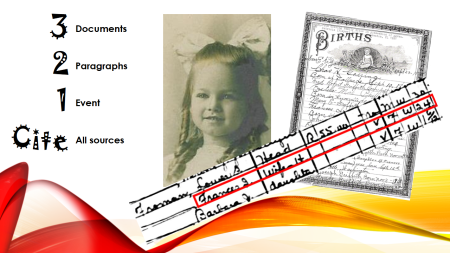
The RAGU Challenge321

The above is an introduction to DearMYRTLE's April 2014 3-2-1 Cite Genealogy Contest. That and her early challenge about being bigger than your genealogy program got me thinking. Here is a link to my response to that challenge;

FTM2014 - Response to 'You are bigger than your genealogy program'


I want to see if FTM2014 is up to this newest challenge. This also gets to some responses that I have received about FTM2014. How can I use FTM2014 to meet the Genealogical Proof Standard? Working with the Mastering Genealogical Proof Study Group #2 hosted by DearMYRTLE, I have just discovered a feature in FTM2014 that has been in the program since FTM2008. What, 5 versions later I am just finding a feature? Yup, it's been there for that long. It's a hidden feature, at least for me.

Here is a hint about this feature.


That "star" is hiding the feature. I do know why it was hidden to me, because when it came out many, many versions ago, we just rated the source on a 5 "star" rating, which didn't mean anything for me.

Taking off from The RAGU Challenge blog post I did using Evidentia, I want to do the same thing in Family Tree Maker. I will click on that Star and see:


That Quality score is what I remembered, but what is this other box?


Wow. That looks like the same kinds of questions that Evidentia has and what the Genealogical Proof Standard talks about and what I get from reading the Evidence Explained website and Facebook Page hosted by Elizabeth Shown Mills, not to mention the Mastering Genealogical Proof by Dr. Thomas W. Jones. It's been hiding in plain sight all this time.

Let's see how this works.

The first question is about the Source. Is it an Original or a Derivative? The hints to what that means is on the right.


This first source is a Family Group Sheet which I think is a Derivative. That is the same at Evidentia 
.


Was the document clear? I have not attached the image of the Family Group Sheet as it contains information on living people on it.

The Fact we are evaluating is the Birth Fact where the Information was taken from that Family Group Sheet.


The person who created the Family Group Sheet was the daughter of the person being researched, so this would be Secondary Information. She wasn't there when he was born.

The information in the Family Group Sheet answered the question about when this person was born and where.


Here is what was in the report from Evidentia
The Joanna’s Family Group Sheet[1] asserts that Birth Date is 19 Jun 1914.
The source reviewed was an Authored work, introducing the risk of errors in interpretation. The information is believed to be Secondary (meaning the person providing the information received that information second hand, from another person or work). The evidence supporting the claim is considered Direct (meaning it adequate to answer the question directly).

Joanna Hart Yunninger is the daughter of Williams James Hart and recorded his birth date to be 19 Jun 1914
The Joanna’s Family Group Sheet[1] asserts that Birth Location was West Grove, Chester County, Pennsylvania.
The source reviewed was an Authored work, introducing the risk of errors in interpretation. The information is believed to be Secondary. The evidence supporting the claim is considered Direct.
Joanna Hart Yunninger is the daughter of Williams James Hart and recorded his birth place to be West Grove, Chester County, Pennsylvania

End Notes

1. Joanna Hart Yuninger, Family Group Sheets, Hart Collection; Joanna Hart Yuninger, {[Address For Private Use], }[Owner Or Supplier's Location], 2000. Family Group Sheets. Joanna does family research for her father’s family, William James Hart.

Prepared 2 Apr 2014
Why not copy and paste that information from Evidentia into that Justification field.


But did you see what happened to that Star Rating? It's a two star rating. Those stars made no sense to me before, as it would have been only my judgement. Now FTM2014 does that for me, and I think I have followed the evaluation of the information (claims) that was on that Family Group Sheet.

As I have posted before, I record what I see. Here is what I have for the Birth Fact


There are 5 birth facts. That first column of numbers (3, 2, 1, 1, 1) is the number of Citations for that specific information. FTM2014 then has us select the Preferred Fact. I'll not provide the details of each of those 8 citations, but there is some incomplete information, only the birth year, some with no location, etc. But it also has some conflicting information. Was he born in 1914 or 1915? Clearly in Pennsylvania. More specifically West Grove, Chester County, Pennsylvania.

The "abt" dates are from Census Records and a letter I have, the 19 Jun 1915 date is from an Authored Work. 

So, my Evaluation is behind my choice of the Preferred Birth Fact.

I copied and pasted my Genealogical Proof Report, from Evidentia, into the Person Notes as seen here.


This report will be updated as the other 5 source documents were entered The conflicting information would be in the Evidentia file along with an update conclusion stating what I said about my evaluation of all 8 documents.

Going to the Publish Workspace and generating an Individual report we see:


They all have Citations as seen with the superscript numbers.

Here is the Source information that is included in this report:


A portion of person notes show:


This is only an example of how working with both programs can help resolve some complicated issues. This was pretty simple, but using the features of both programs, I think can help document and help get beyond those "brick walls".

I have started to use Evidentia more and more with those situations where I am trying to determine if I am looking at two people or one person, or help resolve conflicting information. Like this case, take that source information and run each one through Evidentia to bring me to a Conclusion.

Finally, all of this information would then be sync'ed into my Ancestry Member Tree.


_______________________________________________________________
Copyright © 2014 by H R Worthington

Wednesday, April 2, 2014

FTM2014 - Response to 'You are bigger than your genealogy program

Dear MYRTLE published an interesting Blog Post

You are bigger than your genealogy program

to which I respond: YES. That is a reason why I share my experience with Family Tree Maker. I want to learn it I don't want to just "fill in the blanks", but want to get this program to work for me.

Like many, I started "just filling in the blanks" but I had learned as I started to "cite my sources". Didn't know why nor how, I just learned very quickly to be able to answer the "where did you get THAT information from". I am so thankful that I did.


Since the Source Templates were introduced to Family Tree Maker in FTM2010, I  have spent a considerable amount of time updating my Source information into the Template Format. The Templates in Family Tree Maker are based on Elizabeth Shown Mills' Evidence Explained: Citing History Sources from Artifacts to Cyberspace  I really didn't like the free formed citations that I had created. Printing a report was not a pretty thing. Using the Template feature changed that drastically. In this case, the program did the hard work, I just had to fill in the Blanks. 


I also have been part of two study groups, in the Dear MYRTLE Genealogy Community on Google+, where I have learned about the Genealogical Proof Standard with the book Mastering Genealogical Proof by Dr. Thomas W. Jones.  Between the time I started to research and now, I have learned much and how important it is to get beyond filling in the stories.


What I am trying to do is "make" Family Tree Maker "work for me".


For example, the blog post I did earlier

FTM2014 and Mastering Genealogical Proof - Chapter 4 Source Citations

I think I had been trying too hard. Using the Template feature and working with Evidence Explained, (the book), the Evidence Explained website and Facebook Page, I learned how to create Citations that are so much better.

As features have been added to Family Tree Maker, I have been able to follow other Genealogy tasks much better. Research Logs, Notes on about everything (bread crumbs), Citations in the Notes field, Citations on Media Files. Now I am able to use the "notes" field to generate the Stories or dialog WITH Citations about the person. I am moving the "research notes", from that field into the Research Notes field.

After all of that, I can generate reports or charts where those Notes aren't seen where the Stories should be. But, I can generate a To Do list, or Research Notes when ever I want.

My point here, is that I had to stop, slow down, redo a lot of work, so that I could get beyond the "fill in the blanks" mode that I started in, and learn (and still trying to learn) the techniques that we should be using, then learn how to use my program to "get the job done".

Hopefully, I have been sharing this effort with you, here.

When the Mastering Genealogical Proof gets a little further, I will have at least two more blog posts about other features in FTM2014 that helps me work beyond "fill in the blanks". But again, I had to work at this, both with the Program AND the other two resources. Not to mention the Conversation with my cousin, DearMYRTLE in the Dear MYRTLE Genealogy Community.
_______________________________________________________________
Copyright © 2014 by H R Worthington

Print Friendly