Showing posts sorted by relevance for query hints. Sort by date Show all posts

Friday, August 29, 2014

Announcement from Ancestry.com about the Ancestry APP


We just re-launched the Ancestry App on version 6.0 for iPhone, iPad and iPod touch devices. This isn’t just a re-launch on a new system, we’ve worked hard to add some solid new features that we think you’ll enjoy.
 
Prioritized Hints View
We’ve added a new section to the application which allows you to view all the hints for a given tree from a single place. We’ve added a prioritized sort order to the hints in this section so that your very best hints automatically bubble up into view. In addition to a priority sort, we’ve made it possible to view hints based on recency, with the newest hints at the top of the list. Near the top of the new hints view you will find sort order controls titled “best” and “latest” which allow you to toggle between these two sort orders to meet your needs. We’ve also included some filtering capabilities for the hints in this section which will allow you to filter hints by the last name of the person the hint is for, or to filter hints by type (photo, story or record). When you see a hint that you’d like to learn more about, simply tap; the details of the hint will come into view and you will be able to accept or ignore the hint from right there.
 
Comments
Every day thousands of photos and stories are added to Ancestry by users of the website and the Ancestry App. When one of these pieces of great content might be associated with a  relative of yours you will get a photo or story hint and you get to share this content and benefit from the work of other Ancestry users. Now you will have the ability to comment on these shared pieces of content directly from the mobile app - just like you can on the website. When viewing a photo or story you will notice a new comment area within the mobile app, here you will see comments from others and be able to leave comments of your own.
 
Comments View 
The new comments section provides a running history of the new comments that have been left on photos and stories I your tree,  making it easy for you to keep up to date on the latest comments. When you see a comment that you would like to see in full context or respond to, silly tap; you will be taken to the photo or story that the comment was made on and be able to review the entire comment thread associated with the content.
 
Badges
You may notice a new red badge with a number in it that shows up on the Ancestry app icon. This lets you know that you have new hints or comments to review. We have also included badges on the icons representing the hint and comment sections which allow you to know exactly where the new content can be found.
 
Notifications
If you have enabled the Ancestry App to send you push notifications you will now be notified when the very best new hints or comments are available. When you are ready to view the new hint or comment, simply tap; the app will open and you will be taken dirtily to the hint or comment.
 
Tree Viewer Enhancements
In addition to family and pedigree views, you can now view your family tree in a list view. From this view you can filter the list of tree persons by name or using a number of useful filters (Direct Ancestors, End of Line, Living Relatives, People with Hints, and People with Recent Hints). We’ve also added a dedicated person search within the pedigree and family views. Tapping on the search icon In the top left corner of the tree viewer will allow you to enter the name of the person you are looking for. When you see the person you are looking for, simply tap; the tree will be refocused on this person and you will be taken directly to his or her profile details.
 
Navigation
We’ve simplified and updated the navigation within app. You will notice prominent tabs along the bottom of the app for Hints, Comments, Tree, DNA, and Settings. Getting around the app will now be quicker and easier than ever. 
 
 
In addition to the major updates highlighted above we have worked on smaller touches within the app that enhance the overall experience. As you use the app in more depth you will likely notice other changes like: quick links to web content, side-by-side comparisons between tree and record data, quick access to profile information from hints and updated colors and styling. We hope that the new version 6.0 app experience will be a good one, and that the Ancestry Mobile App will become an ever more integral part of your Ancestry experience. If you have ideas, thoughts or questions please feel free to submit feedback by tapping on the “Feedback” tab within the Settings section of the app.
 
The Ancestry Mobile Team


Saturday, November 9, 2013

FTM2014 - Thought about Shaky Leaves

Today I want to work on a file, but I want to focus on the records that Ancestry.com has on this file that I have in FTM2014. I want to go and harvest those "low hanging fruit" / hints that we see in both FTM2014 and the linked Ancestry Member Tree (AMT).

I see these shaky leaves in the People Workspace, Tree View.


In this view, there are 4 people with shaky leaves.What it doesn't show is what types of hints are there; how many each has, and who else might have hints. In other words, I want a work list for the task at hand. Of the 47 people in this file, WHO has hints.

What about a list that is in the AMT ?

I go to the Plan Workspace and click on the Link to the associated / linked AMT for this file.


 Clicking on that link in FTM2014 will take me to the AMT. Selecting "Tree Pages" and All Hints, I will see a list of all hints, from the AMT point of view.


This will bring up that list of people with hints.


Of the 47 people in this AMT (FTM2014 file) 29 people have hints. 29 hints from other Ancestry Member Trees, 34 are for Records on Ancestry, for a total of 63 Hints.

This list has the Name in the left column and the number of Hints in the right.

But, how to print that list. Simple, CTRL+P. I now have that ToDo list to work from. Since I printed it, I am going to mark it up. I'll start with the person with the most hints and work from there. BUT, I'll work on this from within FTM2014.

NOTE: Not all hints in the AMT will be in FTM2014. In the Tools, Options Menu, I do NOT show hints from other AMTs. I have them turned off for now.

I am off to look for those 34 Records and do a Web Merge as appropriate.
_______________________________________________________________
Copyright © 2013 by H R Worthington

Tuesday, February 18, 2014

FTM2014 - Managing Shaky Leaves / Hints - ToDo List

I have been trying to determine how to Manage the many Hints that I see in my family files. Those shaky leaves keep growing as I enter new information into my Family File. They can become overwhelming. I thought I would share the way that I am currently managing them.

It my be important to understand how I generally do research. If I am trying to re-create a Family Group or the relationships between people within my file, I generally start with Census Records; then go to Find-A-Grave, as there are dates, and perhaps relationships, and places where these people may have resided. Then I go to Military Records, Obituaries, and Newspaper articles to round out my order of records.

Starting in the People Workspace, Tree View, I see (below) 4 generations back from the Home Person.

When looking at shaky leaves, I want to capture the hints so that I can create a Research Plan for those records. Also, for the most part, I only try to capture those hints in my direct line. I have found that I can become distracted but ALL of the hints that may appear.


I have blurred the names, but this is a direct line from the home person. 4 of the people have the Shaky Leaves, so they are the people that I want to track.

Selecting the top person, in the 3rd generation, I see this:


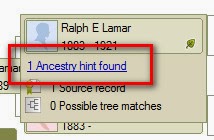
Hovering over the Shaky Leaf, I see that there is 1 Ancestry hint found, on one Source Record. Clicking on that link, I am taken from the People Workspace, Tree View, to the Web Search Workspace.

This happens to be a 1900 United States Federal Census Record. I selected it, NOT to look at the record, but to just compare MY information, in the Lower Left part of the screen, to what Ancestry has, for this person in that Census Record.


A quick glance shows that this is my person. I do NOT go any further I am just trying to develop a research plan.

I copy, by hi-lighting, the Record name and CTRL+C (to copy) that record name, then return to the People Workspace, Person View, where I see this persons Facts.

I select Tasks in the menu bar below the facts, and New, where the New Task window appears.


I then Paste (CTRL+V) that Record into the Description field. I created a Hints Category for this work, so I selected that in the "Edit" menu and leave the Priority to be Medium. and click OK.

So this person has one Task or ToDo item below the Facts.


The Categories help organize the ToDo list in the Plan Workspace for sorting and filtering.

I use High Priority for File Notes, Medium Priority for Person Tasks, and Low Priority for Completed Tasks.


This list can be Sorted by clicking on the Task Description. The above example has a series of Census Records that I want to look at, sorted by Census Year, because I did that Copy / Paste from the Web Search Workspace.

Once I have completed the ToDo / Task List, I will work down from any 1940 US Census Records down to the 1850 Census Records. Then I'll move on to any Find-A-Grave, Military, Newspaper hints as I find them. But will stick to Direct Line Ancestors.

This specific family file has a number of City Directory Hints, which I will probably work on after the Census Records.

There is another reason that I have found that is very helpful. Working with record groups makes using the Source Template feature easier for me. That is, the data entry of Citations for that type of record easier. Once that first record is entered, as a Source Template, then completing the Citation Detail and Citation Text, the next entries become easier.

If I ever run out of hints, I can then look at hints from other people in the tree.

I should point out, that I do all of this within FTM2014. That includes the Web Merging, from those hints, the clean up after that, which I have discussed before, making sure that the Sources are using the Template feature, that I have Fact Notes, captured all of the data I want from the record group, and that the Media files have citations, as described in other posts.
_______________________________________________________________
Copyright © 2014 by H R Worthington

Sunday, October 26, 2014

Following the PA Death Certificate Hints

As you may have seen, I have been working with the Ancestry Shaky Leaf Hints.

For the past several days, I have been working with the relatively new Pennsylvania Death Certificates, 1906-1963 collection. I had already done some research on them, but that was "way back when" you had to write, wait months, and cost money, OR drive to Harrisburg. I had already identified 21 people with Death Certificate Numbers.

The purpose of this blog post, is a summary of my experience with the NEW collection, on Ancestry, that end up in my Ancestry Member Tree as Shaky Leaf Hints. I then compared that with the hints in FTM2014, merged the records in FTM2014 and did all of the follow up work following the merge. That work includes getting the "Source Information" from Ancestry.com, into an Evidence Explained format for Citations, putting a Citation on Each Death Certificate, Entering a Research Log entry for each person that was cited from that record, and created a Death Certificate Fact for follow up later.

I only recorded the Facts from the Merge an will review each Death Certificate in the future. This was just go get the information from Ancestry into my FTM2014 file.

I started with 42 Hints in my Ancestry Member Tree. I was able to merge 32 of them. There are now 10 new items on my ToDo list, for follow up. 75% of the hints were accurate. Of the remaining 10, 7 were hints in the AMT that do not show up in FTM2014. I will be looking into this issue, as I have already reported this to Ancestry.com. There were 3 other hints that I have to look into further, as they weren't a quick fix, quick merge, not quite sure if they are the same people. Bottom line, the hints were good and worth while working with.

The good news, I added 10 more people that were not in my database. Parents of people who I had in my database, not to mention a score of maiden names for people, females in my file. All good. Picked up a couple of middle names along the way.

There is some amazing information in these Death Certificates as I glanced at them along the way, but didn't want to get side tracked in the detail. That is to come.

Everything was updated in my AMT and just checked and have 8 new Hints to follow.


All of the Images in this collection are appropriately Cited, In the right Category, the Filenames are the way I want them and the Image Caption is the way I want them. Research logs on everyone.

Back to the earlier work, I was able to cross reference the Death Certificate Numbers from my manual search with what is now on Ancestry for 5 of the 21, which means I'll be on the look out for 16 more, as they become available on Ancestry. AND I have a ToDo list for each of those 16 people.

I am really liking this working on a specific collection at a time. The time involved doing the many steps that I take is greatly reduced as I don't have to try to remember, how do I do that?

_______________________________________________________________
Copyright © 2014 by H R Worthington

Monday, October 28, 2019

What? No Citations ?

I have a Family Tree Maker file that I had researched 10 to 15 years ago. Many versions of the program ago, but a friend asked me for some information from that file.

I had opened it several times over the years, but was very disheartened to notice that ALL of my Citations were gone. ALL of them. I went to my oldest back up, same deal.

I did have an external drive crash, had recovered it, but still no back up's with Citations.

This is one reason why I recommend "testing" your back ups.

So, what do I do ? I have this very important person asking me questions about folks in this database. I, of course, wanted to be able to say yes or no to questions, but be able to provide Source Information.

After some dialog, mostly that I didn't have answers to the questions, I thought about what I should do, This database has about 1250 profiles, with some good information. Some Dates, some places, many relationships, but no Citations.

I should mention, that this line has some stories that I know about, and have a cousin connection, in my Master File, but that cousin connection also happens to be in THIS FILE. That is one of the reasons that I had looked at this file some time ago. I need to get this file, up to my standards.

Here is my PLAN:

Get this file Online to see IF what I have, will generate HINTS from Ancestry?
7,039 Hints
5,595 RECORD Hints

The data that I have, Names, Dates, Places AND Relationships are doing what they should be doing, Generating Hints.

I totally use these hints for all of my research, that I can Online, to gather enough information to know what I need to look for, and where, when a visit to a repository / archive it required.

I did a couple of Web Merges, to make sure that I would get the expected results, that is GOOD Hints. The one's I have tried, all were accurate, presented no conflicting information (so far). So the theory that the file and linked Ancestry Member Tree would give me good hints.

As I said earlier, I have created my standards for my file (now files). How I do things, manage Filenames, Citations, Place Names (historic and current), Research Log and ToDo Lists.

My first step is to Marks ALL Profiles with a Fact that I will use to show me that this Profile is NOT Documented. I use the Undocumented Fact Report on a routine bases (usually daily). That would be of no use on this file. So, ALL profiles will have this Fact, so when I run the Undocumented Fact Report, I can Filter OUT, all profiles that have this Fact. When all of the Facts for each profile is documented, I can Remove that Fact and run that report again.

While I am Adding that Fact to each profile, I am looking at the profile, mostly for Place Names. This file is so old, that we did NOT have a Resolve Place Name utility, so place names were not in the proper format. So while I am looking at the Profile, I will resolve those Place Names that I am able to (quickly). For example, I had 341 Unresolved Place Names and now am down to 224. Still a lot, but most of those unresolved place names will require a RECORD to correct the place name. There are many that are involved with Virginia / West Virginia historic place names. As I have posted before, I will double enter those place names to include the historic place name and the current place name for the Map feature.

Also, there are many place names from England and Ireland. I am not even trying to address those place names until I look at the records. Many of the 224 Place names all into that category.

ALL of my Birth, Marriage, and Death Dates, that only have the Year, I change to "Abt. YYYY". So, that clean up is being done. I have also deleted a number of Birth, Marriage, and Death Dates where I might have the Year, AND another entry for complete data and place name. I'll delete that Year only entry.

I have already run the Data Error Report with ALL Profiles what appear in that report are Marked with a Fact with that name AND a ToDo item for that profile. I know that the only way I will resolve most of those errors, is with a Record. They are ALL Marked and will resolve them when I am looking at records.

When I finish marking all of the Profiles as being not documented, I will invite this researcher to this Ancestry Member Tree to allow them to look at my data themselves. I have a "File Note" profile, in my database and in the AMT, where I add all of the information on how I handle this file. Why I do "stuff" in the file. Why did I do THAT ??? see the File Notes.

I already have a number of "stories" about the people in this File. I have visited a number of place where this "line" traveled through or to. One of the stories, that I have documented, is this line had an encounter with George Washington and his brother, as the family were neighbors of the Washington's.

I can't forget my Cousin Connection from my Master file, NOR can I forget the connection to my Mother's family, that may have a connection. I had forgotten that connection until I started to look at the file.

Finally, I am writing this blog post, as one of the things I am tracking, is how good or bad are the Hints we get from our online trees, from Ancestry. I have done this study several times in the past, and in the past I have experienced a high rate of success (90% - 95%). With all of the changes in Family Tree Maker and how we receive our Hints, I want to see how the hinting system is working today.

Lesson Learned:

1) Test your Back Up's

2) Don't Delete your "old" Back Up's.


__________________________________________________________
Copyright © 2019 by Cousin Russ

Monday, November 14, 2011

FTM2012 and AMT Hints

In the past, Family Tree Maker users (Version 2008, 2009, 2010, 2011) have wanted some why to look at ALL of the Shaky Leaves that are in their PC based program. We didn't have that feature.

If the same user had an Ancestry Member Tree (AMT), they could go to their AMT and look at everyone with a Hint. However, that wasn't very helpful, as the AMT and the Family Tree Maker files were not synchronized making it a little difficult to take the next step. That is, taking action on that hint.

With FTM2012 there is a way to manage these hints. Here is a screen capture from with the People Workspace, Family View with some Hints.


Clicking on the leaf will take you to the Web Search Workspace where a Web Merge can be done, if the user wishes. Normally, that is the way I like to work, that is One at a time, so that the "hints" can be evaluated. However, from time to time, I would like to concentrate on a specific family or group of families. The above view isn't very helpful.

Return to the Plan Workspace, and there is a link to the Ancestry Member Tree (AMT). It's not important if the TreeSync™ feature has been used recently or not.


Using this Link will take you to the AMT in a new Browser window.


Using the pull down menu, Tree Pages, selecting the Tree Overview link will take you to the Overview of your AMT. In the above screen, you can also see those Hints.


Under the statistics of the AMT is a link to the Hints in the tree.  This example shows that there are 61 hints for this tree. Clicking on that link will take you to a list of those 61 people.


The really nice thing about FTM2012 is the ability to work on this tree, either Online in the AMT or in FTM2012. The user now has the flexibility to work from the AMT, or to print this list and work on this list from within FTM2012. Since I like to write on this type of report, knowing what I have done, want to do, or want to ignore AND I am more comfortable working within FTM2012, I would do so. BUT, and I have done this, is work off of this list from here.

We have options.

Copyright © 2011 by H R Worthington

Monday, November 11, 2013

FTM2014 - Thought about Shaky Leaves - Follow up

 On Saturday, I made this blog post:

FTM2014 - Thought about Shaky Leaves

Where it had said "Of the 47 people in this AMT (FTM2014 file) 29 people have hints. 29 hints from other Ancestry Member Trees, 34 are for Records on Ancestry, for a total of 63 Hints."

Then I had one of my readers say:
Do you realize what happens when you click on that shaky leaf?  For me, it creates more leaves!!  And I find myself getting sidetracked on all the new info, which means I don't get much done on any one relative.  I did, however, manage to clear up about 25 of those shaky leaves -- only 106 more to go (not counting the ones that will get added).  But, thanks for the idea, Russ.  I was having trouble trying to get back to working on my tree and this did it.
 That is so true.

I thought I would post an update, as I have been working through those 34 Records.

What ??? From 47 people to 95 people? 34 Records to 59 Records? I thought those numbers were to go down. So, my reader was right.

BUT, how am I handling this growing number of leaves. It's worse then my front and back yard.

I had my list of hints, that I talked about in my previous posting, and created an Ancestor Chart of my Focus person. I am ONLY following those hints from people who appear on this 3 page chart. Here is the 2nd page of that chart.

Much of the information in that chart was not there when I did that first blog post. But John Westley Powell had 2 hints. One for the 1860 US Census and a Find-A-Grave hint from Ancestry.com.

My trick of only following those on this chart has kept me focused, but in doing so, I found out who J. W. Powell was and his parents and siblings. The Find-A-Grave hint, led me to the Find-A-Grave website with a photo of his daughter, which lead me to a Find-A-Grave page that had links to her parents, her children, and back to John Wesley Powell. Listed above is Raleigh Ross Powell, but it was his sister that has all of the links to help confirm what I have from the Census Record. The census record only have the first and middle initials, but the Find-A-Grave links gave their complete names with links to many new Find-A-Grave pages for that family.

There was one comment, on the Find-A-Grave page, which may be the only "record" of one person. It said "Hoyt Powell (only lived 2  days)" (1). AND there was a comment on the same page: "Also spelled Heatherington. Rest in peace sweet grandmother", dated Nov 4, 2011. Her married name was Hetherington. The Find-A-Grave page for her husband said "Also spelled Heatherington. Love to my grandfather".

Sticking to my Ancestor Tree has kept me focused, but has lead me to hints that I may not have found, had I not been following those Shaky Leaves.


(1) Angela Loflin, "Find-A-Grave", database, Find-A-Grave (www.findagrave.com) Mary Pemilla Powell Hetherington (1892 - 1951) - Find A Grave Memorial. www.findagrave.com.

_______________________________________________________________
Copyright © 2013 by H R Worthington

Sunday, October 20, 2019

FTM2019 - People - Ignored Hints

What ?? Ignoring Hints ?? Yes, I Ignore some, very specific Hints offered by Ancestry.com

I have chosen to Ignore Certain Record Group Hints from Ancestry.com. I hope to explain why, and what I can do IF I run out of hints for a person whose hints I have ignored.


____________________________________________________________
Copyright © 2019 by Cousin Russ

Thursday, April 25, 2013

FTM2012 and Ancestry Member Tree Hints

Working on a project that was created to track individuals that have been listed in some Pedigree Charts. These charts have been researched, but the documentation was not included in the charts. I do know, that the research has been completed and proven, but I want to have some documentation for these charts.

I am entering the data into FTM2012 and using the TreeSync™ feature to post the same file as an Ancestry Member Tree. I have entered 233 people into my file and wanted to see how the hints / shaky leaves matched up.

The data in this file is very limited as to Facts. 233 people, 67 marriages, 9 generations and 61 Surnames. The date range is 1471 to 1713 with most in the UK. The average Fact per person is 4. That would include the Name, and two identification facts. There are 46 places, again in the UK.

This screen is from FTM2012, Plan Workspace, More File Statistics


In FTM2012, I determined that there were 41 Ancestry Hints for 11 people. 4 of the 41 were for unnamed people.

Ancestry Member Trees (AMT) have a way to see a summary of hints.


In FTM2012, I have the Member Tree feature turned off, so the number of Records in the AMT is very close to that of FTM2012. It will be interesting to see the "Story", but I think that will be on someone's Member Tree.

Bottom line here, is the number of Hints are very, very close. Now to start looking at those hints.


_______________________________________________________________

Copyright © 2013 by H R Worthington

Saturday, November 9, 2019

No Ancestry Hints -- What's up with that ????

I created an Active filter, while working on a project. I was looking for Ancestry Hints for some specific profiles, as created in the Filter.


No Hints from Ancestry, but most had Hints that there are Profiles on FamilySearch for most of them. I like that option, because it tells me that my data may be correct. I have blogged about how I use the FamilySearch match feature before.

But WHY no Ancestry Hints.

I went to the Plan Workspace, because I thought this file was uploaded and sync'ed to Ancestry and that I have been working on my 5,000 hints from this file before.


No Connection ???

But, there is a link to the Ancestry Member Tree.

What is going on here ?

Then I looked in the upper Right Corner of the Plan Workspace to find the answer.


I was no longer looked it.

This is not a bug, this is not a problem, it was a change in the interface between Family Tree Maker and Ancestry.

Easy fix ... Log In.

AND I have the 2-Step Verification turned on. All part of helping keeping our information safe.
____________________________________________________________
Copyright © 2019 by Cousin Russ

Sunday, October 6, 2013

My reply to Ancestry Anne's Top Ten Rules for Growing Your Family Tree


I was wondering how her 10 rules would apply to the Family Tree Maker Program. What can I do, in my database to help me grow my file.

NOTE: This isn't a "How To" blog post. I have in the past made blog posts on "how to" do the steps on what will be described here, and will continue to do that


  • Enter what you know
There is where you start when using Family Tree Maker and you don't have an existing family file on your computer or an existing Ancestry Member Tree (AMT). It's the Plan Workspace, New Tree Tab.
Down the  left column you select Enter What you know. To the right, you enter your Name, Sex, Date and Place of Birth. And you can add your Father's Name and Mother's Name.

The next thing to do is to Name the Tree. This will become the File Name of your Family File. Just an observation about file names. Keep them short and simple. I have learned that it is very helpful to include the Version Number of Family Tree Maker as part of the filename. Why? If I have to recover from a Back Up, I know what Version of the program that created the file.
 You may notice that there is another tab in the above screen capture, it says Current Tree. The file name of that tree, in my case is Master2014-1207. It has the version and build number as part of the file name. Not necessary, but it has been helpful to me.

I have other files, Byberry2014, Nicholas2014, to name a few. I didn't add the build number, because I don't work on them as much.
The file name should be meaningful for you.
Ancestry Ann didn't talk about this, but I will. When you get to the next screen, which would be into the People Workspace, you want to put Citations for each item you enter. If you are starting from scratch, I recommend that you lean how to use the Template Feature. There have been many blog posts on this blog about how to do that. It's complicated, but so worthwhile when you do.
  • Prep your tree for hints. 
Once you Register Family Tree Maker, have your computer connected to the internet, the fun begins. During the Registration process you will Enter your Ancestry.com's Username and Password OR if you don't have one, create one, during registration. As you begin to build your family tree, you may start to see those Shaky Leaves appear within FTM2014.
This is in the People Workspace, Tree View. You will see that 6 people have Shaky Leaves. Don't be discouraged if they just don't immediately appear, but they will. These people are in the 1700's so there are more records available online, but these Hints will be worth looking at in the future. To be clear, looking at, does not mean do anything with that hint, but look at the hints.

 The more information that you enter into FTM2014 (and other versions) more search criteria is sent to Ancestry.com for its search engines to find records for us. The data that is important are Names, Dates, and Places. The screens in Family Tree Maker help with a more important piece of information, Relationships.
That doesn't mean that you enter everything that you KNOW about the person when you start, that can some later, but Names, Dates, and Places help the search engine. The Birth, Marriage, and Death FACTs are very helpful in this step. As the first step said, Enter What You Know, especially in this area, for those Birth, Marriage, and Death Facts.

  • Apply the “does this make sense” test? 
 This is referring to those Shaky Leaves. When you LOOK at them, how does the information in that "hint" relate to the person in your file that has that Shaky Leaf? Be careful, make sure that you are certain that it's YOUR person. Look at all of the information on that online record, compare it to the information in your file, and Does This Make Sense, is it information on my person.

In that earlier screen, I want to look at those Shaky Leaves. I let my mouse / cursor hover over that Shaky Leaf and you will see that 5 Ancestry hints have been found, but what are they? Are are they about this Thomas Ridgway, Jr.


Clicking on the link, will take you to the Web Search Workspace. If you just clicked on the Web Search Workspace, not following the Hint, you would be on the normal search screen. But this feature, following the hints, has already done the searching for you and has results for you.

There is a lot of information on this screen, but lets see what is here. This is the first glance at "does this make sense"

In the lower LEFT is data from your FTM2014 file. Not everything but enough that you can compare what is from Ancestry, and what is in your file. The 5 Hints (in this example) are from Ancestry.com. Selecting each one will populate the Lower RIGHT screen with the information from Ancestry. The first test is to look at those two fields at the bottom of the screen.

You can look at the record / hint from this screen.
Selecting that first hint shows us this

Looks like my person. I can see the name and dates are correct. BUT, I am NOT going to do anything further at this point. I could Merge what is on Ancestry into my file, or if this hint wasn't my person, I could mark that record as Ignore. No action at this point will keep that Hint for me.

But I want to look down that list of 5 hints, because I saw the words View Image


 The first hint didn't have an image. That screen capture was all that it was going to provide, but this hint has an image. I clicked on that link and saw this.


This is an Abstract of wills and has Thomas Ridgway listed. That's my person. BUT Is is?
  • Go slow.  
That's the painful step, but so important. Cite your sources, look carefully at the records you are finding. The Web Merge feature is awesome, BUT, there may be some clean up to do afterwards. I have blogged about that in the past. I spent most of last year cleaning up my 'messy' Source List. I hadn't cleaned up my file. But, then again we didn't have the Source Template feature. A Web Merge does NOT, at this time, present us with a Source Template created Citation. The going slow, for me, is to take the time to convert the Free Form Citation and put that record into the appropriate Template as update (clean up) the Citation. I have blogged about that as well. Going Slow is a good thing, and as Ancestry Anne said "This will allow you to avoid mistakes".
  • View the image.  
At top of this FTM2014 window is a Mini-Navigation bar. To the Right of Thomas' name is a downward pointing arrow, that by clicking on that will bring down a list of their children.


As you can tell, three of those children are listed in that Abstract. I want that information. Looking in my database that Caleb Carr, Son-In-Law helped confirm Ann Ridgway's sister Sarah's marriage.

So this record is worth using. I would use the Web Merge feature of Family Tree Maker to get all of this information, including that image, into my file. I'll do a Blog Post on that.
  • Not everything on the internet is true. 
I will take that one step further, Not everything that IS online is on Ancestry.com. BUT, FTM2014 allows for us to add our own Favorite web sites.

I am a contributor to the Find-A-Grave website. On that website, I can create a list of My Cemeteries. As I visit or search for "my people" on that website, I add that Cemetery to my list. From the Web Search Workspace I see a list of my favorite websites.


I have blogged about how to add to your list. In this example, I want to look at the Find-A-Grave website and my list of cemeteries. In the Hints, earlier, was an Ancestry.com Hint for Thomas on Find-A-Grave. I have blogged about how to do that, but I want to go directly from FTM2014 to that Cemetery on the Find-A-Grave website.


 I scrolled down the list and can click on that link, from within FTM2014, and visit that website.

But Ancestry Anne's step is absolutely true. After I have gathered as much information that I can, online, I find that I am much better prepared for a visit to a Repository that has the information I need or want. I have blogged about a visit to a Library (Repository) with out taking a computer. I have first looked at the Repository's website, understand the "rules of the house", see what THEY have Online, and what they DON'T have online. The report I create will help me concentrate on what records I want to look at when I get there.

  • Start by gathering all the census records.
 This is so true. Up to this point, we have been entering names and what we believe to be relationships. The US Federal Census records AFTER 1860 will start to show those relationships. But really look at those relationships in the Images that are available.
A friend of mine had a road block for her Step-Grandmother. When she looked at this Census Record, she only looked at those people with her SURNAME. But when I looked at it, I looked at the HOUSEHOLD.
What I saw, looking at the Image of the census record, was a Step Relationship between the Head of Household, Ancestry's new Viewer, high lighted the household. When I looked at the household and the road block went down. The Step Children had the Head of Households 2nd wife's Married Name.
  • Bigger is not better.  
My main family file has been just under 9,000 people for years. That's OK. I chose to focus on my 6th Great Grandfather and his descendents. He was the first of my line to enter the colonies. I knew and have confirmed that line down to me, and my children.
But there were "family stories" that someone was also a descendent of Capt John Worthington. So I have researched those other descendents, found some stories to be true, others not so true. Because I can travel to those places where they lived, I have done so. A couple of hours on the road to see a Civil War Battlefield that was in a relatives back yard, is a very meaningful experience.
 I am not interested in having that file grow to 50,000 people or more. I have learned this hobby is more than Names and Dates.
  • Family is important. 
 I have found that the stories of our ancestors are so important to me. How they lived, where they lived, what they did is very insightful.
The best example, for me, was my Great Grandfather, Samuel. He came from a long line of Quakers, living in Philadelphia, and for no apparent reason shows up in the Kansas Territory on a farm. Why? Oh, the Civil War was approaching, he wanted to leave Pennsylvania, and because of his Quaker beliefs "left town". But, what did he do? Joined the 11th Cav. Kansas and was off to the Civil War. He had a farm there, and with his wife, had a bunch of kids, some born in this house. That is my Great-Grandmother in the picture.

It's reported that my Grandfather was one of them. After both parents died, the youngest three children, my grandfather being one of them, were sent by train back to the Philadelphia Area, to be picked up from family in New Jersey. My grandfather went on to become a farmer, working for others, then purchasing his own farm where my Dad farmed, and I worked on as a very young lad. The family story of "farmers" doesn't stop there. My daughter works on a farm, 
 and goes to her markets


 Not quite the same as my Dad's younger sister and a farm stand "by the road"

 
and my house backs up to a farm.


  • Be focused.  
So true. Some times it might be focused on cleaning up Source Information, or a specific line because you just found a new Cousin, or verifying some data already entered, but be Focused. Look for patterns, like farming,

But what Ancestry Anne didn't say ...
  • And have fun
I don't know about you, but I couldn't do all of this without a good Genealogy Database Management program that works for YOU.
_______________________________________________________________
Copyright © 2013 by H R Worthington

Wednesday, April 25, 2012

What to put into your Citation? - hint's

It's interesting as to how much information I miss after looking at the various screens in Family Tree Maker.

I have been struggling with Citations. If you have been following this blog, you will understand the struggle.

What I was missing was right in front of me, all of the time. That is the "hints" that are one the screens that we look at.

I'll start with a screen capture of the "Free Form" Source screen, when you want to add a new Citation. I have selected a known, no template used, Source, and clicked on Add, in the upper right. Look at what is grayed out in the red box.


What the Citation Detail box says "Enter the title, page #, file #, volume, Internet address". That is what is suggested to enter into this field.

In the Citation Text box says "Enter pertinent text from the source and/or an explanation of the relevance of the data to your research". Again, that is the suggested information to enter.

What is most helpful, and I just actually read the screen, is when you use the Template Feature. My question was "What do I entered into the Citation Details and Citation Text fields"

As you may now, is that different Census Records from various years,  and what should be entered into these two field. Here is the 1870 Census Template, clicking on Add (a new Citation) you see:


I already selected the 1870 Template, by Census Year and Location. The Hints for a New Citation, in the Citation Detail says:

Enter the civil division, page number consulted, dwelling number, family number, and person(s) of interest.

Citation Text is basically the same as before:

Enter pertinent text from the source and/or an explanation of the relevance of the data to your research.

What I should have looked at these hints much earlier. Here is the hints for the 1930 Census, which is what I suggested for the 1940 Census.


The Citation Detail says:

Enter the civil division, page number consulted, enumeration district, sheet number, street name, house number, dwelling number, family number, and person(s) of interest

The Citation Text:

Enter pertinent text from the source and/or an explanation of the relevance of the data to your research.


One more example, is a World War II Draft Registration:


Citation Detail:

Enter the date the record was accessed, a description of the item, ARC or other identifying number, and credit line (how the information is credited on the website)

Citation Text: same as above.

Lesson Learned: Follow the hints:


________________________________________________________________  

Copyright © 2012 by H R Worthington

Tuesday, February 18, 2014

FTM2014 - One Hint at a Time

I recently did a blog post FTM2014 - Managing Shaky Leaves / Hints - ToDo List. To follow up on that post I started with a female with a 1940 US Census Record. As I mentioned, I usually follow them first to help identify families and their relationships.

The first person with a 1940 Census was Maude H Lamar, with the Census in Kansas City, Missouri. Right of, I wasn't sure, as the family stayed pretty close to New Jersey, but I needed to follow this hint.


This record doesn't look right, as Lamar was Maude's birth Surname and this record showed a Married Surname. I had enough information in my file, (on the left) what indicated that she married a Williams, first name not known. Not going to do anything to this hint yet.

The next hint was a Church Record. This is close for the Birth year, but looking at the Parents, not the right person. Again, not going to do anything with this hint either.


No, I do have the option to Ignore these two hints, which I did in both cases. Clicking on that ICON will indicate that I looked at these two records and have determined that it's not the right record.

Back to the ToDo / Task List I want to make a note that I looked at these to hints, but am not going to do anything with them at this time.


I put a check mark in the completed check box, but did NOT make the Priority Low, as I may still want to look at these two records in the future, as more information becomes available.

I do update the Research Log for this person. This is in the Notes Tab, but the 2nd ICON that says Research Log. I dated the entry with two notes.


18 Feb 2014
HINT: Pennsylvania, Church and Town Records - Location appears to be right, but Parents Names: A C Lamar and Mary C do not appear to be correct

HINT: 1940 United States Federal Census - Does not appear to be the right Maude H Lamar - Married Name and Birth Location not consistent

Remembering that the Church Record was in the right place at about the right time, I looked to see if I have another Maude in my database, and I do. She too has Hints, but no church related hints. Then I looked at her parents names and I see A C Lamar and Mary C Strang. That looks right.


I return to the Web Search Workspace, for the Maude H Lamar and select the other Maude Lamar from the Index.

This will move this 2nd Maude into the Lower Left box (my information) so that I can compare my information with that of Ancestry.com

This is the right Maude. The spelling of her name is without an "e" in the Church Record and has a middle name of Helena. This makes some sense, as Maude H Lamar and Maude Helena Lamar are 1st cousins.

I merge the records. That is the Church Record to Maude Lamar, now Maud Helena Lamar. In the first Merge Screen, I selected the Ancestry name as the Preferred Name, but keeping Maude Lamar as an Alternate name, properly cited.


The other merge screens were followed and the Media file, the image of that page in the church record were included in the merge.

I now can go back to the Maude H Lamar with the Hint, show it complete, and change the priority to Low, as I have completed that hint.


I updated the Research log to:

18 Feb 2014
The Church Record below, actually belongs to Maude Lamar, daughter of Alonzo  Cordovia Lamar and Mary C Strang
HINT: Pennsylvania, Church and Town Records - Location appears to be right, but Parents Names: A C Lamar and Mary C do not appear to be correct
HINT: 1940 United States Federal Census - Does not appear to be the right Maude H Lamar - Married Name and Birth Location not consistent
I also added a new ToDo / Task to Maud Helena Lamar to clarify her correct Name. I was given Maude Lamar but the Church Record shows Maud Helena Lamar. Will need to resolve that "conflict".

Still have not completed or resolved that 1940 Census Record.
_______________________________________________________________
Copyright © 2014 by H R Worthington

Print Friendly