Thursday, April 25, 2013

FTM2012 and Ancestry Member Tree Hints

Working on a project that was created to track individuals that have been listed in some Pedigree Charts. These charts have been researched, but the documentation was not included in the charts. I do know, that the research has been completed and proven, but I want to have some documentation for these charts.

I am entering the data into FTM2012 and using the TreeSync™ feature to post the same file as an Ancestry Member Tree. I have entered 233 people into my file and wanted to see how the hints / shaky leaves matched up.

The data in this file is very limited as to Facts. 233 people, 67 marriages, 9 generations and 61 Surnames. The date range is 1471 to 1713 with most in the UK. The average Fact per person is 4. That would include the Name, and two identification facts. There are 46 places, again in the UK.

This screen is from FTM2012, Plan Workspace, More File Statistics


In FTM2012, I determined that there were 41 Ancestry Hints for 11 people. 4 of the 41 were for unnamed people.

Ancestry Member Trees (AMT) have a way to see a summary of hints.


In FTM2012, I have the Member Tree feature turned off, so the number of Records in the AMT is very close to that of FTM2012. It will be interesting to see the "Story", but I think that will be on someone's Member Tree.

Bottom line here, is the number of Hints are very, very close. Now to start looking at those hints.


_______________________________________________________________

Copyright © 2013 by H R Worthington

Tuesday, April 23, 2013

Exporting to a GEDCOM with unexpected results on Import


Recently, I exported a file to the GEDCOM format. When that file was imported into a 3rd party program, the results were not right. For example, I had an Occupation fact that had a Location. What I saw in the report from the 3rd party program was

Occupation / Location

It should have just been

Location

The issue is in the way the GEDCOM was formatted. The first export was in the GEDCOM 5.5 format, but had selected Version 16, when the type of format was selected. I have used that format for many years. Out of habit I suspect.

To correct the unexpected results, I returned to the File, Export menu.


This brings up a window where you select the format that you want to export the file into. In this case, I selected GEDCOM 5.5, which is seen from the Output Format: pull down menu. 


The default is FTM16, which I had used before, with the unexpected results. From this menu, I will select FTM2012.


With FTM2012 selected, a window will appear to name the GEDCOM file.


This time, the results were correct.

Not all GEDCOMs are equal.


_______________________________________________________________

Copyright © 2013 by H R Worthington

Tuesday, March 5, 2013

Creating the Land Record Source Citation

Blogger friend, Randy Seaver, posted Creating the Land Record Source Citation in Family Tree Maker 2012 . I didn't get a chance to reply to him, or to using the Template feature for a Land Record. As it turns out, it is a very timely post, as this record type was talked about in the DearMYRTLE Community in Google+ and on a Hangout on Air. There will be a discussion about these records very soon.

I found Randy's image and here are the steps I took, which are very close to what he had posted. I only used the Name FACT in my database, for this blog post, but wanted to Add this Source and Citation to the Name FACT. So, I clicked on New Sources, on the People Workspace, Person View. The Add Source window opened, where I selected More.... From there, I selected Local and State Records, Property and Probate. As did Randy, Image Copies, Online.


I opened my Evidence Explained to page 494, which would reflect the information at the top of the Select Source Template window.

This brings up the Edit Source screen where I added New York, Erie County, and Aurora. The Record Series was Erie County, New York Deeds, 1844-1850, volumes 78-79, found on Family Search, www.familysearch.org and FamilySearch.org ast the Repository.


For the Citation Detail I entered:

Volume 78, Page 396, Samuel Vaux deed in Aurora, N.Y. from Seth Sprague (Lot 22), accessed 05 Mar 2013; citing New York, Land Records, 1630-1975; Erie Deeds 1844-1850 vol 78-79; Image 184 of 792 

For the Citation Text I left it blank, as there does not appear to be any additional information that  might need.


I did, past the Web address from Family Search, but chose not to include the Citation text nor Web address in the Reference Note.

In the Source Workspace, the Citation Information looks like this.


Wanting to see what the EndNote would look like, I generated an Individual Report in the Publish Workspace.


The data elements are there. The difference, as I have seen before, the order of the jurisdiction is not the same as in Evidence Explained. The FTM2012 templates for location got from smallest to largest. Aurora, Erie (County), New York (State). But this is consistent within Family Tree Maker.
_______________________________________________________________

Copyright © 2013 by H R Worthington

Thursday, January 17, 2013

Cousin Collaboration

I was reading Genea-Blogger Ginger's Blog on her blog. The topic is important, with the topic being collaboration. Please stop by her blog as she makes some important observations.

Genealogy By Ginger's Blog: Downloading Someone Else’s Online Tree and then Uploading it as My Own

One of the nice features of an Ancestry Member Tree (AMT) is that it does allow for collaboration between researchers and cousins. Currently, each AMT has an "owner". The is the person who created that specific tree. AMT's are FREE, but the OWNER has control over who can see what, who can do what, IF anyone can find the AMT.

For example, I have several Ancestry Member Trees online. MY working file is on my computer, in Family Tree Maker Version 2012. That version has the TreeSync™ feature which allows me to maintain the file / tree on my PC, but to also have it Online in an AMT. I do that so that I can access and work on that tree when I am not at my PC at home. The TreeSync feature allows me to work on the AMT (online) then sync that online tree with FTM2012. I can update the tree online or on my PC, AND keep them both in Sync.

This tree, however, is 1) not picked up by Ancestry's search engine, 2) privatized, so that no living persons information can be seen, 3) BUT I can invite someone to see my tree.

Another example, I was doing some research for a colleague of mine, I did the work in FTM2012, uploaded the file to a new, private AMT, and Invited my colleague to see the work that I was doing. There are 3 options for someone who I might invite, 1) view, 2) edit, 3) contribute. Each setting has different capabilities for the person invited. The ability to view some of the data to completely able to update the AMT, just like I would. ALL Online.

This is where the collaboration comes in. It's MY Tree, but my colleague has the same capabilities that I do, when I work online.

As Ginger points out, the file can only be controlled by ONE Computer. That makes sense to me.

The file that I have been collaborating on, with my colleague will ultimately be handed over to this person when they get FTM2012 and are ready to work with the file on their computer. When that happens, I will do a File, Back Up, Back up the file to Dropbox, or File, Export, invite the colleague to do a File, Restore or Copy the file from Dropbox to their own computer.

When that happens, our roles will be reversed. Their AMT and they will make me a contributor, we we go in that direction. I will probably not have to do that, as the research was for them.

Two limitations that I think Ginger is having is 1) One Computer for ONE FTM2012 file, and 2) One FTM2012 file for one AMT. From my testing, the use of Dropbox for the storage of the FILE does not handle the link to the AMT file and the ability to maintain the AMT from the two computers.

Bottom line here, is that I have the ability to collaborate with others, but it's MY file and MY AMT and that I have control. My Sharing of the information that we have collaborated on, is 1) it's online, 2) I can share charts and reports, or 3) I can share the file external to the Family Tree Maker program, but using the features of FTM2012.

As Ginger points out, both the AMT view and the FTM2012 file do NOT contain all of the same information. For example, Comments a user might make on the AMT will NOT be included in the FTM2012 file. At the same time, Fact Notes, Research Notes, Tasks that might appear in FTM2012 will not be included in the AMT view of the same tree/file. Or All of the information in FTM2012 and the AMT will NOT be exactly the same.

As the security settings in AMT provide different levels of information, some of the information is not shared or available on both. A good example would be for Pictures that might be in my FTM2012 file can be marked NOT to appear online. A Find-A-Grave image, that is not mine, I do NOT want to be online, until or unless I had the "owner" of that picture's permission to use it. Another example, in my file I might have a social security number but do NOT want it seen online.

But, what about the Comments or Tasks that are not in both places? For my collaboration project, I generated a ToDo / Task List PDF Report and emailed it to my colleague. So, I CAN share my ToDo list. Although I didn't run into any comments (yet), I would probably incorporate the comments into the Person Notes that IS IN both places, as a comment in the notes. Person Notes, Research Notes, or Fact Notes in FTM2012. Again, making the data / information available in both places.

I appreciate Ginger's blog post that encouraged me to see if I could explain how I handle the Collaboration effort that she it trying to accomplish. Thank you Ginger.


_______________________________________________________________

Copyright © 2013 by H R Worthington

Thursday, December 13, 2012

Keeping Track of Emails in your research

A couple of weeks ago, I posted Citing as you Go --- What about Email? on how I might handle information taken from an Email. In the earlier blog post, I used Family Tree Maker for the Mac, 2nd version (FTMM-2). The PC Version (FTM2012) works the same way, but the Template is a little different and the FTM2012 template works as I had expected it to. The Reference Note is much clearer.

That first blog post was the planned way that I was going to handle the emails, but, as emails go, the Source Workspace didn't work as nicely as I wanted. The Subject Line as the Citation Detail followed by the Date of the Email, in the Citation Text, just didn't work for me.

This is what did work for me.

The first step is to create a new Source, Personal Email Template. From the Sources Workspace, clicking on the Add ICON in the upper right of the Source screen, and New, enter EMA in the Keyword box, and it will present the Personal Email template screen.

Because this is "live" data, I have shaded the real data out. But the fields on the Left are clear. The Collection would be what ever you want it to be, in my case it was for a project, so the Collection was the Project Name. It could be for a Surname project. The Researcher information, in this case, was me. The Writer, for this project, was the person who I corresponding with. The Recipient was myself.


If there had been others involved with this project with email. other Sources would be crated for them, but listed to the same project or Collection.

With the new source. we want to add a new Email to the Citation Screen. Normally, you would enter the Citation Detail and Citation Text on this screen.


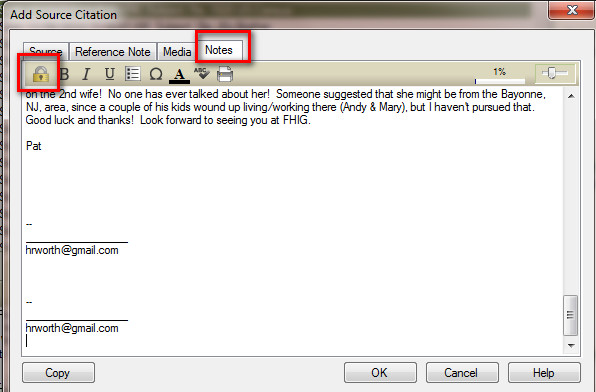
But, in this case, I want the email included in the Citation Notes. So I copied the email and pasted into the Notes Tab. For my purposes, I "LOCKED" the notes so that when this is uploaded, the text of the email would NOT appear in an Ancestry Member Tree, but the Citation would be there.


Since the Subject Line and Date / Time of the Email, is the important information on the Citations, High-lighting the Subject Line from the Notes Tab, hitting CTRL+C (Copy), will select the subject line.


 Then selecting the Source tab, putting the Cursor into the Citation Text field, and CTRL+V (Paste), will put the Subject line there.


Returning to the Notes Tab, high-lighting and Coping the Date / Time Stamp, back to the Source Tab, that information will be pasted into the Citation Details field.


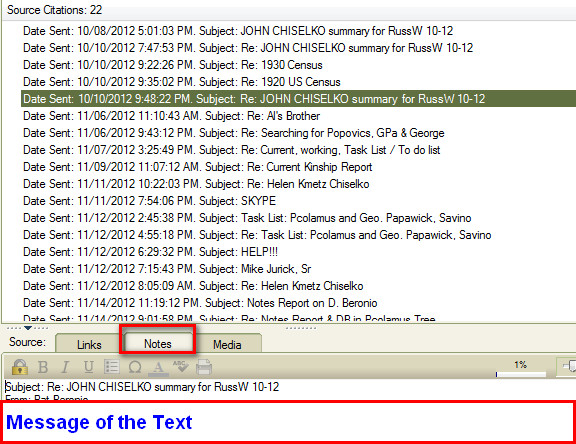
Below in the Reference Note for this email. That will be the Citation.


For me, the important information is in the "Locked" Notes field, which is the text of the email. Links then can be put on any Facts that came from that email.


Not all emails will have links, from this project at least, in several cases there was conflicting information, which would end up on the Task List for that person for resolution. But by looking at the Citation Notes (or email), it's easy to see what was included in that email.

Another Source was created for me as the Writer and this person would be the To: person on the email.

For me, what was important is the Sequence of the Emails, by date / time, then the subject line. The Emails are still in my email program.


_______________________________________________________________

Copyright © 2012 by H R Worthington

Wednesday, December 12, 2012

Found a couple of Family Tree Maker Tutorials on a You Tube Channel

I don't know if you have noticed that I have added a Page to the Blog, Training Resources.

There are a number of online resources that may be of interest in learning how to use the Family Tree Maker program. Each of us learn in different ways. Each of us teach / present in different ways. I thought that I would pass along this series of You Tube videos on the use of FTM2012. 

Jesso George - You Tube Channel:


_______________________________________________________________

Copyright © 2012 by H R Worthington

Wednesday, December 5, 2012

GenDetective and Family Tree Maker - Options

After posting GenDetective and Family Tree Maker yesterday, I looked a little closer at what GenDetective™ has for options for dealing with Facts in Family Tree Maker, and Facts/Events in GenDetective. I don't normally run into Immigration Records, so my manually changing Arrival to Immigration Facts was not a big chore to clean up. I am sure that other users of Family Tree Maker have custom Facts that might be useful in how they are handled in GenDetective.

So, rather than changing the Family Tree Maker fact, which means adding an Immigration Fact, Copying an Existing Citation from Arrival, Linking that Existing Citation to the New Immigration Fact, and Deleting the Arrival Fact, GenDetective has another way, and so much easier, to handle it.

It's also important to pay attention to the steps as the GEDCOM file is being imported into GenDetective. There are very helpful videos on the GenDetective website for details.

For Example:


Should here be an Media File associated with the Burial Fact. Its a matter of changing the answer to the question: Is a media file required?


Another example is for an Obituary. I haven't used an Obituary Fact, up until now, in Family Tree Maker. BUT there is a question there "I use a specific event to track and record Obituaries?" So, if I had another Event that was equal to an Obituary Fact, I would specify what Fact that was.

In my case, I hadn't identified that Arrival / Immigration issue until after I was into the report generator of GenDetective, there is another way to let GenDetective know that Arrival is the same as Immigration.

Once the file has been initially imported into GenDetective, in the Analyzer application, after clicking on Exit Analyzer Wizard, you are taken to the next screen, where I selected Event Definitions.


Since a Fact in Family Tree Maker is the same as an Event in GenDetective, I selected Arrival, and in the pull down menu on the Right, I selected Immigration.


Now, when I go to the Research Progress report in GenDetective, I can clearly see that I have or don't have a record of immigration.

So, if you have a lot of Arrival Facts, and want to have them show up as Immigration in GenDetective, the option is there to be used.
_______________________________________________________________

Copyright © 2012 by H R Worthington

Tuesday, December 4, 2012

GenDetective and Family Tree Maker

I don't normally Blog about software besides Family Tree Maker, PC and Mac versions, but I had the opportunity to fill in as host for Monday's with Myrt webinar series. The Webinar on November 26th, we discussed what websites the participants used for their Online Research. We used a Case Study as an illustration. Remembering that Not Everything is Online, the December 3rd Webinar was to discuss the "next steps", to prepare for a visit to a repository or location and get our feet on the ground for follow up research.

I have posted a couple of articles on how I have used the existing reports in Family Tree Maker that I have used for such a visit.

This time, I wanted to use a 3rd Party software program to help with this research trip. I have had, and have used GenDetective in the past for some of the reports, but thought GenDetective would really help with this project.

I'll NOT go into the details, yet, on how I used GenDetective for this project, but I want to point out that I had to re-think how I handle a couple of situations to make GenDetective work for me. This has to do with my data entry, and NOT what GenDetective does or doesn't do. In fact, GenDetective did exactly what I wanted.

There is a Blog Post on the GenDetective with some more details about this.

The issues that I have identified so far 1) in the way I handle Obituaries, and 2) Immigration information from Census Records.

I have considered Obituaries as a Source, up until now, but didn't really have a way to "track" what Obituaries I had or didn't have. If I found one, I recorded it as a Source, and cited any Facts that I was able to take from that Obituary. So, really, I have not idea what I have or don't have. Running a Search Progress report in GenDetective reflected that I didn't have ANY Obituaries. So, to resolve that, I am just adding an Obituary Fact for each Obituary that I have. This is easy to do, as I just go into my Source Workspace, looking at the Newspaper Sources, and find the Obituary and link that obituary to a Obituary Fact for the person who is the subject of the Obituary.

For this Case Study, I had a number of people in the file who had Immigration data on Census Records. When I ran the Search Progress report, there was no indication that I had any data.

In most of my Census Record data, I use the Web Search and Web Merge feature. I have a list of Facts that I want to collect based on the year of the Census Record. I have blogged about that here as well.

When I look at a Census Record that Information is there, but wasn't recorded clearly enough for GenDetective. Again, a User input issue.

Here is an Example of a 1920 Census Record:


Column 13 shows that the Immigration date for the first person was 1890 and the second was 1900. Important information.


A rotated view of the same record.

When the Web Merge feature is used, the "Arrival" Fact is used. Not very helpful, as to what "Arrival" means. Family Tree Maker has a built in Immigration Fact. GenDetective is "looking" for that Fact / Event. to report that there is an Immigration Date for the person.

So my clean up is to Locate all Arrival Facts, Add an Immigration Fact for each person that has an Arrival Fact, and Copy and Paste the Citation from Arrival to Immigration, the delete the Arrival Fact for that person.


Now the Source Progress has that data in the report.


_______________________________________________________________

Copyright © 2012 by H R Worthington

Sunday, November 11, 2012

FTMM-2 - Research Log, just a thought

Many of us struggle with how to keep a research log. I have posted about this before:


You can search this blog "research log" and will find additional entries.

I am working on a project in Family Tree Maker for the Mac (FTMM-2) and thought I would try something else. This project involves collaboration with a colleague of mine. This file, is part of a presentation, so my involvement with this file will end following the presentation. Also, this person is a PC user. So, how do I SHARE the Research Log. Understanding that some fields and data in FTMM-2 may not be transferable and is not in an Ancestry Member Tree, where this colleague is viewing the file.

What I have been doing, is sending a PDF file, of my Task List (To Do List) sharing what I have researched, need to research, or have completed.

For this project, I thought I would use the High Priority, as the highest or first items to be researched, such as Census Records.

As I go along, I may remember that I need to "look something else up", for a person, so I put that in the Medium Priority. When I complete a Task, I change that to the Lowest Priority.

What I also did, was to create a To Do List, based on the Shaky Leaf Hints. I put all of them in the Medium Category EXCEPT for hints that are from Ancestry Member Trees. I put them in the Lowest Priority. I won't be working on any of them, but my colleague may, in the future want to follow up on those connections.

It dawned on my, why not make this To Do List my Research Log. Where I searched, what I found or didn't find.

As an example, I was working on looking for Obituaries. So, I want to create a lost of those I want to look for obituaries and what I found. I'll start by generating a Custom List of only people who I have Death Information on. That would be the Date and Location.

Go to the Publish Workspace, People Collection, Custom Report. Once the Custom Report starts to generate, then clicked on Selected Individuals. Selecting the Death Fact, where the Place Is Not Blank.


The generated a list of 22 people who have some Death Information.

Note: this is a small file, specifically for this project

The report that is generated, included the Death Fact, (date, place, description), Burial Fact, and for another purpose, the Find-A-Grave fact that I created. Another clue here, is to have the Female Name include the Married Name. An option in the Items to Include menu and selecting the Name Fact at the bottom of the Fact window.


 With this report I can then begin my research.

My first place to look for Obituaries is on GenealogyBank.com. I added Genealogy Bank to my Favorite place to search in the Web Search Workspace. I have blogged about how to do that here.

One of the reasons for doing my searching from within FTMM-2 (and FTM2012) is the ease to looking at more details for that Person, but looking in the Lower Left Window or going to the People Workspace. I also am able to use the Web Clipping Option and Merging the data from this non-Ancestry.com website.

Below is the mini-Pedigree Navigation bar, with my person selected. Some of the details for that person is in the Lower Left, as you can see, and I have Selected Genealogy Bank in the Web Search workspace.


Using Genealogy Bank searches I can work with the data, or note that there isn't an Obituary for that person.

In the People Workspace, Person Tab, Task Menu, I make an entry like:

Obituary on GenealogyBank

or

Obituary on GenealogyBank
Not on 1977 - today - 11 Nov 2012

The first example, I would make it Low Priority and Completed.

The second example, I would make it Low Priority but NOT completed.

The Date is important so that at some time in the future, we might want to go back to do another search on Genealogy Bank.

The reason for doing all of this, in this fashion (for me at least), is that My Research Log is a complete listing in the Plan Workspace. It can be filtered, sorted, etc. For Example: the To Do List for Obituaries from today.


The first couple of entries are completed, others were looked for but not found (including the date).

ff I were to sort by the Person's Name, I can see how I have searched, what I need to search, and what I found or didn't found. That is also available in the People Workspace, Person View, Task Tab.

This is working for me. but may be a different approach for others.

_______________________________________________________________

Copyright © 2012 by H R Worthington

Friday, November 9, 2012

Citing as you Go --- What about Email?

Just before Hurricane Sandy hit, my friend, YOUR Friend in Genealogy, Dear MYRTLE posted this Citing as you go. 

Spending time keeping my family safe, keeping warm, and trying to access the internet took up my time, but I did want to address this issue.

I have been working on a project that has used email more that I have used it in the past. In this case, this project is for a Presentation that I have been working on, BUT, for several reasons, decided to run the project with Family Tree Maker for the Mac (FTMM-2).

What was important to me, was to have the 'data' from the Email's within FTMM-2, as the presentation will be run from my Mac. I wanted the content of these emails with me, and not relying on my email account to access the data. I also wanted to Cite information that might be of use in the file, to compliment or dispute or help resolve issues that are addressed in the email.

The data in the file is all mine, completely documented, but the start of the file came through email and a document attached to one of the emails. Each piece of data that came from that attachment is cited, and since it was attached to an email, I wanted to Cite the emails as well as to have the cited emails in the file.

The screen captures are from FTMM-2, so they may look a little different from the normal screen captures.

I also wanted them to be in the Evidence Explained !! format when End Notes are generated.

The appropriate Template is found by going to the Sources Workspace, clicking on Add (right side of the screen, just below the Workspace menu bar, selecting New when the Add Source Citation screen opens, and enter EMA (for email) as the Keyword. That will offer the Personal E-mail template.

It Source Template: (Personal E-mail) has the following fields to be filled out:
  • Collection
  • Researcher Surname
  • Researcher Forename(s)
  • Researcher E-mail Address
  • Researcher Address
  • Researcher Address
  • Writer Surname
  • Writer Forename(s)
  • Writer Address
  • Writer Location
  • Writer Contact
  • Recipient Surname
  • Recipient  Forenme(s)
  • Comments
Because this is live data, and I prefer not to include the details that are in the various fields, it will explain what the terms mean to me.

Collection: I used the name of the Project as the Collection Name. It could be a Surname, but for this, I named the collection with a Project Name.

The Researcher is me, the "Writer" is the person who sent me the email. If multiple people were involved with emails, the collection would remain the same, but the Writer would be different. The Recipient, would be me as well.

All of the contact information is in the Source Screen.

What I chose to do, was to create Citations for the Subject Line of the Email. This includes any Replies to that subject line.. That is the Citation Detail entery. The Citation Text, I used "thread started" with the date.

The resulting Reference Notes (End Notes for reports) are clear.

The Source, is the Email Template entry, and the various Email's are the Citations in the Center Panel. There are links to each Fact that I picked up in that Email. In this specific case, it is the Attachment to an Email, so a number of Facts are linked to that document.


Again, because of the nature of the data, the Reference Note is not very easy to read. But, the information is correct and in the Evidence Explained!! format.

Each of the email (threads, first message and the replies) are listed by the Subject line of the email.

The next piece that is important to me, is the Text of these email threads. It was a matter of Copying the Text of each Email, Header information included (header information would include the email addresses and the date time of the email) as well as the text.

Below is what that looks like.

This example has the Subject and the date the thread of emails started, and in the Notes Tab for that Citation is the text of the first and follow up emails with that subject line.

Most of the emails do not have links to any Facts, but several do. For example: The Name fact, in many cases, were spelled differently. Several of these emails helped identify why the name was different. A specific example was that a Census Record "assumed" that two children carried the head of household's surname. When in fact, the head of household was NOT these two children. I have to rely on the family Expert, who had different sources and access to sources that are not online. The family expert has documented for me, the correct surname for these two children.

This conflict of surnames, is a To Do or Task List item for these two children for ME to find the appropriate documentation IF they exist online some where.

This is how I Cite as I go, with Email as the Source of some of the data in my file.


_______________________________________________________________

Copyright © 2012 by H R Worthington

Print Friendly