Showing posts sorted by date for query help. Sort by relevance Show all posts

Friday, December 17, 2021

Reader Question: Streamline Source Group List

Here is a Question from a reader:


I want to streamline my Source Group List - for ex. Can I have all 1900 Censuses within one large Source group with subgroups for each State? I would like to see an in depth way you select source groups and your list of source groups. I have narrowed mine to 383 source groups as of now. I didn't see this topic on your website except for the video where you said don't just merge Censuses because they are from different locations. Thanks in advance.

I don't want to streamline my Source Group List. So, I am not sure I can help you. You can submit your request from the Help Menu of FTM2019.

Having said that, why don't I want to streamline my Source Group List. 

First, I don't normally work from that list. That is starting to do something from the Source Group list. I do go the Source Workspace frequently. I do want to see, in your Census example, the Census Year, by State, and County. The Census Source Template feature allows for just the Year, or Year and Location. I want the Year and Location.

I spend a lot of time on my Sources and Citations, but I want to see the details. 

Another example, for me, Email Citations. I have a Source Group for each "cousin" that I have emailed with, as the "cousin" as a Source Group. I would also have a Source Group for myself and each of those "cousins". The Cousin Source Group would be those emails FROM that Cousin, and My Source Group would be TO that Cousin.

Remember, please, that I use the Source Template Feature 100% of the time.

IF that doesn't answer your question, Please (Marnie) help me understand what you mean by "streamline". I am guessing shortening the Source Group List. The way I use them, I need to understand what you are trying to accomplish.
____________________________________________________________
Copyright © 2021 by Cousin Russ

Friday, September 24, 2021

Edit - Find Duplicate People

The Find Duplicate People feature is in the Edit Menu. You can be in any Workspace, this image is in the People Workspace.


Selecting the Find Duplicate People menu item will bring up a Back Up window. RECOMMEND that you use that option. (not shown)

Then Family Tree Make will run a People Matching routine.


At the end will be a list of potential duplicate profiles.


At the bottom of this window will give you choice:
  • Go To Person
  • Remove Row
  • Compare-Merge
  • Close
  • Help
There are 44 possible matches. This takes time, but do the "merging" carefully. In many cases, you may just Remove a Row.

This blog post is not going into detail about how to do that, but to show what to do when you are done for this session. That is to CLOSE this list, BUT Saving the Work that you just did.


When Close is selected a Window will pop-up as ask if you want this list to be SAVED. By clicking Yes, that updated list will be saved until the Next Time you run this same report.

Clicking on Find Duplicate Individuals you we see this screen, where you can "Load Saved List"


or you can Perform the Matching Again.

____________________________________________________________
Copyright © 2021 by Cousin Russ

Monday, September 13, 2021

FTM2019 - Master File - Clean Up Summary

A Summary of a week long Clean Up project:


A little over a week ago, I started a Clean Up project of my Master Family Tree Maker file (FTM2019). I found notes back to 1997, which reminded me of how long I have been working on this SAME File. More importantly, I was reminded of the Changes that the program has made over the years. Most of the clean up was caused by those changes, which, in fact, is a Good Thing.

The biggest push, for me, to take the TIME to clean up, is the use of the Research Log (Notes) and Person Notes. Most of the work was to take Person Notes out of the Research Notes Tab and move them into the Person Notes Tab.

I started with 742 PAGES of Research Notes and ended with 578 Pages of Research Notes.

About 800 Pages of Person Notes that ended up with 919 Pages of Person Notes.

I now have NO (0 - Zero) Notes that can be seen in the Ancestry Member Tree. Mostly because of the formatting, or lack of formatting in the AMT. It looks very bad in an AMT, so I marked them ALL Private (for now), for the AMT.

When I started this clean up, I realized that in about 2014, I changed the formatting of the DATE in the Research Log and saw where I had played around with several formats in 2014. I took this time to Reform the dates, using the Find and Replace feature in FTM2019 and updated about 1,150 Entries.

I was reminded about the amount of resource material I have in the Person Notes tab. The plan going forward is to work on those Private Person Notes. Mostly for myself, but may re-consider making them public.

The other MAJOR clean up was to Mark ALL FACTS as Private, with the exception of Birth, Marriage, and Death Facts. I now have a record of the FACTS that I use, and have already Deleted 5 or 10 Facts along the way. Mostly, early Facts that I didn't clean up earlier.

I now have an Evernote Notebook with the Facts I have reviewed already, and how I want to use them. For example, my Military Facts are out of control. I had not documented, at the time, how I was going to use them.

Also, I realized that I had some Fact Notes information in the Person Notes Tab. Again, it's one of those things I changed over time, but hadn't made time to clean up those changes.

Of the 919 Person Notes Pages, I expect that number to go down, as the 488 Fact Notes Pages, goes UP. 

My goal is to be Consistent and to document how I do "stuff" in my File.

AND, I have 1,682 Profiles without Documentation, meaning at least ONE Fact without a Citation. I know who they are, but this review have me hints that I really do have the information about where I got that information, just hadn't entered it correctly.

The Filter In, Filter Out feature is my best friend going forward. That is why the FACT Review was and IS so important, as that is what the Filters help with. Knowing who has Undocumented Facts, helps, but along the way, with earlier Do-Over's, I have notes as to where to look for the Citations for those Facts.

____________________________________________________________
Copyright © 2021 by Cousin Russ

Tuesday, August 10, 2021

FTM2019 - Ancestry Member Tree Test

As you may have seen, I have been working on, and thinking about the best use of an Ancestry Member Tree (AMT), for myself and others that might visit my AMT.


With the help of DearMYRTLE I ran a test of what a "Contributor" of an AMT can and can not see and do. It was a learning experience and I thank Myrt for her time.

We discovered a couple of thing that didn't work, but several important things that did work. 

Each of the steps described in the previous blog post worked as expected.
  • Living profiles are all marked Private, using the "guessed" 120 year rule, meaning a given birth date and no death date, where the birth date was more than 120 years (used 1920, was viewable, 1922 was private)
  • A visible indication of the "end of line" profile, where there are no parents
  • A visible indication that I have a Photograph of the person in the Profile.
Was the "test" a Pass or Fail ? [ I would usually give The Legal Genealogist answer, but I will refrain ]

My answer,  Yes / No / Maybe. The work done so far turned out the way I had hoped. The limitations observed are out if my control. 


____________________________________________________________
Copyright © 2021 by Cousin Russ

Friday, July 23, 2021

Brick Walls (well maybe)

The other day, I was getting ready to go teach my "in person" class, when I received an email. I had not prepared anything special for the class, but the email, I thought, was going to be a great question for the class help answer.
I am having much trouble with one of my ancestors, John Ayers. He would be my paternal 3rd gg. I haven't been able to find records of his birth or his parents. I have census records of John and his wife, Sarah Stephens, being in the household of his son, John Wilson Ayers, my 2nd gg. I have records of his wife Sarah's, father, Uriah F. Stephens Jr., my 4th gg, naming Sarah and her husband, John Ayers, in his will. Uriah would be another patriot for me in the DAR, but I have to have proof of John's existence.

This looks like a "brick wall" question to me, but then I don't have "brick walls", I just haven 't done "reasonable exhaustive" (I usually change the to exhausting, because when you find what I am looking for, I am usually exhausted.

The previous week we had a question from another student, who wasn't present, and talked about "how NOT to ask a research question". So, after reading the above problem to the class, I asked on a scale from 1 to 10, how would they rate the question. Most said 7 or 8, then I asked "why" and what was missing. One of the students said "dates". I was able to answer that, as the student with the question sent a follow up email.

The approximate dates for John Ayers are 1776-1864 and for Sarah (Sally) Stephens, 1786 - 1858.

What else took a bit of pulling of the teeth, but I let that drop (for now). I told the class that I would enter the data that I was provided into FamilyTreeMaker, Including "Sally". I asked, where would I enter that, one student said "Also Known As", she got a gold star for the day.

What I explained about entering of the information was the Relationships what was provided in this information. Knowing that I had some of this information in my database AND online, I went to the Ancestry Member Tree (AMT) that I created for this student in the past. So I did a search for and found John Ayers already in my AMT, with the relationships in the information  that was provided.


Basically, I had what was provided. BUT, I asked what was wrong with this picture? No answer, they didn't understand my question. So, I reminded them that I use Ancestry Hints 90% of the time. I said that Ancestry searches far better than I do.

For some reason, the notion of DAR caught my attention when I read the statement to the class again, and talked (again) about the National Park Service, Soldier and Sailor website, for Searching for Civil War solders and Fold3 for Military records in General. One of the new students didn't know about Fold3, so we went there looking for Uriah F. Stephens Jr., the father-in-law. I mentioned that I browse Fold3, normally, and demonstrated that. BUT one of the questions browsing was a "location". We did not have a specific location, but that he was born in Connecticut. There was NO result in the Browsing of the Revolutionary War, so I did a Search, and found a 20+ page Pension File. Is that our person? The class said "don't have enough information". (Class Star).

But "Uriah" reminded by about searching on Ancestry. I did not want to search for him on Ancestry, but another student has a good example. The Surname of Jones, 50 Million Records. So I dropped Jones and put in "Omar" for the Firstname. Only 10 Million records. Who knew. What else can we do to get from 10,000,000 down to something manageable. What was his occupation ? "Minister". The search results went to 0 (Zero). (I had cheated and marked that entry as Exact). Demonstrated the Ancestry Search Slider bars, when I asked where Omar Jones was born or lived and entered Delaware, (or neighboring states). 5,000 hints, so we are moving in the right direction. The FIRST Hint, of the 5,000, was a World War I Draft Card. We looked at the Image and SAW (wait for it) "Minister". I reminded the class to read the information about the Records, to see what can be found, and what we are provided in the Transcription of that record. Occupation was not in what Ancestry Provided. Another lesson that I had not planned.

So, back to the problem at hand. Still thinking about the military aspect of the problem, I asked where else could I look. The DAR was the only answer. So, I asked "what about the SAR", Sons of the American Revolution. For grins and giggles, I searched for "Uriah Stephens" on Ancestry, but asked out "Stephens" was spelled. The correct answer was said by all "spelling doesn't count", so I entered the name that was provided.

Again, could NOT have planned the First Hint, a SAR Application Record.

Backing up to the beginning of the class, I had mentioned that I will probably NOT find "Sally" in any record, as it is an AKA. Right there on the application was "Sallie" (ok, spelling doesn't count). But the data what we already had, but close, and a lot of data we did not have, but it was clear that we had the right set of relationships.

On the 3rd page of the Application, was the information for the application came from a Revolutionary War Pension File. I wonder if that one we looked at earlier was THE application that was used for this SAR record.

Back to the image, from the AMT, I asked again what was wrong with that Image. Finally, they saw there John Ayers had NO HINTS. Everyone else, and the Wife's side of the tree also had lots of hints, but John had none.

The closing comment from the Class, specifically the person who asked the question to start with was

Maybe I have the wrong John Ayers

Class dismissed.

____________________________________________________________
Copyright © 2021 by Cousin Russ

Thursday, May 6, 2021

Preparation for the 1950 US Census ==> Part 2 - Filters

Are you ready for the release of the 1950 US Federal Census ? Watch for this graphic, on this Blog, and DearMYRTLE's Blog and Facebook Groups as we will use this for the DearMYRTLE's CensusGenie branding.
This  blog will also carry this branding on the blog posts related to the CensusGenie project.

This is the second post in this series and will provide the steps in setting up the Filter so that I can review each of the Profiles, in this list. This should help me locate where I should be able to find them when the 1950 Census is released.

In our CensusGenie studies, I have learned the importance of knowing the Address for the profiles in my database. There are many records that have address information, and my review of these profiles will help me identify who I have Addresses for, and who I may not have addresses and that I may need to locate.

Future blog posts will demonstrate the Profile Reviews that I do, as well as information that I may need to locate.

I intend to provide links in the Blog to educational material that may be discussed in a Video.

How to set up the initial FILTER, Video Recording.


Filter (Initial)
  • Include all persons
  • Filter Out: Death is before 1949
  • Filter Out: Birth is after 1950
  • Filter Out: Residence does not exist
  • Filter Out: Address does not exist
  • Filter Out: Birth is after 1940 - Added
References: 

1 - Preparation for the 1940 US Federal Census on this blog already, can be found in the "Census1940" Label. The 1950 CensusGenie series will use the "Census1950" Label on the Left Column of this blog, or search for "1940census" or "1950census".


Weekly - 7 Apr 2021 14 Apr 2021 21 Apr 2021 
Monthly - May 2021 -Feb 2022 Weekly - Mar 2022 
Daily - Apr 2022 until we get the hang of the indexing. 

3 - Register once for this recurring Zoom Meeting. 

Dates for upcoming will appear below. For the most recent dates, be sure to see DearMYRTLE's Calendar located here
:

2 Jun 2021 at 9pm Eastern.
21 Jul 2021
11 Aug 2021
8 Sept 2021
6 Oct 2021
3 Nov 2021
1 Dec 2021
5 Jan 2022
2 Feb 2022
2 Mar 2022
9 Mar 2022
16 Mar 2022
23 Mar 2022
30 Mar 2022


 ____________________________________________________________
Copyright © 2021 by Cousin Russ

Monday, November 25, 2019

Reader Question: One Photo, Many People


Here is the question:

DEAR ALL
I HAVE SEVERAL PHOTOS WITH UP TO FIFTY PEOPLE ON THEM AND WOULD LIKE TO IDENTIFY THE PEOPLE IN THEM BY SOME METHOD SO THAT THEY CAN BE EASILY CROSS REFERENCED TO A LIST OF NAMES. IT HAS BEEN SUGGESTED THAT I MAKE A GHOST OR OUTLINE PICTURE THAT I COULD NUMBER THE INDIVIDUALS SO THAT THEY COULD BE IDENTIFIED ON THE LIST , BUT I AM NOT SURE HOW TO DO THIS .
I WOULD BE GRATEFUL FOR ANY HELP YOU CAN OFFER MANY THANKS PATRICK
(first, please don't use all caps, it's difficult to read -- Thank you)

Actually, FTM2019 added a New feature, which I will have to blog about, where you can use ONE Image, and use that one image to be the Person Profile picture in Family Tree Maker. There may be a limitation as to how many you can do that for, my Max, so far, is 4. I have a photo of my grandmother, and 3 of her siblings, as young children.

I used that one photo, and selected each of the four children, and made a profile picture for them. Not additional photos are in the Media file.

You can do as you suggest. I have a FlipPal, which allows my to scan an image, then make a 2nd scan, and write a number of a name on that image.

https://worthy2be.wordpress.com/2012/02/08/flip-pal-mobile-scanner-sketch/

You still need to know who is in that photo.

The issue that you did not mention, is How and Where are you going to present or show that picture with 40 people in it.

The other option, probably an easier solution is to use the Media Description field in the Media Workspace, where you type in the Names by Row.

Back Row, Left to Right

Name 1, Name 2, Name 3.

Just like you would on the Back of that photo, in the good old days.

Russ
____________________________________________________________
Copyright © 2019 by Cousin Russ

Monday, October 14, 2019

Reader Question: FTM2019 and FamillySearch Images


Here is a Question from one a blog Reader
How do you attach documents in family search to a person in FTM 2019?
The easy answer, the same way you do from Any website, like Ancestry, The Web Merge feature. I have many blog posts on that.

I may do another blog post, specifically now that we had the FamilySearch 2.0 features. (upcoming blog posts on that as well.)

In the meantime, in the Help Menu, select Companion Guide, and go to page 145 for the details.


__________________________________________________________
Copyright © 2019 by Cousin Russ

Saturday, October 12, 2019

Reader Question: How to open Old Files


Here a question I received from a reader:
I have several old versions of my ancestry trees of over 3000 individual's going back to the late 1400s, that I can't open in current operating systems. I never learned and have no help to convert them to Geodom(sp?).

So this is my question: can Family Treemaker open and preserve all this work completed by an older relative who left it to me, and myself???

If it can't be saved, it will be lost for good, which seems a shame.
And the Good News is,FTM2019  will open all previous versions of the Family Tree Maker program.


And, if you don't remember where those files are, on your computer, the New, Tree Browser, will find them for you.

I did a blog post on that one.

https://ftmuser.blogspot.com/2019/10/ftm2019-plan-workspace-tree-browser.html

and, the Tree Browser will find files on any external hard drive connected to your computer.


The one that is high lighted in on an external drive and I haven't touched it for 15 years.
__________________________________________________________
Copyright © 2019 by Cousin Russ

Saturday, September 28, 2019

Undocumented Fact Report Management

I understand that many users don't care about Sources and Citations. Over the years, I have learned how important they are. I have also learned how to manage that issue. I want ALL Facts with a Citation, even those Facts that I create and the I use for my purposes to maintain the file.

Working with two (2) new files, in the past three years, I learned to run the Undocumented Fact Report Daily. By doing so, and I can keep this issue under control. That is FIX the issue, based on the work that I did that day.

I took those two files and merged them into my Master database. That experience is a whole other topic. Because for the past two or three years I was in the habit of running the Undocumented Fact Report I ran it for the first time in my Master database. What I ended up with was a 169 PAGE Report. Shocked, to say the least.

To run this report, go to the Publish Workspace, select the Source Report in the Collection Tab, select Undocumented Facts, then Create Report.


When the "Create Report" button is selected, I want to make sure ALL Individuals are included.


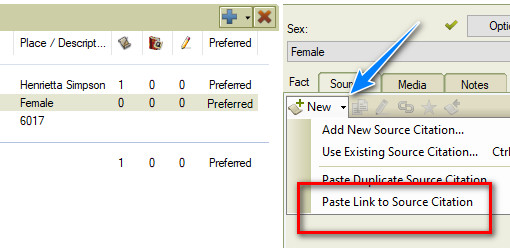
Then I realized one problem that really brought the importance of this report. A change, many versions ago, about the "Sex" Fact had been changed requiring a Citation. Many Records either state that as a fact or can infer that fact, and should be documented. Family Names / Given Names are not always obvious. So we were given the Citation field for that Fact.

That second image is the clue /  reminder to me as to why there were so many pages of Undocumented Facts. I have some clean up work to do. I had to develop a Plan to deal with all of these Undocumented Facts. What I was NOT going to do, is clean them all up right now.

As you may know, we can Edit the Profile, from the Report, by double clicking on the Name (that is bolded) and the Person View will appear.


The Sex Fact does not have a Citation, but the Name Fact does have a citation, This is a quick and easy way to resolve this problem, Copy the Citation from the Name Fact, and Paste Link to Source Citation. The Copy source citation is the ICON to the Right of the "New" and left of the Edit (Pencil) ICON. That is the Family Tree Maker Clipboard (not Windows Clipboard)

Then select the "Sex" Fact, and Past Link to Source Citation.


That process will take care of those Facts that did not require a citation from previous versions. Easy but time consuming and needs to be done.

BUT, the next profile had other Facts that did not have Citations. From my analysis since I started this clean up project, over the many versions of Family Tree Maker, some Citations were lost and / or unlinked from Facts. So I needed a PLAN.

My plan is to use the Filter Feature to help me manage those profiles that have one or many Facts without a Citation. To do that, I created a "No Documentation" Fact. That way, I can Filter In or Filter Out, anyone with the No Documentation Fact. The name of the fact is not important, that was just the one I chose.

Keeping in the Undocumented Fact Report, I would ADD that Fact to every person in that report AND put a Citation on that Fact. Here is my citation (Reference Note)
Worthington, Russ, [ ADDRESS FOR PERSONAL USE, ], File Citations; This is a "No Documentation" citation, where there are no citations on Facts.
As I started to go through this process, three things were seen.

  1. No Citations on any Facts in that profile
  2. Only ONE Fact without a Citation
  3. A number of Facts without a Citation
Number 1 was may be a large problem, as there is not clue, on that screen to tell me where that information came from. More time involved, but in the People Workspace, Person View, looking at other information, especially a spouse, parents, or children. Clearly not in the report.

It became clear, that this phase of the project is to Mark All Profiles with a Citation issue. 

Number 2 and 3 are a little easier, in that I have at least ONE Citation on other Facts. I can review those citations to see if that record addresses the Fact(s) that are not documented. The Only one fact, should be an easy fix.

This is time consuming, but here is where the Filter In / Filter Out feature comes in very handy.

Lets say I added the No Documentation Fact to the First Page in the Report. I can now go back to the "Individuals to Include". Select ALL, Filter OUT, select the "No Documentation Fact", Any Data, and those profiles with that Fact will be removed from the report.


For me, this does a couple of things, Lets me focus on the easy fixes, or the ones that will take more time, and I can resolve that one fact that doesn't have the citation from previous versions of the program.

In looking at the Undocumented Fact Report, it became obvious which Profiles had that one fact, not documented. It included on the Name and the Fact.

I can fix them right then and there, as noted above.

Once all of the Undocumented Facts are identified what the No Documentation Fact, I can then get back to research and when I come across a Profile with that FACT, I can deal that that undocumented fact then, because I can see it in the List of Facts.


I marked the No Documentation Fact as Private, so only I can see it. In this example, I do not know the persons Name, (5 underscores), but when I look at the full profile, I see that this is a Spouse of someone in my database. I can look at the Citations for the Spouse, to pick up the Citation for this person, that has NO Citations on either Fact.

The No Documentation in the Fact Description field, may be an easy fix, or may be  not so easy.

My goal is to KNOW who has one or more Facts that are not documented. Using the Filter In / Filter Out feature, and get that Undocumented Fact report to Zero, then I can go back to my research. AND I can also go to the People Workspace, and use the Filter In Feature, to Filter IN all who have the No Documentation Fact, and further include, if I want, the No Documentation, Undocumented Fact, or Undocumented Facts in the description.

NOW, once I have all of the Facts documented in the Profile, I can DELETE that No Documentation Fact from that Profile. Now running the Undocumented Fact Report is important to be run frequently, with the goal of No / Zero profiles on that report (again, filtering out the No Documentation Fact).

Lesson Leaned: Run the Undocumented Fact Report daily
____________________________________________________________
Copyright © 2019 by Cousin Russ

Wednesday, September 18, 2019

User Question: Ancestry and Media


A Question from a reader:

What can you do once Ancestry media won't process in FTM?
Easy answer: Use Help, Family Tree Maker Tech Support, and on the Right use the LIVE CHAT Support link.


____________________________________________________________
Copyright © 2019 by Cousin Russ

Friday, December 28, 2018

Blog Post Comments [ resolved ]

Dear Readers,

I have finally resolved a long standing email issue, when comments are made on this blog. I have followed all of the steps on various Google and Facebook Groups about this specific issue, many other Bloggers have reported the same problem.

The cause of the problem was known and we know when it happened. The "help" instructions were many, and were the same solution, but did not work for this blog.

I worked with a friend who had a working blog, and the Notification about a Comment being made was received. We compared settings.

After comparing one setting today, I found the problem, and it has been resolved.

I just published a number of Comments that were in Cue to be published and responded to each of them, except the dozen Spam comments.

I am sorry for the delay in having those comments published, but they are now active and I have responded to them.

____________________________________________________________
Copyright © 2018 by Cousin Russ

Monday, December 10, 2018

Knowledge Base - Help Menu


There is a lot of information in the FTM2017 Help Menu

I have many Blog Posts about the Family Tree Maker Help menu


_______________________________________________________________
Copyright © 2018 by Cousin Russ

Tuesday, December 4, 2018

Proposed New Series of Blog Posts


I have decided that I want to help readers of the blog, to be able to find articles on the FamilyTreeMaker.com support page (https://www.mackiev.com/familytreemaker/)

I will gather articles based on the seven (7) Workspaces, Offer the Article and a Link to that Article.

There probably will be some other categories, not specific to a Workspace, that I will also offer. I will probably offer about 5 articles per blog post, but if I find other articles in that same Workspace, I'll update the blog post (creating a NEW blog post, but mark is as an Update) where I will add new articles that I found. 

I will also attempt to show the Date of the Article.

In other words, I am hoping to build a Directory of articles, by workspace, written by Software MacKiev about the Family Tree Maker Program.

Since my blog posts are by Workspace, down the Left Column and the Search box in the Upper Left, you will be able to find My Blog Posts about that Workspace, as well as the Directory of Articles, hopefully, will help find information a little easier.

My blog posts are about how I use the program, and that changes over time, but I want the readers to be able to find what the good folks at Family Tree Maker have to say.

I will attempt to use this banner on this type of post to make it clear(er)

_______________________________________________________________
Copyright © 2018 by Cousin Russ

Tuesday, November 20, 2018

FTM2017 - A Thought on Media File Naming

Not too long ago, in a Facebook Group, there was a long discussion about how we name our Genealogy Files. The person who started the discussion have a very long file naming system that works for that person.

So, I stopped that really thought about this topic. I'll share my current thinking here, for Family Tree Maker Users.


Here is the example that was used (modified a bit)

SURNAME_Firstname-Aunt-_Daughter_Of_Brother_of_SURNAME_Firsname_Middlename.jpg

At the same time, I have just added an external drive, with Back Up software to another back up of my data. It was throwing off Error Messages that some Filenames were TOO long. The conversation of FB indicated that I was wrong and a Windows10 computer did not have a filename restriction.

Looking into this issue, in fact Windows10 had removed an earlier 256 character limitation. The key part of that limitation included Full Path to the file and name.

So, the above example would include (for FTM2017  Users, using the default settings, that would mean having

c:\username\Documents|Family Tree Maker\Filename Media\ 

in front of that. So 55 plus 78 (133) Character right there. Still doesn't meet the 256 character limit. I am sure I am missing some technical character information placed on that old limitation.

I took some time to really think about how I deal with filenames in general, and for genealogy, again in general, and for Family Tree Maker specifically.

So, let's back up a minute. I have a scanning project going on where I set up my laptop computer, with scanner and worked on the project not connected to the internet, nor to have any program running. Just wanted to scan a notebook of photos, letters, and newspaper clippings.


The first step was just to let the computer scan the files and create it's own filename and saved into a Documents\Scanned folder. The notebook (upper left) has pages and I wanted to keep the pages in order and be able to return the notebook to the owner as I received it.

I then renamed the "Image-001" to "File01-01", File01-02, where "file" in the archival sleeve, then the number that followed was the order that the scanned image was in that sleeve. To deal with the Front and Back of that page, scanning both sides, even if it was blank, the ODD numbers were the front, Even numbers the back. 

Not very useful, EXCEPT, I got all of the scanning done pretty quickly. 

Note the 2nd monitor (oh the right), it had EXCEL open, where I created a spreadsheet to keep track of what I was doing.

The first column has the Scanned Image Filename. Next column was the Location (Sleeve01), Subject, Envelope - 2 - Front, for example. Date / Page was the next column. I entered what I could as the image was being scanned.

There were several sleeves that were empty, but I had [ empty ] iin the subject column. I wanted to keep track of everything, and to be able to provide a Thumb drive with all of the images and the spreadsheet to the owner of this notebook.

200 images, not very helpful filenames, on a Thumb Drive.

Here is where the filenaming thought comes into play AND where and how will those files be used.

When I have files that I am not ready to put into Family Tree Maker, I have them in a "Genealogy" Folder on my hard drive. I might have Surname Sub-Folders, or Place Name Sub-Folders, and Cemetery Sub-Folders. The thought is, where can I find those Media files Quickly when I am ready to enter them into FTM2017.

Sub-Sub Folders could be used, based on my scanning example. All of them were for one Surname, so, ALL of the Scanned Images could be COPIED from the Thumb Drive into the "Jones" or "JONES" Surname folder, still with the weird filenames. Not yet helpful.

Thinking back to the suggested filenaming scheme that started this, I re-evaluated my normal process. That is:

Surname_Firstname_Middlename-YYYY-Event

Some may choose to use all Upper Case surname, I choose not to. The important thing for me to consider was the "readability" of the Filename AND Sorting. Oh, Female surnames are always Birth Surnames, for me. I will let FTM2017 handle the married name issue, based on the relationship(s) within the program. IF I don't know the birth surname, I use my "unknown name" format of 5 underscores.

What I also do with filenames is NO spaces. Old DOS day's habit but it works for me. The parts of the filename are separated by one Underscore to replace the space, and a Dash between the Name, Date, and Event.

With the spreadsheet open, now I take the time to Rename the files into the above format AND move that file to a sub-folder. Lets say I am looking at an obituary from a newspaper. The YYYY becomes the Year of the Newspaper, and the Event becomes "Obituary". If there are three scanned images of that obituary or multiple obituaries, I just add "-01" or "-02" even though the date of those newspaper articles may have different dates. What I am capturing is the Year and Event.

Here is where my thought has gone. We always want to Cite our Sources, I have chosen not to "cite my source" in  a Filename. I will do that in FTM2017. And, whether I have a scanned image of my own, or one from an Online Resource, my filenaming works and the citation will remind me where I got it from. That scanned image from that thumb drive will be my the folder mentioned above, while an online image will be in the Filename Media folder in Family Tree Maker.

So far, none of the images that I have scanned are in Family Tree Maker, but in a folder on my hard drive. With the filenaming and the folders that I created, I can Find what i am looking for.

Now to FTM2017. I have blogged about the fact that I ALWAYS use the  Copy Option NOT the Link To option that is available. I will NOT link to those images that are in the Subfolder, but will Copy that scanned image into FTM2017 and the "media" folder. (remember that Full Path Name that I mentioned earlier). 

I now can create Media Categories to help find media files from within Family Tree Maker. I don't need sub-folders. For me, the Media Category feature IS the Sub-Folder feature out side of FTM2017. I have 50 or so Media Categories. "Census - Federal", "Census - State" for example.

Taking a Census Record or any Record, the Same filenaming format is used.

Surname_Firstname_Middlename-YYYY-Federal_Census.jpg

This census example is where I am cleaning up right now. I started with

1940_US_Federal_Census-Surname_Firstname_Middlename-State_County. Doesn't sort wall for me, My Citations handle the place of the Census (state, county).

WORD OF CAUTION: Rename the files within the Media Workspace of Family Tree Maker and NOT outside of the program.

What I want to be able to see, both within Family Tree Maker and Outside of Family Tree Maker is what Media files to I have for a Person, and date order and what event.

The Rule that I have about Census Records is always by Head of Household, unless my  person was a boarder. My linking of that Census Record to the Facts for members of the Household, with the media file linked to that Citation and the Citation linked to the Fact.

Please note: that IF a merge of a Census Record is done in an Ancestry Member Tree, there may be an issue with Citations, as Ancestry handles this type of citation different from the way Family Tree Maker does.

That Census Media file (1), is linked to a Citation, what would provide the Details of that record. That Citation, with media, is linked to the Facts for the Profiles (people) mentioned in that Record.

From Filenames, was can see what Media files that person (name) has, in Date Order.

A Rule about my file, I do NOT use the Suffix Sr (Senor). No birth record that I have seen shows that suffix. Records may, but a birth record may not. The Name format, is the same for that Person's Media Files (always).

So, what about the same name in your file. The "DATE" / YYYY helps tell them apart. The Suffix, if used, also helps. There have been times when I go back and Rename the file, such as finding the Middle name which I didn't have before. I can easily find those media files to rename.

There is another thing to consider. The CAPTION of a media file.

That is important to me, because that is what is going to be seen in the Ancestry Member Tree (AMT). Filenames don't count in an AMT.

My solution is the similar to the filenaming. I replace the Underscore (for space in the filename, to a SPACE in the Caption. The Dash separates the fields.

Firstname Middlename Surname - YYYY - Event

I want the Caption to be reader friendly.

Two things to remember about the way the Media Workspace sorts the Media Files. !) By Filename, 2) By Caption. 

With the "List by: All Media" The files will be sorted by Firstname, Middlename, Surname, Date, and Event. (not concerned about the surname for this sort), but grouped by Person. Sorted by Filename, then would sort by Surname, the SAME is you would see the Files, with Windows File Explorer.

This shows me a "time line" of Media files for a person, sorted either way, Caption or Filename.

One final benefit here, is that in the Media Workspace, All Media, bottom of the Center Panel on the Left is the Number of Media Files, Linked into my database. I regularly check that number with the Number of Files, in the Media Folder outside of the program. Those two numbers should be the same, UNLESS there is a Photo Darkroom folder, which would provide one more "file" in File Explorer vs the count in Media Workspace.

Not mentioned yet, is "those media files" that have multiple "pages" or images. A Census Record where the Household is on two pages. Easy Solution - "Page 1" for the Caption, "-p1" for the filename. I have a couple of media files where there are more than 10 "pages" or media files. I just start, both the Caption and Filename with  "Page 01" and "-p01". Like the dash between the name, date, and event, I use the dash to separate the event from the pages.


Finally: Each of use need to create our own Filenaming scheme.

Lessons Learned: 

Try it before you set your filenames up

Be consistent

Find what works for YOU. I can only share my experience and it is working very well for me.

_______________________________________________________________
Copyright © 2018 by Cousin Russ

Thursday, August 9, 2018

User Question: Multiple Marriages in an Outline Decendant Report (ODR)

A User Question:


How to indicate a second spouse on the Descendants Outline Report?

First, check the Companion Guide in the Help Menu, page 188

Help Menu, Search Tab, select Publish, Relationship Report, Outline Descendant Report.

The bottom line, is that Family Tree Maker does that for you. The indication is the "+" as the same "level" as the Husband (in this case)


_______________________________________________________________
Copyright © 2018 by H R Worthington

Friday, May 4, 2018

User Question: FTM2017 starting to add 100's of Facts


Here is a Family Tree Maker User Question:

FTM 2017 has started a new fact for 100's of facts that normally would have gone into a regular Fact item. I use Ancestry online to make changes and sync to FTM 2017. Now in FTM 2017 I have all these new fact categories. I don't how or why it is doing it and don't know how to fix them.
Sorry, the question is too vague but I will take a stab at a response. Beware, I will probably have some views along the way.

What I am guessing the question is about, is the types of FACTs that Ancestry will add when a Merge of a record, from Ancestry, OFFERS to the owner of that Ancestry Member Tree (AMT). When a merge is started, the user is offered what Facts to keep, ignore, or accepted as Alternate Facts.

What I don't understand it "facts that would have going into a regular Fact item. A FACT is a FACT. Don't know what a "regular fact" is nor do I know what "new fact categories" means. Above that, how to fix "it".

Various Records from Ancestry offer many different Facts, based on that Record. In other words, these records provide us with INFORMATION about the Profile (person) to help us determine that persons story. If Regular Facts means Birth, Death, and Marriage Facts, then a Social Security Death Index Record might add Facts like "Last Residence", Last Benefit", "Social Security Number".

One of the advantages of doing the Merging of Records in FTM2017 is that you are the "big" picture, all of the Facts, that you have collected so far, before you do the merge, and during the merge you see some of them. That is on the Lower Left Panel of the Web Merge Screen, and in the Lower Right Panel is the FACTS (Information) that is contained in the Record.

Like the merge done online, you have the option to chose which Facts are or are not going to be included in that Merge.

Here is what the Web Merge looks like in the AMT


The information on the Left is from the Record and the information in my database (AMT) is on the Right. In this example, I only have the person's NAME (fact) and some relationships. This was taken from an AMT Hint. The word NEW in the left panel and right panel, is suggesting that I can ADD those FACTS to this profile. AND I have choices.

Sorry, I just can't guess what the real question is, only guessing what it might be.

Finally, IF I were do to this merge in the AMT, then did a FamilySync with FTM2017, those "new"facts would be added to my FTM2017 database.

_______________________________________________________________
Copyright © 2018 by H R Worthington

Print Friendly